
Top 29 TinyWow Alternatives in 2026
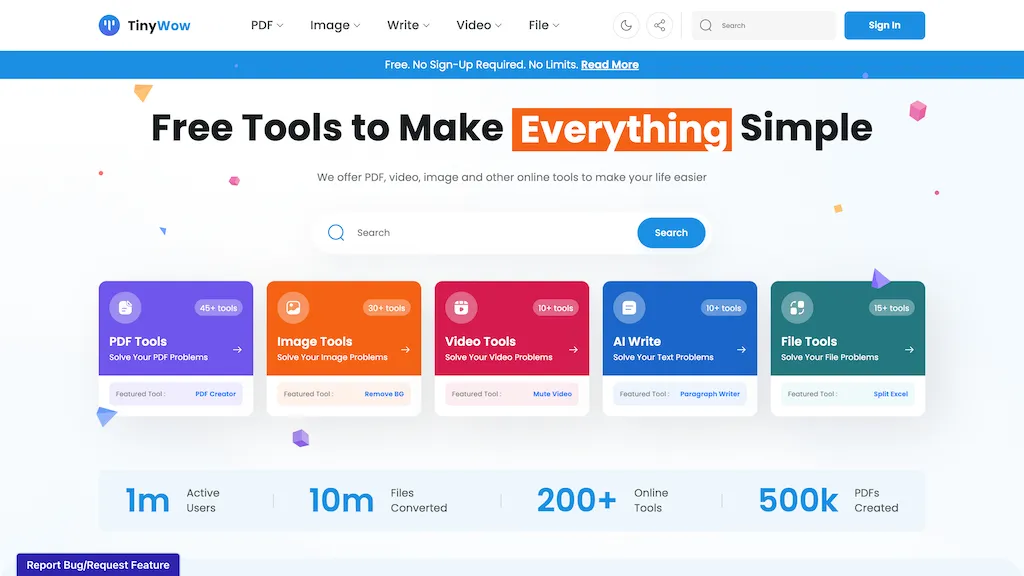
79.2% positive · 24 user reviews SubscriptionTinyWow is a web-based service that offers free tools for editing and converting PDFs, images, and videos, plus AI-driven text and image creation. Files are auto‑deleted after an hour for privacy.
We've ranked 29 TinyWow alternatives, including 23 with a free plan. Rankings are based on feature coverage and user feedbacks.
Top-rated alternatives include TopPDF, GoPDF, and AI PDF Summarizer.
29 TinyWow Alternatives & Competitors, Ranked by User Reviews
Click Compare on any tool to compare it side-by-side with TinyWow.
 #1
TopPDF
#1
TopPDF
AI PDF Tools offers robust features for editing, translating, compressing, merging, and converting PDF documents. It ensures efficient document management while maintaining formatting integrity across various formats, enhancing productivity for users handling PDF files.
 #2
GoPDF
#2
GoPDF
GoPDF is a browser‑based PDF editor that enables editing, annotating, formatting, and compression without installation. It supports text/image insertion, header/footer, page management, conversions (PDF→JPG/Word/HTML), merging/splitting, AI chat, invoicing, and AI quiz creation for students.
 #3
AI PDF Summarizer
#3
AI PDF Summarizer
AI PDF Summarizer converts PDFs up to 10 MB into concise summaries within seconds. Upload by drag‑and‑drop, then request summaries, key‑point highlights, translations, search, rephrase, or citation extraction. Files are encrypted and not stored, ensuring privacy.
 #4
PDFgear
#4
PDFgear
PDFgear is a cross‑platform PDF editor that allows editing of text, images, shapes, and form fields; supports annotations, batch conversion to Word/Excel/PowerPoint, OCR in 30+ languages, AI chat summaries, and merge/split/compress/sign functions.
 #5
AISummarizer.ai
#5
AISummarizer.ai
aisummarizer.ai is a text and document summarization tool that creates concise summaries from plain text, Word, PDF, and PowerPoint files, using NLP and OCR for context-aware results. It also includes an AI translator, grammar checker, and Q&A features, with secure, temporary file processing that deletes uploads after summarization.
 #6
pdfAssistant.ai
#6
pdfAssistant.ai
pdfassistant.ai is an AI chatbot that serves as your personal PDF assistant, available 24/7 to handle all your PDF processing tasks with ease. It helps with complex PDF workflows and tedious manual document handling as pdfassistant.ai lets you work smarter.
- Catch deals before they expire
- Unlock tools matched to you
- Show off your AI stacks
Already a member? Sign in
 #7
aiPDF
#7
aiPDF
aiPDF lets users upload PDFs, EPUBs, URLs or YouTube links to extract data, summarize content, and ask context‑specific questions. It returns source‑backed answers, supports any file size, auto‑deletes uploads, and offers response exports.
 #8
Watermark Remover
#8
Watermark Remover
WatermarkRemover.io uses AI to erase watermarks from images, videos, and PDFs while preserving quality. It supports batch uploads, command‑line, web, API, and plugin integration for workflows, with secure, compliant data handling.
 #9
Apowersoft
#9
Apowersoft
Apowersoft delivers cross‑platform screen, audio, and video capture with high‑fidelity recording, along with versatile media conversion, editing, and PDF OCR. It also offers background removal, data recovery for mobile/desktop, HEIC conversion, and multi‑monitor support for creators and businesses.
 #10
PDFSummarizer.org
#10
PDFSummarizer.org
AI‑powered PDF Summarizer turns multi‑page documents into concise summaries in seconds, supporting 90+ languages. It generates study guides, outlines, and searchable citations, helping students, researchers, and professionals cut review time.
 #11
Wondershare Uniconverter
#11
Wondershare Uniconverter
Wondershare UniConverter is an AI‑powered all‑in‑one tool that converts, enhances, compresses, records, and edits video and audio. It supports 1,000+ formats, delivers ultra‑fast conversions, upscales to 4K/8K, adds subtitles, removes backgrounds, and preserves metadata for creators and SMBs.
 #12
PhotoGrid
#12
PhotoGrid
PhotoGrid is a browser‑based AI photo editor that offers one‑click enhancement, background removal, and upscaling. It lets users build collages from 20,000 templates, add stickers, text, custom backgrounds, and convert images into short video clips.
 #13
Cover-letter generator with AI
#13
Cover-letter generator with AI
TheToolBus offers free, instant tools for small business owners, including PDF merge/split/compress, Word/Excel conversion, OCR, PowerPoint export, image compression/resizing/format conversion, background removal, QR code and website‑to‑PDF creation, plus business calculators and utilities like password generation and time‑zone conversion.

Pixlr is a browser‑based photo editor that uses AI for background removal, generative fill, and object deletion. It offers cropping, color correction, collages, templates, and social media layouts across desktop, tablet, and mobile.
 #15
PDF Summarizer
#15
PDF Summarizer
PDF Summarizer is a tool that quickly extracts key insights from multiple PDFs, Word, and PowerPoint files through multi-document chats. It offers summaries, translations, and secure side-by-side comparisons for efficient analysis.
 #16
BestPDF
#16
BestPDF
BestPDF is a web-based PDF editor and converter that edits text/images, translates while preserving layout, performs OCR, converts between PDF, Word, Excel, PowerPoint and image formats, and offers batch merge, split, compress and text-polishing tools.
 #17
ToolLab.AI
#17
ToolLab.AI
Extract Text Image from ToolLab.ai converts images and PDFs into editable text formats, supporting various file types. It features high-accuracy text extraction and watermark removal, ensuring document quality while maintaining user file security.
 #18
TLDR This
#18
TLDR This
Online article summarizer that condenses long texts into concise summaries, extracting metadata, estimating reading time, and removing ads for a distraction‑free view. Supports text, URLs, PDFs, DOC/DOCX up to 25 MB, with a browser extension for instant page summarization.
 #19
DeepPDF
#19
DeepPDF
DeepPDF is an AI-powered tool for interacting with PDFs, enabling conversational queries, summaries, translations, and analysis of text, images, and formulas. It also supports OCR, annotations, and multi-format conversions for seamless document handling.
 #20
PicWish
#20
PicWish
PicWish AI Photo Editor automates image enhancement, background removal, and watermark deletion. It processes batches of up to 30 files, offering resizing, lighting, upscaling, AI Designer prompts, Face Cutout, and single‑click unblur/sharpen. Available on Windows, macOS, iOS, Android, and browser.

Image Editor Online is an AI-powered tool that edits your photos using simple text prompts. It allows you to remove backgrounds, adjust poses, transfer styles, and continuously refine your images in one place.
 #22
ChatPDF
#22
ChatPDF
ChatPDF lets users upload PDFs for conversational queries, mapping content and providing cited answers. It supports folders for combined documents, side‑by‑side chat and source viewing, and offers multilingual input and output.
 #23
Innerai.com
#23
Innerai.com
All‑in‑one platform integrating GPT‑4o, Claude, Gemini, and others for unified text, image, video, and document AI. Offers summarizing, translation, prompt templates, workflow tools, quiz creation, SCORM export, web search, subtitles, dubbing. SOC II‑compliant with field‑level encryption and data isolation.
 #24
Background Remover
#24
Background Remover
AI Background Remover deletes backgrounds from JPG, PNG, WebP images while preserving resolution, handling up to 500 at once. Users can replace with color, gallery, or upload; ideal for designers, marketers, and e‑commerce workflows.
 #25
Youlearn
#25
Youlearn
AI tutor that transforms PDFs, videos, slides, and recordings into study notes, quizzes, podcasts, and personalized exams, providing key takeaways, answer breakdowns, progress tracking, and interactive chat support for learners and educators.
 #26
summarizer.org
#26
summarizer.org
AI Summarizer quickly condenses essays, reports, and articles into short paragraphs or bullet lists. Paste text, upload DOCX/TXT/image, or give a URL; adjust summary length or set custom styles. Supports Spanish, French, German, Portuguese, and offers private, downloadable .docx outputs.
 #27
Free AI PDF Reader
#27
Free AI PDF Reader
Free AI PDF Reader is a tool that analyzes, translates, and summarizes PDFs via drag-and-drop, delivering key insights. Its AI chat feature supports follow-up questions and multilingual interactions while ensuring data privacy.
 #28
iFoto
#28
iFoto
AI Photo Studio automates e‑commerce image editing: background removal, resolution enhancement, lossless compression, profile passport creation, hairstyle preview, object cleanup, old‑photo restoration, colorization, AI fashion model generation, clothing recolor, background changes, and file conversion to PDF/Word/PPT for streamlined product photography.
 #29
aidocmaker.com
#29
aidocmaker.com
AI Doc Maker produces PDFs, Word, PowerPoint, and Excel files from prompts or uploads, applying layouts, tables, and multilingual formatting. It provides templates for reports, contracts, proposals, and spreadsheets, streamlining document creation for professionals.
Frequently Asked Questions
Why look for TinyWow alternatives?
Common reasons users switch from TinyWow:
- Cost: TinyWow is a Subscription tool — users often look for more affordable or free options.
- Feature gaps: teams needing specific capabilities like Edit Documents may find a more focused alternative better suited to their workflow.
- Flexibility: exploring alternatives helps find tools that better match your team size, integrations, and budget.
What is the best alternative to TinyWow?
Based on 19 user reviews, TopPDF (89.5% positive) ranks as the top TinyWow alternative. AI PDF Tools offers robust features for editing, translating, compressing, merging, and converting PDF documents. It ensures efficient document manage It is available on a Free plan.
How do the top TinyWow alternatives compare?
| Tool | Pricing | Starting Price | User Rating |
|---|---|---|---|
| TinyWow this tool | Subscription | — | 79.2% (24) |
| TopPDF | Free | — | 89.5% (19) |
| GoPDF | Freemium | $9.99/mo | 71.4% (7) |
| AI PDF Summarizer | Free | — | — |
| PDFgear | Free | — | 76.5% (17) |
| AISummarizer.ai | Freemium | $6.9 | — |
Are there free TinyWow alternatives?
Yes, 23 free alternatives found in our list: TopPDF, GoPDF, AI PDF Summarizer. and 20 more — use the pricing filter above to see them all.
What should I look for in a TinyWow alternative?
- Core capabilities: confirm the tool supports Edit Documents, Generate Images, Remove Backgrounds.
- Pricing transparency: look for clear free plan, trial period, or tiered pricing — avoid tools that hide costs.
- User reviews: check both the satisfaction percentage and the number of reviews; a high score from few users is less reliable.
- Integrations: verify it connects with your existing stack before committing.
- Support and updates: active development and responsive support are strong signals of a maintained product.
Which TinyWow alternative has the highest user rating?
Cover-letter generator with AI has the highest satisfaction score among TinyWow alternatives, with 100% positive from 1 user review. It is available on a Freemium plan.
What are TinyWow alternatives used for?
- Edit Documents
- Generate Images
- Remove Backgrounds
- Extract Audio
- generate text