Best Video Cutter Alternatives in 2026
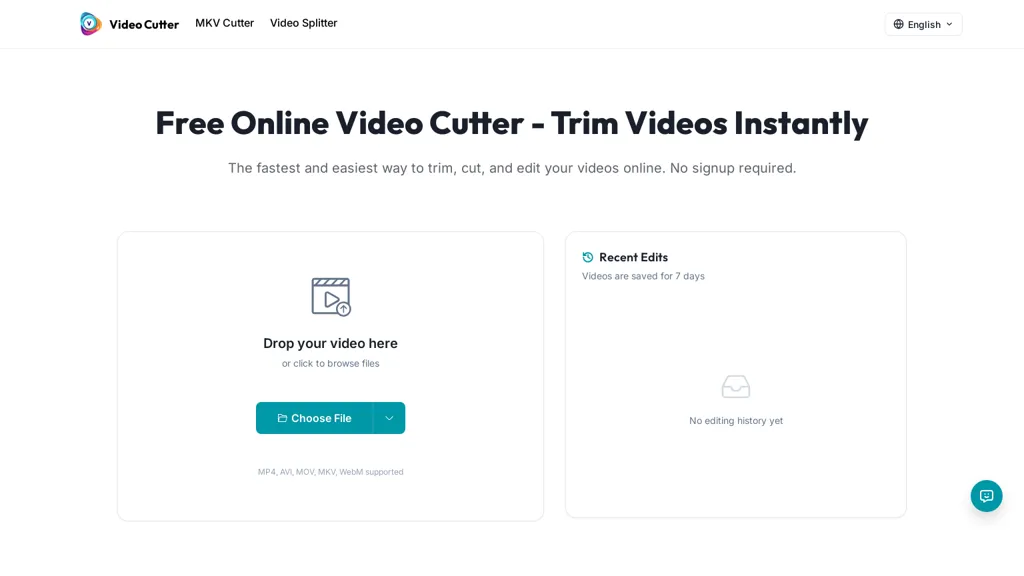
66.7% positive · 6 user reviews FreeVideo Cutter is a free online tool for precise, lossless trimming and splitting of videos in multiple formats. It features a drag-and-drop interface, preserves audio and subtitles, and allows quick export and sharing of clips.
We've ranked 15 Video Cutter alternatives, including 11 with a free plan. Rankings are based on feature coverage and user feedbacks.
Top-rated alternatives include EZTrimmer, FlexClip, and CapCut.
15 Video Cutter Alternatives & Competitors, Ranked by User Reviews
Click Compare on any tool to compare it side-by-side with Video Cutter.
#1
EZTrimmer
EZTrimmer is a browser-based video editor for trimming, splitting, and merging clips with a timeline interface. It enables quick preparation of short-form content for platforms like TikTok and YouTube Shorts with frame-accurate cuts and drag-and-drop simplicity.
#2
FlexClip
FlexClip is an online video editor with templates, resources, and powerful tools to create and edit videos for various purposes, as well as integration with royalty-free stock media providers and easy social media sharing.
CapCut is an AI-powered video editor & design tool with social media templates, background removal, upscaling, color correction, portrait generation, text-to-speech, voice changers, and team collaboration support - accessible online and for Mac download.
#4
Online Audio Converter
Browser-based Online Audio Converter converts 300+ audio/video formats to MP3, WAV, M4A, FLAC, OGG, etc., extracts audio from video, offers bitrate/sample rate/channel controls, fade/reverse/voice removal, batch conversion, metadata editing, and cloud export.
#5
Kapwing
Kapwing is an online video platform offering drag‑and‑drop editing for trimming, layering, overlays, and team collaboration. Its audio tools record, edit, and clean tracks; subtitler auto‑generates captions in 40+ languages.
#6
Smart Media Cutter
Smart Media Cutter is a desktop tool for streamers and editors that enables frame-accurate, lossless cutting of video and audio. It uses AI transcription, chat activity overlays, and automated silence removal to quickly find highlights and export clips for social media.
- Personalized recommendations
- Custom collections
- Save favorites
Already a member? Sign in
#7
Klap.app
Klap automatically extracts key moments from long videos, reframes them for vertical formats, adds multilingual subtitles, and lets you customize branding. Upload files or YouTube links, then share or schedule ready‑to‑publish clips across TikTok, Instagram, LinkedIn, and YouTube.
#8
FastCut
FastCut uses AI to transform raw footage into short‑form videos for TikTok, Reels, Shorts, and social ads. It trims clips, removes silence, adds captions, selects B‑rolls, and provides music and overlays, cutting editing time by up to 90%.
#9
Edit Videos Online
The AI-enhanced Online Video Editor provides smooth, registration-free editing with advanced features like AI background removal and auto caption generation. It supports multiple formats, enables easy audio/image insertion, and requires no software download.
#10
Audio Cut
Audio Cut is a browser-based tool for trimming and cutting audio files without installation. It supports multiple formats, processes files securely in your browser, and allows for lossless export.
#11
Trimmr
Trimmr: Automated video editing with AI-powered presets, captions, and animations for efficient content creation.
#12
SNAPVID
SNAPVID.AI automates cutting long videos into 30‑second clips, removes filler pauses, adds multi‑language subtitles, offers 4K output, AI‑generated B‑roll, audio cleanup, and batch processing with a credit‑based monthly reset for creators.
#13
Video Converter
Video Converter is a free browser-based tool that converts video and audio files between popular formats and extracts audio. It offers cloud processing for large files, batch conversion, and adjustable quality settings, all with secure, encrypted handling.
#14
Audio Cutter AI
Audio Cutter AI is a browser-based tool for trimming and editing MP3, WAV, and FLAC files with AI-assisted cut point detection and precise interval selection. It enables a simple three-step workflow—upload, set trim points, and download—for creating polished audio clips without any local software.
#15
YT Copycat
YT Copycat lets licensed users download and archive YouTube videos for offline use, supporting batch processing, multiple formats, and direct export to local or cloud storage. Creators can repurpose clips and maintain a private library.
Frequently Asked Questions
Why look for Video Cutter alternatives?
Common reasons users switch from Video Cutter:
- User satisfaction: Video Cutter holds a 66.7% positive rating — some users report unmet expectations.
- Feature gaps: teams needing specific capabilities like Edit Videos may find a more focused alternative better suited to their workflow.
- Flexibility: exploring alternatives helps find tools that better match your team size, integrations, and budget.
What is the best alternative to Video Cutter?
Based on 8 user reviews, EZTrimmer (62.5% positive) ranks as the top Video Cutter alternative. EZTrimmer is a browser-based video editor for trimming, splitting, and merging clips with a timeline interface. It enables quick preparation of short- It is available on a Free plan.
How do the top Video Cutter alternatives compare?
| Tool | Pricing | Starting Price | User Rating |
|---|---|---|---|
| Video Cutter this tool | Free | — | 66.7% (6) |
| EZTrimmer | Free | — | 62.5% (8) |
| FlexClip | Freemium | — | 87% (23) |
| CapCut | Free trial | — | 77.8% (27) |
| Online Audio Converter | Subscription | — | — |
| Kapwing | Freemium | — | 75% (20) |
Are there free Video Cutter alternatives?
Yes, 11 free alternatives found in our list: EZTrimmer, FlexClip, CapCut. and 8 more — use the pricing filter above to see them all.
What should I look for in a Video Cutter alternative?
- Core capabilities: confirm the tool supports Edit Videos, Trim Videos, Split Videos.
- Pricing transparency: look for clear free plan, trial period, or tiered pricing — avoid tools that hide costs.
- User reviews: check both the satisfaction percentage and the number of reviews; a high score from few users is less reliable.
- Integrations: verify it connects with your existing stack before committing.
- Support and updates: active development and responsive support are strong signals of a maintained product.
Which Video Cutter alternative has the highest user rating?
Klap.app has the highest satisfaction score among Video Cutter alternatives, with 100% positive from 3 user reviews. It is available on a Paid plan.
What are Video Cutter alternatives used for?
- Edit Videos
- Trim Videos
- Split Videos