
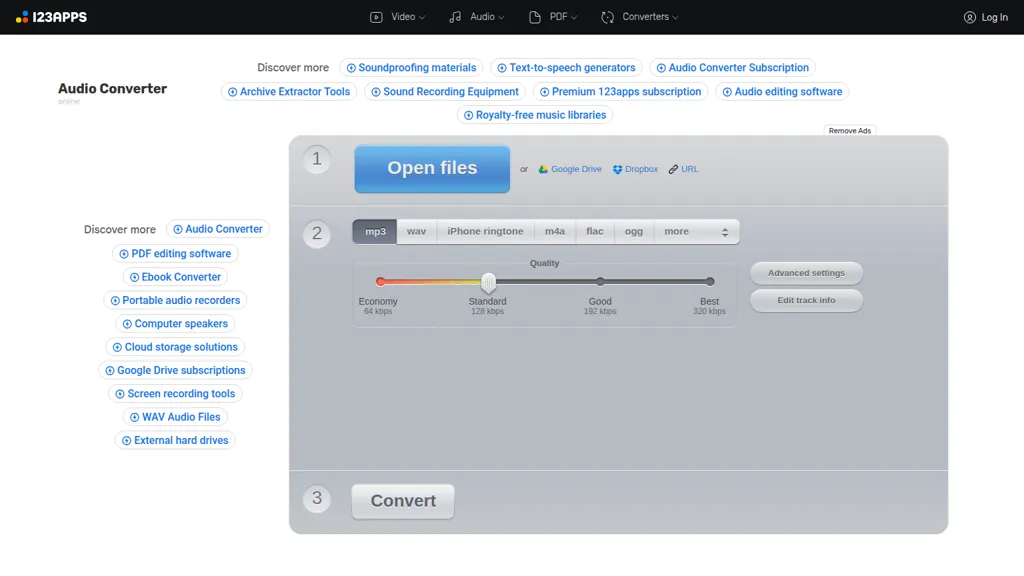
What is Online Audio Converter?
Online Audio Converter converts audio and video files to MP3, WAV, M4A, FLAC, OGG, AMR, MP2, M4R and other formats. It supports more than 300 input formats, including common video files, and can extract audio tracks from video. Advanced output controls include bitrate, sample rate, channel selection, fade in/out, reverse playback and voice removal.
The tool supports batch conversion with ZIP download, ID3 and metadata editing for MP3/OGG/FLAC/WAV, and cloud export to Google Drive and Dropbox. Browser-based operation requires no installation; users upload files, choose format and settings, and download results.
Online Audio Converter details
- Built for
- Individuals
Online Audio Converter tech specs
- Integrations
- Google Workspace
Online Audio Converter pricing
SubscriptionVerify on the official pricing page.
View plansOnline Audio Converter's key features
-
Convert over 300 input formats to common audio formats (mp3, wav, m4a, flac, ogg, amr, mp2, m4r)
-
Extract audio tracks from video files
-
Advanced audio settings: quality, bitrate, sample rate, channels, fade in/out, reverse, voice removal
-
Batch conversion of multiple files simultaneously with ZIP archive output
-
Edit and embed audio metadata tags (title, artist, album, year, genre) for mp3/ogg/flac/wav
Online Audio Converter use cases
-
Convert batches of lecture recordings, webinars and interview videos to standardized MP3 or WAV files for podcasting or offline study using the Browser-based Online Audio Converter's batch conversion, bitrate/sample rate controls, metadata editor and direct cloud export for easy publishing
-
Extract audio from music videos or live performances to create karaoke or remix-ready stems by using the converter's vocal removal, channel controls and fade/reverse effects, then export to FLAC/M4A with custom bitrate and embedded metadata
-
Prepare consistent, publication-ready audio for multimedia projects by converting mixed-format files to a single sample rate/bitrate, applying fades and trims, editing ID3 tags, and exporting to cloud storage for seamless team collaboration
Online Audio Converter user reviews
Would you recommend Online Audio Converter?
Who is Online Audio Converter for?
-
Audio enthusiasts
-
Podcasters
-
Video editors
-
Musicians
-
Content creators
-
General users needing audio conversion
Online Audio Converter FAQ
How much does Online Audio Converter cost?
Online Audio Converter is a paid product with no free plan. Plans include Premium at €6/mo €44 once a year (yearly -20% off).
What are the best alternatives to Online Audio Converter?
The closest alternatives to Online Audio Converter are Audio Cut, Mp3Converter AI, Music 2 Tube, FreeTTS and Audioconverter. You can compare them side by side in the alternatives section further down this page.
What does Online Audio Converter do with my data?
Its privacy policy states that personal data is not sold or shared for marketing purposes. Data may be shared with third-party service providers that help run the product.
What does Online Audio Converter integrate with?
Online Audio Converter connects with Google Workspace.
Compliance, privacy and billing terms are as stated in each product's own published documentation and have not been independently verified by TopAI.tools.


