Best TextGen - oobabooga Alternatives in 2026
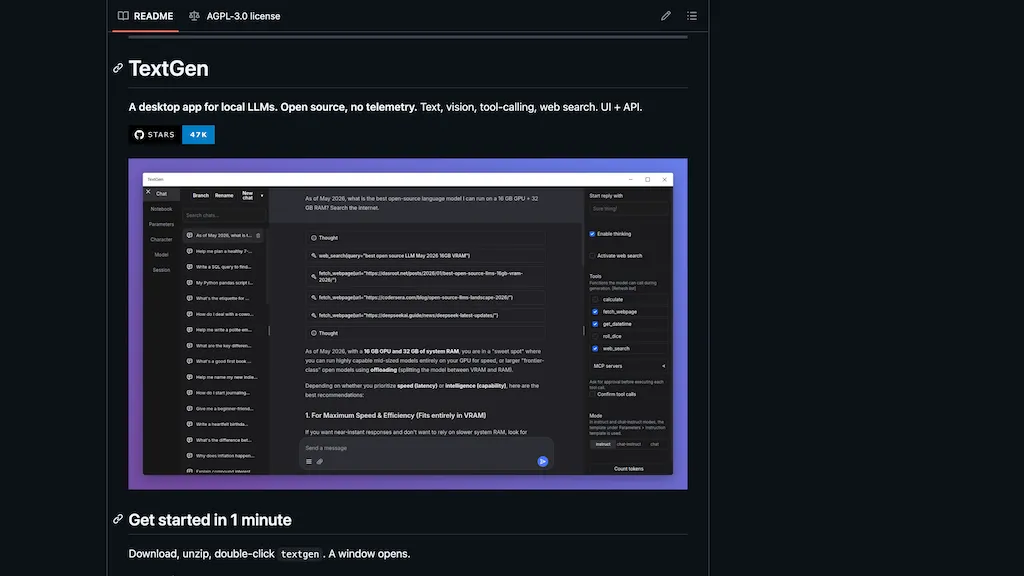
100% positive · 1 user review FreeOpen-source desktop app for running local LLMs on Windows/macOS/Linux, supporting text and multimodal inputs, file attachments, multiple model backends with hot-switching, chat/instruction modes, prompt-engineering tools, API/tool-calling, extensibility, and conversation branching.
We've ranked 29 TextGen - oobabooga alternatives, including 25 with a free plan. Rankings are based on feature coverage and user feedbacks.
Top-rated alternatives include Ollama.ai, LLMChat, and LlamaChat.
29 TextGen - oobabooga Alternatives & Competitors, Ranked by User Reviews
Click Compare on any tool to compare it side-by-side with TextGen - oobabooga.
#1
Ollama.ai
Llama is a local AI tool that enables users to create customizable and efficient language models without relying on cloud-based platforms, available for download on MacOS, Windows, and Linux.
#2
LLMChat
LLMChat is an AI chat tool that offers a beta version experience with diverse AI models, personalized memory, custom assistant creation, and privacy-focused locally stored conversations. Explore features like plugin integration, tailored preferences, and prompt examples for various tasks.
#3
LlamaChat
Llamachat is an AI tool enabling chat with llama, alpaca, and GPT-4 models on Mac. It offers a chatbot-like experience, supports model conversion, and is open-source for contributions on GitHub.
#4
LLMWare.ai
LLMWare AI installs a lightweight client on PCs, providing instant access to 100+ AI models optimized for Intel and Qualcomm hardware. It supports RAG, auto‑tunes weights, runs locally without Wi‑Fi, and offers an admin console for monitoring, scaling, and audit logs.
#5
Jan
Jan is an offline ChatGPT alternative for Mac, Windows, and Linux. Enjoy customizable AI assistants, productivity boosts, and secure, exportable data. Integrate with OpenAI equivalent API server and soon-to-come mobile app.
#6
LLMStack
LLMStack is an open‑source platform that lets developers build AI agents and workflows without coding, supports multiple model providers, imports data from web, PDFs, audio, cloud services, and offers a collaborative React UI with granular permissions.
- Personalized recommendations
- Custom collections
- Save favorites
Already a member? Sign in
#7
MindMac
MindMac is a native macOS client that integrates ChatGPT, Azure OpenAI, Gemini, and Claude on the desktop. It offers inline prompts, a 150‑template library, customizable context modes, shortcuts, keychain storage, and 15 UI languages for developers, researchers, and teams.
#8
boltai.com
BoltAI is a native macOS app that lets users switch between 300+ AI models, including OpenAI, Anthropic, Google Gemini, and local Ollama. It supports multimodal analysis, fine‑grained controls, project management, local storage, and secure cloud sync.
#9
Ava PLS
Ava is an open‑source desktop app that runs language models locally using llama.cpp, offering a GUI or headless mode. Built with Zig/C++ and SQLite, it enables rapid prototyping, privacy‑focused experimentation, and straightforward local deployment.
#10
Chatbox
Chatbox - AI Copilot Desktop is a versatile cross-platform (Windows, Mac, Linux) tool featuring multiple LLN models. It combines an ergonomic design, diverse AI model assistance, and local data storage to boost productivity by converting conversations into valuable insights.
#11
TypingMind
TypingMind unifies ChatGPT, Gemini, Claude, and other LLMs in one interface, enabling parallel chats, project folders, tagging, search, and built‑in tools for documents, images, and code, plus features like agent building, prompt chaining, RAG, voice, canvas, and plugins.
#12
Llama Tutor
Llama Tutor is an open‑source AI tutoring platform using Llama 3.1 and Together AI. It creates custom lesson plans and explanations for users across education levels, supports many subjects, and offers real‑time dialogue with adaptive sequencing and instant feedback.
#13
Le Chat - Mistral
Le Chat is an AI assistant that simplifies tasks from everyday questions to complex projects. It combines powerful AI with access to various data sources for comprehensive answers, offering features like search, code analysis, and custom workflow building.
#14
liteLLM
LiteLLM is an open‑source gateway that unifies access to 100+ LLMs through a single OpenAI‑compatible API, enabling provider fallback, cost tracking, tag‑based budgeting, guardrails, observability, and on‑prem or cloud deployment with a lightweight SDK.
#15
Cherry Studio
Cherry Studio is a desktop application for Windows and macOS that enables users to switch between multiple AI language models effortlessly. It offers straightforward installation, rapid conversation completion, and strong community support for enhanced user engagement.
Llama.cpp is an open-source tool for efficient inference of large language models. Run open source LLM models locally everywhere.
#17
local.ai
local.ai runs language models locally without GPUs. Its Rust backend keeps the binary under 10 MB and performs CPU inference with GGML quantization. A single‑click interface streams responses to a UI, while a model manager tracks, verifies, and resumes downloads.
#18
Inceptionlabs - Mercury coder
Inception Labs' diffusion-based large language models (dLLMs) offer faster, more efficient, and cost-effective text generation than traditional autoregressive models. With built-in error correction, multimodal support, and structured output control, they excel in function calling and complex data generation.
#19
LM Studio
LM Studio is a local platform for running various large language models like Llama 2 and Mistral. It offers an offline environment, user-friendly interface, and supports multiple operating systems, enhancing privacy and allowing for simultaneous model execution.
#20
Oobabooga
The text-generation-webui is a Gradio-based web UI for Large Language Models, supporting various backends and multiple interface modes. It allows quick model switching, extension integration, and dynamic LoRA loading for custom training.
#21
LLM Price Check
LLM Price Check aggregates LLM API models and provider details into sortable tables and a cost calculator, showing context windows, input/output cost metrics, and quality indicators to help developers and teams evaluate cost–performance tradeoffs.
#22
Unsloth Studio
Unsloth Studio is a no-code web UI enabling local training, running, and exporting of open AI models like Qwen3.5 and NVIDIA Nemotron 3, simplifying experimentation for users without extensive technical expertise.
#23
LLMWizard
LLMWizard offers access to multiple AI models like GPT-4o and DALL-E 3, enabling users to automate tasks across coding, legal work, and content creation. The platform supports real-time comparison of AI responses for diverse insights.
#24
DapperGPT
DapperGPT consolidates multiple AI models—OpenAI, Anthropic, Gemini, Mistral, Grok, and Llama—into one chat interface that supports images, documents, and code uploads. It offers built‑in agents, custom toolchains, Spotlight search, folder organization, pinning, and browser‑extension integration, keeping data locally.
#25
Super Tech Fans
MultiAI‑Chat is a Chrome extension that opens separate tabs for multiple LLMs such as ChatGPT, Gemini, Qwen, and Perplexity. It lets users configure accounts per tab, compare outputs side‑by‑side, sync history, and prioritize privacy.
#26
Alice App
Alice is an AI assistant for macOS, Windows, and Linux that launches via hotkey, stores context locally, supports multiple LLMs through API keys, offers keyboard shortcuts, custom commands via Zapier/Make, and handles files, web, images, and visuals for reliable responses.
#27
Llama中文社区
Llama Family is an extensive AI platform featuring versatile llama models for multiple applications. It promotes open collaboration, democratizing AI access, with notable offerings including the popular Llama open-source model and Atom mega-model for enhanced Chinese language processing capabilities.
#28
Duck.ai
Duck.ai offers anonymous access to popular AI models, including GPT-4o mini, Claude 3, and open-source options like Llama 3.1 and Mixtral. It ensures privacy by keeping conversations untracked and outside AI training data, with seamless model switching.
#29
LLM Pricing
LLM Pricing Comparison lets developers and businesses compare token costs, context lengths, and modalities for major large‑language models. An interactive calculator estimates application expenses based on input/output token volumes, helping teams budget AI workloads accurately.
Frequently Asked Questions
Why look for TextGen - oobabooga alternatives?
Common reasons users switch from TextGen - oobabooga:
- Feature gaps: teams needing specific capabilities like Run AI Models may find a more focused alternative better suited to their workflow.
- Flexibility: exploring alternatives helps find tools that better match your team size, integrations, and budget.
What is the best alternative to TextGen - oobabooga?
Based on 27 user reviews, Ollama.ai (74.1% positive) ranks as the top TextGen - oobabooga alternative. Llama is a local AI tool that enables users to create customizable and efficient language models without relying on cloud-based platforms, available f It is available on a Free plan.
How do the top TextGen - oobabooga alternatives compare?
| Tool | Pricing | Starting Price | User Rating |
|---|---|---|---|
| TextGen - oobabooga this tool | Free | — | 100% (1) |
| Ollama.ai | Free | — | 74.1% (27) |
| LLMChat | Free | — | 66.7% (6) |
| LlamaChat | Free | — | 100% (1) |
| LLMWare.ai | Freemium | — | — |
| Jan | Free | — | 100% (2) |
Are there free TextGen - oobabooga alternatives?
Yes, 25 free alternatives found in our list: Ollama.ai, LLMChat, LlamaChat. and 22 more — use the pricing filter above to see them all.
What should I look for in a TextGen - oobabooga alternative?
- Core capabilities: confirm the tool supports Run AI Models, Host LLM APIs, Generate Text.
- Pricing transparency: look for clear free plan, trial period, or tiered pricing — avoid tools that hide costs.
- User reviews: check both the satisfaction percentage and the number of reviews; a high score from few users is less reliable.
- Integrations: verify it connects with your existing stack before committing.
- Support and updates: active development and responsive support are strong signals of a maintained product.
Which TextGen - oobabooga alternative has the highest user rating?
LlamaChat has the highest satisfaction score among TextGen - oobabooga alternatives, with 100% positive from 1 user review. It is available on a Free plan.
What are TextGen - oobabooga alternatives used for?
- Run AI Models
- Host LLM APIs
- Generate Text
- Analyze Images
- Manage Workflows