
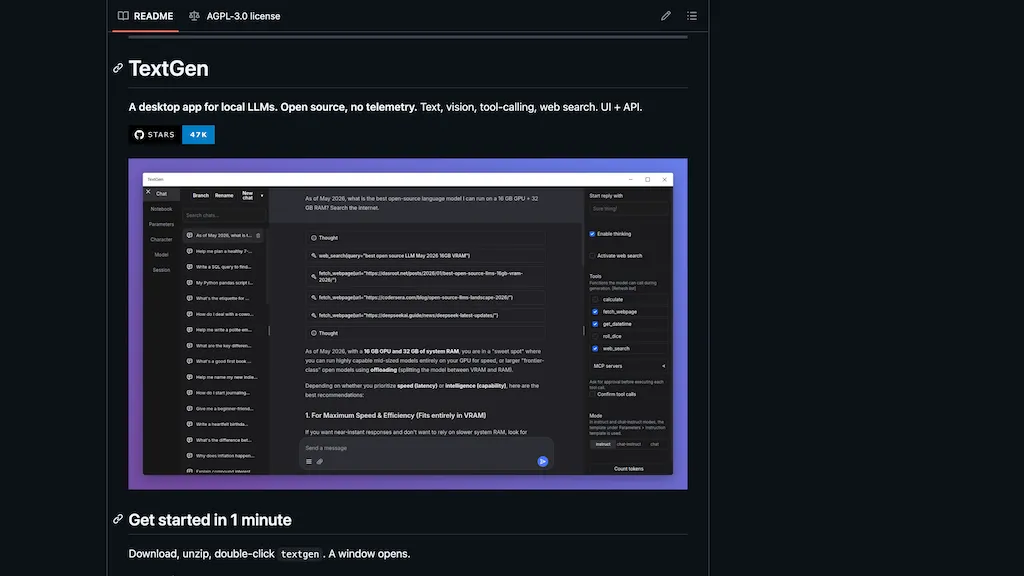
What is TextGen - oobabooga?
TextGen is an open-source desktop app for running local LLMs on Windows, macOS, and Linux.It supports text and multimodal (vision) inputs, file attachments (TXT, PDF, DOCX), image understanding, and a notebook tab for free-form generation.
Multiple backends and model formats are supported, including gguf (llama.cpp), exllamav3, transformers, ik_llama.cpp, and tensorrt-llm, with backend switching without restart.Provides chat and instruction-following modes, jinja2 prompt templates, conversation branching, message editing and versioning for prompt engineering workflows.
Includes an OpenAI/Anthropic-compatible API and tool-calling support for custom functions, web search, page fetching, and MCP server integration.Portable builds available with CUDA, Vulkan, ROCm, and CPU-only options; dependencies are bundled for quick local deployment.
Extensible via extensions, training and image-generation backends, and a desktop UI plus API for developers building local LLM applications.
TextGen - oobabooga pricing
FreeThis tool is free to use, with no credit card required.
Verify on the official pricing page.
Get started freeTextGen - oobabooga's key features
-
Cross-platform desktop app for running local LLMs on Windows, macOS, and Linux
-
Supports text and multimodal (vision) inputs, image understanding, file attachments (TXT, PDF, DOCX), and a notebook tab for free-form generation
-
Multiple backends and model formats (gguf/llama.cpp, exllamav3, transformers, ik_llama.cpp, tensorrt-llm) with backend switching without restart
-
Chat and instruction-following modes with jinja2 prompt templates, conversation branching, message editing and versioning
-
OpenAI/Anthropic-compatible API and tool-calling support for custom functions, web search, page fetching, and MCP server integration
TextGen - oobabooga use cases
-
Build a private, offline multimodal personal assistant on your laptop that ingests PDFs, images and notes, performs document-aware text generation for summaries and Q&A, and switches model backends dynamically for best speed vs. accuracy
-
Create a research and writing workspace that attaches source files and datasets, uses the prompt-engineering tools and conversation branching to iterate on literature reviews or grant drafts, and exports reproducible prompts or API/tool-calls for downstream workflows
-
Prototype and test LLM-powered automations locally by hot-switching model backends, defining custom function-calling and tool integrations, and iterating on multimodal prompts and branching dialogs before deploying to production
TextGen - oobabooga user reviews
Based on 1 review, 100% of users recommend TextGen - oobabooga, rated highly for quality results.
Liked for
Would you recommend TextGen - oobabooga?
Who is TextGen - oobabooga for?
-
Software developers
-
Machine learning engineers
-
Prompt engineers
-
Startup founders
-
Local llm hobbyists
TextGen - oobabooga FAQ
Is TextGen - oobabooga free?
Yes. TextGen - oobabooga is free to use and does not require a credit card.
What are the best alternatives to TextGen - oobabooga?
The closest alternatives to TextGen - oobabooga are AnythingLLM, Ollama.ai, Jan, Llama.cpp and Oobabooga. You can compare them side by side in the alternatives section further down this page.
Does TextGen - oobabooga have an API?
Yes. TextGen - oobabooga offers an API, so you can call it from your own applications instead of using the interface directly.


