
Top 29 Quadratic Multiplayer Alternatives in 2026
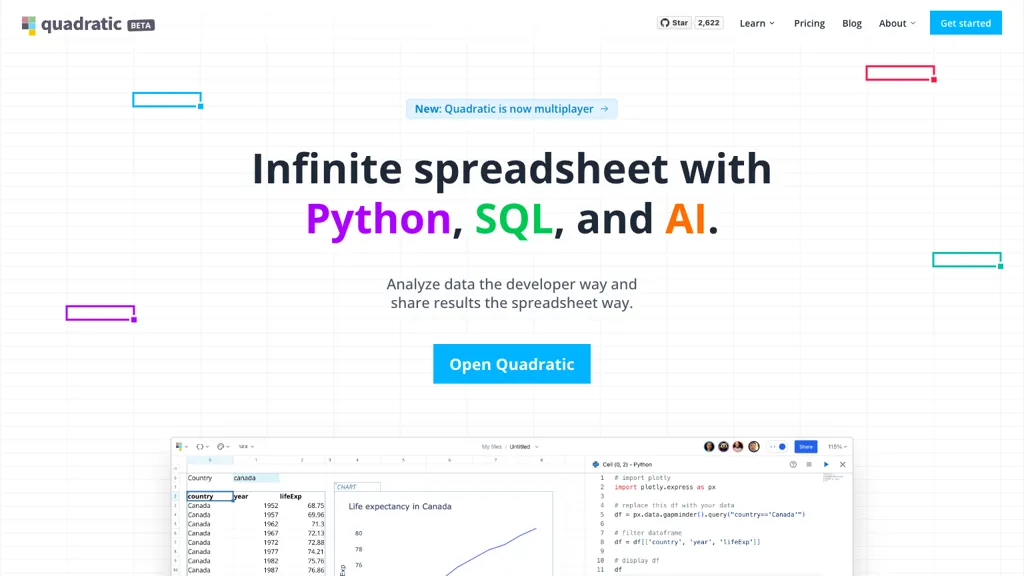
100% positive · 1 user review SubscriptionQuadratic is an AI‑enabled spreadsheet that connects to CSV, Excel, PDFs, and databases like Postgres and Snowflake. It lets users filter, clean, and analyze data in a grid, ask natural‑language queries, and generate editable Python and SQL code for visualizations.
We've ranked 29 Quadratic Multiplayer alternatives, including 23 with a free plan. Rankings are based on feature coverage and user feedbacks.
Top-rated alternatives include Bricks, Julius, and Graphy.app.
29 Quadratic Multiplayer Alternatives & Competitors, Ranked by User Reviews
Click Compare on any tool to compare it side-by-side with Quadratic Multiplayer.
 #1
Bricks
#1
Bricks
Bricks AI transforms CSV, Excel, Google Sheets, and database files into instant interactive dashboards and reports. It auto‑creates charts, lets users edit data via natural‑language commands, refreshes with one click, and offers reusable templates with encrypted privacy.
 #2
Julius
#2
Julius
Julius AI connects spreadsheets, databases, and cloud storage, letting users ask natural‑language questions. It delivers instant charts, tables, and reports, sharable in Slack or on a schedule, and supports no‑code plus R, Python, or SQL workflows, keeps data private.
 #3
Graphy.app
#3
Graphy.app
Graphy transforms raw data from Google Sheets, CSV, Excel, or APIs into AI‑generated charts, auto‑highlighting insights. It supports multiple chart types, branding, annotations, real‑time updates, and export/embed options for marketing, finance, and consulting teams.
 #4
Sourcetable
#4
Sourcetable
Sourcetable is an AI‑powered spreadsheet platform that lets users query data in plain English, auto‑generate charts, Python/SQL code, and clean data. Built‑in connectors link to databases and apps, while templates enable quick reporting.
 #5
Excelmatic
#5
Excelmatic
Excelmatic uses AI to analyze and visualize spreadsheet data via natural-language queries, offering one-click charting, KPI extraction, anomaly detection, PDF/image-to-Excel conversion, formula generation from plain English, and batch data-prep for .xlsx/.csv files.
 #6
Quills.ai
#6
Quills.ai
Quills AI links databases and files for data consolidation. Users ask plain‑English queries, which it converts to SQL and returns results via chat, Slack, or widgets. It supports visual editing, direct SQL, and export to Excel or CSV.
- Catch deals before they expire
- Unlock tools matched to you
- Show off your AI stacks
Already a member? Sign in
 #7
AlTable.ai
#7
AlTable.ai
AITable.ai is an AI data organization tool that combines database and spreadsheet features for streamlined CRM and project management. It automates tasks, integrates with 6000+ apps, simplifies data entry, and offers AI data analysis for enhanced productivity.
 #8
Sparkco AI Sheets
#8
Sparkco AI Sheets
Sparkco Sheets converts text and documents into live spreadsheets with natural-language formulas, pivot tables, charts, automated reports and SQL generation; OCR extracts tables from PDFs, real-time connectors sync financial and healthcare systems, with export and compliance options.
 #9
Aijourney
#9
Aijourney
Julius AI is a data analyst assistant that connects to Excel, Google Sheets, and PostgreSQL to generate bar charts, histograms, heat maps automatically. It offers interactive, customizable visualizations, embeddable into reports, and exports cleaned data for stakeholders.
 #10
SheetXAI
#10
SheetXAI
SheetXAI automates Google Sheets and Excel via natural-language commands to analyze data, generate formulas, and run workflows. It extracts tables and invoices via OCR, produces bulk multilingual content, and integrates with Notion, Stripe, HubSpot and Jira.
 #11
QLAI.ai
#11
QLAI.ai
SQLAI.ai translates natural‑language input into SQL queries for over 30 database engines, optimizes and validates them, offers formatted diffs, schema‑aware generation, and a VS Code‑style editor with step‑by‑step explanations to improve collaboration.
 #12
Datayaki
#12
Datayaki
Datayaki lets users ask plain‑English questions of spreadsheets, CSVs, and cloud databases (Postgres, Supabase, Snowflake, Firebase) directly in the browser. It keeps data local, offers explainable AI, and supports secure, collaborative dashboards.
 #13
ChatCSV
#13
ChatCSV
ChatCSV lets users upload CSV files from computer, URL, or clipboard and query data with natural language. It auto‑generates common questions and returns charted answers (bar, pie, custom). Interactions are saved, shareable, used for team collaboration across retail, finance, marketing.
 #14
GRID 2.0
#14
GRID 2.0
GRID embeds a native spreadsheet engine in apps for real‑time calculation and data management. With optional editor/viewer UI, it supports AI/LLM integration, improves reliability, scales workflows, streamlines development, and offers a familiar spreadsheet experience.
 #15
Tomat.AI
#15
Tomat.AI
Tomat.AI is a desktop app that automates data analysis and enrichment for Excel, CSV, and database files. It loads datasets locally, lets users filter, sort, merge, pivot, and apply AI prompts in bulk, and exports reports to PDF.
 #16
AskExcel
#16
AskExcel
AskExcel uses AI to generate Excel formulas from natural language, automating data cleaning, formula insertion, and advanced analytics such as correlation, KPI tracking, and sentiment analysis. It supports CSV/XLSX uploads up to 10 MB for efficient spreadsheet workflows.
 #17
SheetAI
#17
SheetAI
SheetAI adds AI-driven functions to Google Sheets, enabling list, table, and image creation via formulas. It supports models like OpenAI, Claude, xAI, integrates external services (Replicate, OCR, audio), and allows custom training for context-aware responses and API automation.
 #18
Text2SQL.AI
#18
Text2SQL.AI
Text2SQL.ai transforms natural‑language questions into optimized SQL queries for MySQL, PostgreSQL, Oracle, SQL Server, MongoDB, and others, using the supplied schema. It offers a public API, a local desktop app, version control, auto‑generated charts, and follow‑up query support.
 #19
ChartGen.ai
#19
ChartGen.ai
ChartGen.ai is an AI chart generator that converts CSV/Excel data or pasted text into presentation-ready visualizations using plain-English prompts. It supports numerous chart types, offers live data sync, and exports in multiple formats with enterprise-grade security.
 #20
AiAssistWorks
#20
AiAssistWorks
Access 50+ AI models in Google Sheets™ without writing functions or copy-pasting. Save and reuse prompts easily. Models from GPT, Claude, Google Gemini™, Openrouter, and Groq are available.
 #21
AI2sql
#21
AI2sql
AI2SQL is an AI-powered tool that generates error-free SQL queries and supports various databases.
 #22
GPTExcel
#22
GPTExcel
GPTExcel automates spreadsheet tasks in Excel, Google Sheets, LibreOffice, and Airtable. It generates formulas, scripts, SQL, regex, builds pivot tables, charts, and reports, offers conversational data queries, and OCR table conversion across 50+ languages.
 #23
Sheeter.ai
#23
Sheeter.ai
Sheeter converts natural‑language requests into Excel or Google Sheets formulas, supporting sums, conditionals, dates, text, and data extraction. It allows one‑click insertion, reduces formula‑error risks, and streamlines analysis for business and finance teams.
 #24
BlazeSQL
#24
BlazeSQL
BlazeSQL AI analyzes SQL schemas and generates queries from plain‑language input, supporting Snowflake, BigQuery, PostgreSQL, MySQL, and Redshift. It learns from interactions, tracks accuracy, returns results and visualizations locally, and offers an API for embedding.
 #25
Rise of Machine
#25
Rise of Machine
AI2sql converts natural‑language questions into SQL for PostgreSQL, MySQL, SQL Server, and Snowflake, letting analysts retrieve data without code. It integrates via API into pipelines and dashboards, offering real‑time query previews for quick validation.
 #26
AI Excel Bot
#26
AI Excel Bot
AI Excel Bot translates natural‑language prompts into accurate Excel or Google Sheets formulas—SUMIF, VLOOKUP, array functions—providing step‑by‑step explanations and on‑demand VBA script generation. Available as a Chrome extension or add‑in for quick, in‑app access.
 #27
ChartPixel
#27
ChartPixel
ChartPixel is an AI tool that generates charts and insights from messy data files or webpages using AI algorithms to clean and engineer new features, provide AI-assisted annotations and statistics to explore patterns and quirks in the data.
 #28
numerous
#28
numerous
Numerous.ai embeds ChatGPT into Google Sheets and Excel via a simple =AI function, allowing users to generate bulk marketing content, summarize datasets, and prototype prompts directly in spreadsheets—no API keys needed, effortlessly.
 #29
spreadsheetdaddy.com
#29
spreadsheetdaddy.com
Spreadsheet Daddy is an AI add‑on for Google Sheets and Excel that automates formula creation, data analysis, and chart generation. It offers ready‑made templates for budgets, invoices, inventory, and projects, and supports natural‑language queries via GPT.
Frequently Asked Questions
Why look for Quadratic Multiplayer alternatives?
Common reasons users switch from Quadratic Multiplayer:
- Cost: Quadratic Multiplayer is a Subscription tool — users often look for more affordable or free options.
- Feature gaps: teams needing specific capabilities like Analyze Data may find a more focused alternative better suited to their workflow.
- Flexibility: exploring alternatives helps find tools that better match your team size, integrations, and budget.
What is the best alternative to Quadratic Multiplayer?
Bricks ranks as the top Quadratic Multiplayer alternative. Bricks AI transforms CSV, Excel, Google Sheets, and database files into instant interactive dashboards and reports. It auto‑creates charts, lets users It is available on a Freemium plan starting from $25/mo.
How do the top Quadratic Multiplayer alternatives compare?
| Tool | Pricing | Starting Price | User Rating |
|---|---|---|---|
| Quadratic Multiplayer this tool | Subscription | — | 100% (1) |
| Bricks | Freemium | $25/mo | — |
| Julius | Free | — | 66.7% (24) |
| Graphy.app | Freemium | $16/mo | — |
| Sourcetable | Freemium | $20/mo | — |
| Excelmatic | Subscription | — | — |
Are there free Quadratic Multiplayer alternatives?
Yes, 23 free alternatives found in our list: Bricks, Julius, Graphy.app. and 20 more — use the pricing filter above to see them all.
What should I look for in a Quadratic Multiplayer alternative?
- Core capabilities: confirm the tool supports Analyze Data, Generate Spreadsheets, Build Visualizations.
- Pricing transparency: look for clear free plan, trial period, or tiered pricing — avoid tools that hide costs.
- User reviews: check both the satisfaction percentage and the number of reviews; a high score from few users is less reliable.
- Integrations: verify it connects with your existing stack before committing.
- Support and updates: active development and responsive support are strong signals of a maintained product.
Which Quadratic Multiplayer alternative has the highest user rating?
Aijourney has the highest satisfaction score among Quadratic Multiplayer alternatives, with 100% positive from 1 user review. It is available on a Freemium plan.
What are Quadratic Multiplayer alternatives used for?
- Analyze Data
- Generate Spreadsheets
- Build Visualizations
- Optimize Queries
- generate reports