
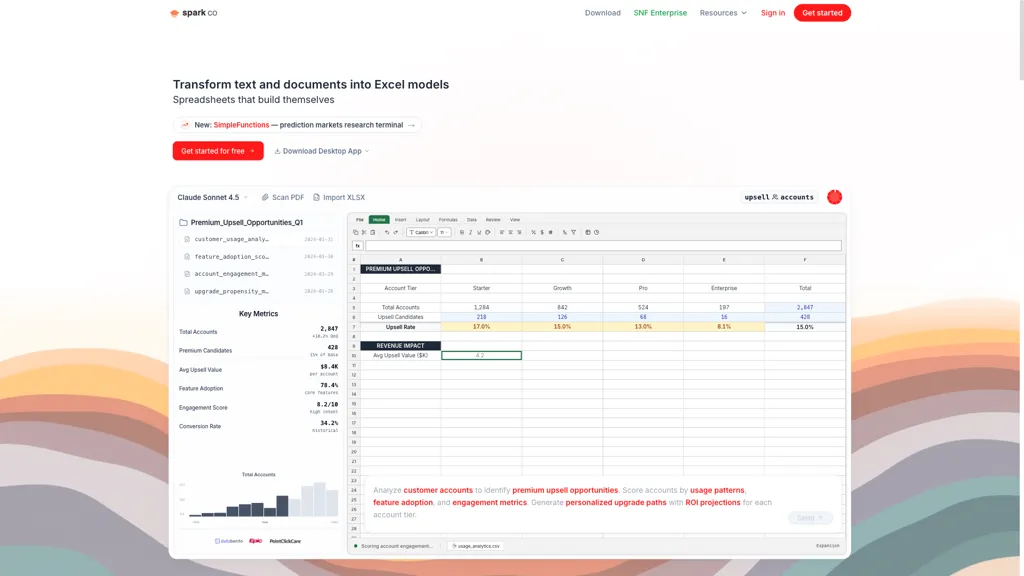
What is Sparkco AI Sheets?
Sparkco Sheets is an AI spreadsheet and AI Excel agent that converts text and documents into live spreadsheets with natural-language formulas, pivot tables, charts, and automated reporting. It generates SUMIFS, XLOOKUP, SQL queries, and complex formulas from plain English and extracts tables from PDFs using OCR for fast data ingestion.
Built-in data connectors and real-time sync link Stripe, QuickBooks, SAP, Epic, PointClickCare, and databases to populate sheets and dashboards automatically. Features include context compression for large files, task tracking, API access, and export to XLSX/CSV/Google Sheets to support collaboration and auditability.
Use cases span financial modeling and DCF valuation, healthcare analytics and readmission analysis, sales forecasting and pipeline tracking, and general market and operations modeling. Security and compliance options include HIPAA/BAA support, SOC 2, and encrypted data in transit and at rest.
Sparkco AI Sheets tech specs
- Works with
- OpenAI / GPT Anthropic / Claude xAI / Grok ElevenLabs
- AI infrastructure
- Hugging Face
- Cloud
- Vercel Cloudflare Fly.io Supabase
- Payment Processors
- Stripe
- Integrations
- Google Workspace GitHub
Sparkco AI Sheets pricing
Free trialSparkco AI Sheets offers a free trial before requiring payment.
Verify on the official pricing page.
Start free trialSparkco AI Sheets's key features
-
Natural-language AI spreadsheet agent that generates formulas, pivot tables, charts, and dashboards from plain English
-
Connectors with real-time data sync and automatic schema detection for databases, ERPs, EHRs, and APIs
-
Automatic SQL generation from natural language with live query results populated into sheets
-
PDF OCR and data extraction to import and extract tables from documents
-
Intelligent context compression and smart file box for organizing documents and reducing context size
Sparkco AI Sheets use cases
-
Convert invoices, bank statements and PDF reports into a live reconciliation workbook with Sparkco Sheets’ OCR-extracted tables, apply natural-language formulas, pivot tables and charts to automate month‑end close, sync with real-time financial connectors and export compliance-ready reports and SQL for auditors
-
Build a clinical outcomes dashboard by extracting tables from patient records and lab PDFs, syncing EHRs in real time with Sparkco Sheets, use the AI assistant and natural-language formulas to calculate metrics, generate charts and pivot summaries, and produce automated regulatory reports
-
Transform contracts, purchase orders and procurement documents into an interactive vendor-spend spreadsheet with Sparkco Sheets, generate SQL queries to join multiple systems, create pivot tables and visualizations to track KPIs, and schedule automated exports for ERP ingestion and audit compliance
Sparkco AI Sheets user reviews
Would you recommend Sparkco AI Sheets?
Who is Sparkco AI Sheets for?
-
Data analysts
-
Financial professionals
-
Reporting specialists
-
Operations managers
-
Project managers
Sparkco AI Sheets FAQ
Is Sparkco AI Sheets free?
Not permanently. Sparkco AI Sheets gives you a free trial, after which a paid plan is required.
What are the best alternatives to Sparkco AI Sheets?
The closest alternatives to Sparkco AI Sheets are GPTExcel, Excelmatic, AskExcel, Equals and SheetAI. You can compare them side by side in the alternatives section further down this page.
Does Sparkco AI Sheets have an API?
Yes. Sparkco AI Sheets offers an API, so you can call it from your own applications instead of using the interface directly.
Which AI models does Sparkco AI Sheets use?
Sparkco AI Sheets is built on OpenAI / GPT, Anthropic / Claude, xAI / Grok and ElevenLabs. Which models you can reach may depend on your plan.
What does Sparkco AI Sheets integrate with?
Sparkco AI Sheets connects with Google Workspace and GitHub.


