Top 29 parmonic.com Alternatives in 2026
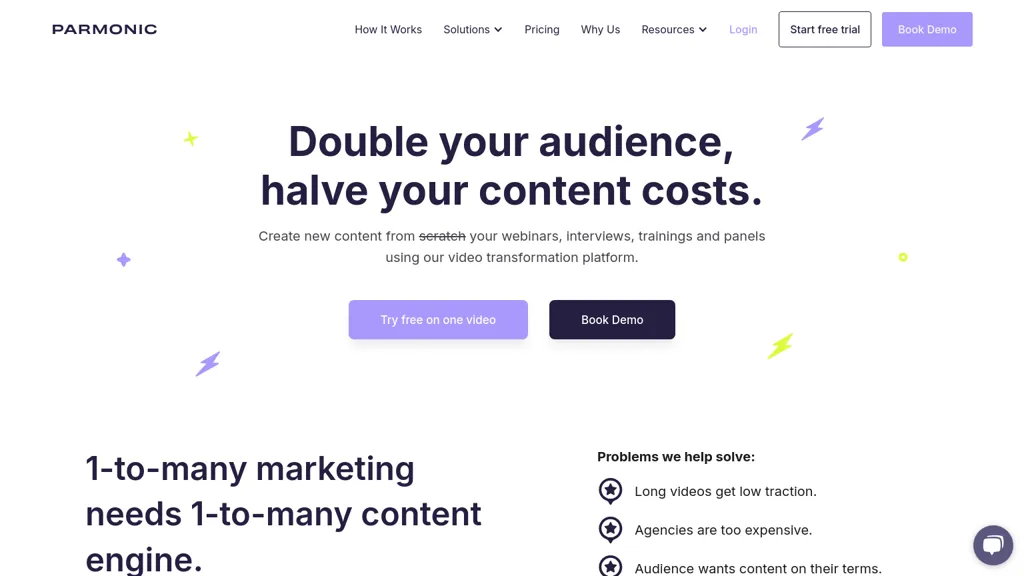
100% positive · 1 user review FreemiumParmonic automatically extracts key moments from long webinars, presentations, and interviews, creating short clips, audiograms, and multilingual subtitles. It cleans audio, removes filler words, adds branding, and integrates with webinar hosts, marketing tools, and LMS for quick distribution.
We've ranked 29 parmonic.com alternatives, including 19 with a free plan. Rankings are based on feature coverage and user feedbacks.
Top-rated alternatives include SNAPVID, Opus Clip, and Innerai.com.
29 parmonic.com Alternatives & Competitors, Ranked by User Reviews
Click Compare on any tool to compare it side-by-side with parmonic.com.
#1
SNAPVID
SNAPVID.AI automates cutting long videos into 30‑second clips, removes filler pauses, adds multi‑language subtitles, offers 4K output, AI‑generated B‑roll, audio cleanup, and batch processing with a credit‑based monthly reset for creators.
#2
Opus Clip
OpusClip is an AI-powered video tool that transforms long videos into shareable short clips with one click. It uses AI to identify compelling moments, generate captions, and optimize for social media.
#3
Innerai.com
All‑in‑one platform integrating GPT‑4o, Claude, Gemini, and others for unified text, image, video, and document AI. Offers summarizing, translation, prompt templates, workflow tools, quiz creation, SCORM export, web search, subtitles, dubbing. SOC II‑compliant with field‑level encryption and data isolation.
#4
2Short.Ai
2short.ai automatically extracts the most engaging segments from long videos to create 1080p YouTube Shorts, using facial‑tracking, one‑click animated subtitles, and flexible aspect ratios. It supports multiple languages, direct Drive/URL imports, and brand presets for consistent visuals.
#5
Podsqueeze
Podsqueeze automates podcast transcription with speaker tags, timestamps, and subtitle export. It produces show notes, summaries, short clips, and audiograms, trims audio, edits subtitles, and offers AI voice tuning and topic suggestion for streamlined production.
#6
TubeOnAI
TubeOnAI automatically summarizes videos, podcasts, PDFs, and web content, offering multilingual text and audio outputs. It auto‑subscribes to channels for instant updates and transforms insights into blogs, social posts, newsletters, scripts, and mind maps with one click.
- Catch deals before they expire
- Unlock tools matched to you
- Show off your AI stacks
Already a member? Sign in
#7
wondershare.net
Wondershare AI delivers end‑to‑end media creation: it turns scripts into spokesperson videos with multiple voices, generates music, offers real‑time transcription, AI audio cleanup, talking‑photo synthesis, PDF markup, text‑to‑image, multilingual video, object removal, and batch conversion.
#8
AIVideoSummarizer.io
aivideosummarizer.io is an AI tool that converts videos (from uploads or links) into concise summaries, full transcripts, and chapter markers. It supports multiple formats and languages, generating editable outputs like study outlines and mind maps for faster content review.
#9
Prodshort.com
Prodshort.com is an AI tool that automates the creation of short meeting clips from Google Meet, Zoom, and Teams recordings. It uses AI transcription and engagement detection to flag key moments, offers a timeline editor for quick segment selection, and generates word-level animated captions optimized for TikTok, Instagram, and LinkedIn.
#10
Qlip.ai
Qlip automatically extracts short, vertical or square clips from longer videos, preserving focus on key moments. It applies brand templates, generates speech‑to‑text transcripts with speaker tags, and offers an API for clip creation, aspect‑ratio conversion, subtitle burning, and transcription.
#11
SummarAIze
SummarAIze turns podcast and video recordings into searchable, branded content assets. It transcribes audio, generates captions, subtitles, SEO titles, social media posts, blog drafts, and more, all from one dashboard with customizable brand settings.
#12
Ssemble
Ssemble automatically extracts viral moments from long videos, centers faces for vertical formats, adds captions and translations, and schedules short clips for TikTok, YouTube, and Instagram. AI‑generated titles, hashtags, and API access support scalable content production.
#13
Chopcast
Chopcast is an AI-powered content repurposing tool that automates the process of identifying key moments in long-form video and turning them into short-form content for social media channels, saving time and reducing edit costs.
#14
Pictory
Pictori is an AI-powered video creation tool designed for bloggers, social media managers, YouTubers, course creators, coaches and more. It offers auto-captions, transcription, summarization, and requires no technical skills or software downloads.
#15
Minvo 2.0
Minvo automates video editing and social media scheduling, converting long videos into short clips, images, and subtitles. Features include AI clip extraction, B‑roll insertion, multi‑language translation, animated captions, branding templates, and cross‑platform posting with performance analytics.
#16
Klap.app
Klap automatically extracts key moments from long videos, reframes them for vertical formats, adds multilingual subtitles, and lets you customize branding. Upload files or YouTube links, then share or schedule ready‑to‑publish clips across TikTok, Instagram, LinkedIn, and YouTube.
#17
Kapwing
Kapwing is an online video platform offering drag‑and‑drop editing for trimming, layering, overlays, and team collaboration. Its audio tools record, edit, and clean tracks; subtitler auto‑generates captions in 40+ languages.
#18
Videohighlight
Video Highlight delivers AI‑driven summaries, searchable transcripts, and timestamped key points for YouTube, Vimeo, Dailymotion, and private files in 37+ languages. It supports annotations, exports to Notion, Word, Markdown, CSV, Readwise, and enables collaborative sharing.
#19
Vizard
Vizard.ai automatically transcribes footage, spots highlights, and creates TikTok, Reels, and Shorts‑ready clips with one click. It provides text trimming, timeline precision, vertical resizing, multilingual captions, brand templates, collaborative workspaces, and API integration.
#20
PodcastAI
PodcastAI automates podcast production—editing, noise reduction, mastering—while providing post‑production, promotional assets, and distribution integration. It converts written content to audio, translates episodes, and offers a web‑based studio with scheduling and analytics for creators, agencies, and marketing teams.
#21
Cliptalk
Cliptalk turns text, images, or website content into ready‑to‑publish short‑form videos, automating editing, captions, B‑roll, and voice creation. It supports multiple languages, voice styles, and natural‑language editing for quick publishing.
#22
Notegpt
NoteGPT transcribes and summarizes lectures, meetings, and recordings in any language, offering PDF/PPT/book/video overviews, translation, and AI drafting tools. It also supports text‑to‑speech, voice cloning, infographics, slide generation, and multi‑model chat assistance.
#23
Short AI
Short AI automates short video creation for TikTok, YouTube Shorts, and Instagram, converting long videos into clips. It extracts key moments, adds captions, and supports multi-language script generation and automated social media scheduling.
#24
Clip FM
ClipFM uses AI to scan long videos, automatically extract highlights, generate captions, detect emotions, and assign virality scores. Export clips in platform‑specific formats (TikTok, Instagram, YouTube, X, LinkedIn, Facebook) with a one‑click export.
#25
Recast Studio
Recast Studio uses AI to transcribe and edit webinars, podcasts, and live recordings in 20+ languages, auto‑framing key moments and producing clips, audiograms, and social posts for TikTok, Instagram, YouTube, Facebook, LinkedIn, and Twitter. Collaboration and scheduling are built‑in.
#26
AnyClip
AnyClip automates video tagging, subtitles, and chapter creation, enabling searchable, measurable content. It extracts highlights, clusters topics, and builds contextual playlists. Facial recognition and brand‑safety filters keep compliant, while interactive players support live captions and AI‑driven ads.
#27
magnifi.ai
Magnifi automates sports highlight creation and distribution. It extracts clips from live or recorded footage, resizes them for all devices, adds multilingual subtitles, and publishes directly to web, mobile, and social platforms in a single click.
#28
RecCloud
RecCloud converts speech to text, auto‑polishes and summarizes meetings, lectures, or transcriptions. It creates multilingual subtitles, offers voice synthesis, video summarization, and editing tools, and supports screen recording, medical, Zoom, and YouTube transcription.
#29
AI Video Cut
AI Video Cut uses prompt‑based AI to transform long videos into short, platform‑optimized clips. It auto‑detects faces, crops frames, adds multilingual captions, and supports multiple aspect ratios for fast, high‑quality content creation.
Frequently Asked Questions
Why look for parmonic.com alternatives?
Common reasons users switch from parmonic.com:
- Feature gaps: teams needing specific capabilities like Edit Videos may find a more focused alternative better suited to their workflow.
- Flexibility: exploring alternatives helps find tools that better match your team size, integrations, and budget.
What is the best alternative to parmonic.com?
SNAPVID ranks as the top parmonic.com alternative. SNAPVID.AI automates cutting long videos into 30‑second clips, removes filler pauses, adds multi‑language subtitles, offers 4K output, AI‑generated B‑ It is available on a Subscription plan starting from $16/mo.
How do the top parmonic.com alternatives compare?
| Tool | Pricing | Starting Price | User Rating |
|---|---|---|---|
| parmonic.com this tool | Freemium | $66.58/mo | 100% (1) |
| SNAPVID | Subscription | $16/mo | — |
| Opus Clip | Freemium | — | 50% (2) |
| Innerai.com | Subscription | $8/mo | 78.6% (28) |
| 2Short.Ai | Freemium | $9.9/mo | 66.7% (3) |
| Podsqueeze | Subscription | $35/mo | 100% (1) |
Are there free parmonic.com alternatives?
Yes, 19 free alternatives found in our list: Opus Clip, 2Short.Ai, TubeOnAI. and 16 more — use the pricing filter above to see them all.
What should I look for in a parmonic.com alternative?
- Core capabilities: confirm the tool supports Edit Videos, Extract Moments, Generate Social Media Videos.
- Pricing transparency: look for clear free plan, trial period, or tiered pricing — avoid tools that hide costs.
- User reviews: check both the satisfaction percentage and the number of reviews; a high score from few users is less reliable.
- Integrations: verify it connects with your existing stack before committing.
- Support and updates: active development and responsive support are strong signals of a maintained product.
Which parmonic.com alternative has the highest user rating?
Podsqueeze has the highest satisfaction score among parmonic.com alternatives, with 100% positive from 1 user review. It is available on a Subscription plan starting from $35/mo.
What are parmonic.com alternatives used for?
- Edit Videos
- Extract Moments
- Generate Social Media Videos
- Generate Audiograms
- Generate Subtitles