
Top 29 EchoWave Alternatives in 2026
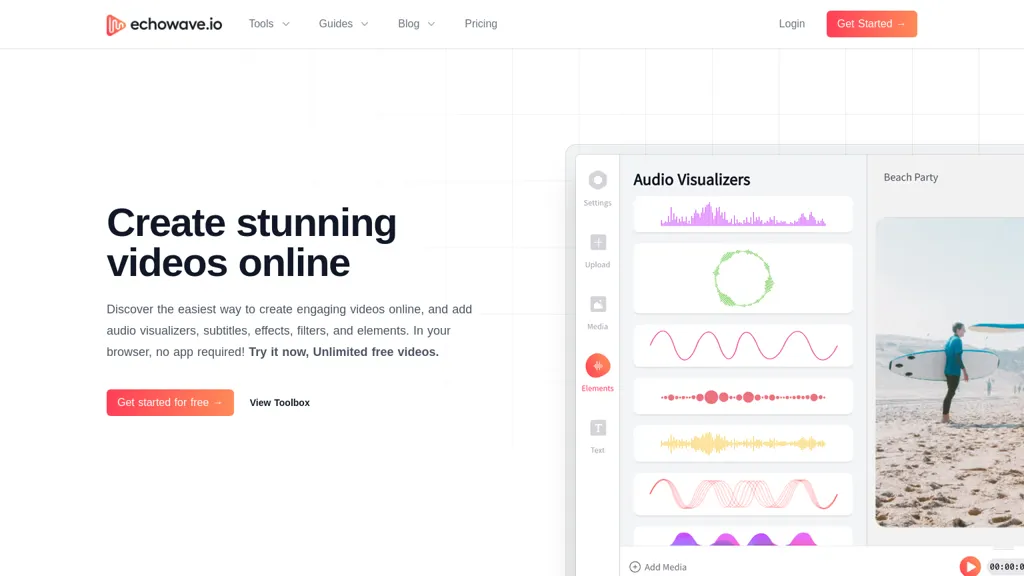
82.4% positive · 17 user reviews FreemiumEchoWave converts audio into video using templates or custom layouts, adds subtitles and waveforms, offers editing tools, compresses files, and exports to social media formats—ideal for podcasters, musicians, and creators seeking quick, cloud‑based video production without software.
We've ranked 29 EchoWave alternatives, including 18 with a free plan. Rankings are based on feature coverage and user feedbacks.
Top-rated alternatives include Music 2 Tube, TurboScribe, and Online Audio Converter.
29 EchoWave Alternatives & Competitors, Ranked by User Reviews
Click Compare on any tool to compare it side-by-side with EchoWave.
 #1
Music 2 Tube
#1
Music 2 Tube
Music 2 Tube automatically converts MP3/WAV files into videos for YouTube, Instagram, TikTok, and Reels. It supports bulk drag‑and‑drop, direct uploads, scheduled publishing, visual effects, cloud‑based covers, and maintains original audio quality across platforms.
 #2
TurboScribe
#2
TurboScribe
TurboScribe is an AI-powered transcription tool offering ultra-fast conversion of audio and video files to text. It supports over 98 languages, handles uploads up to 10 hours long, and features speaker recognition for meetings, interviews, and podcasts.
 #3
Online Audio Converter
#3
Online Audio Converter
Browser-based Online Audio Converter converts 300+ audio/video formats to MP3, WAV, M4A, FLAC, OGG, etc., extracts audio from video, offers bitrate/sample rate/channel controls, fade/reverse/voice removal, batch conversion, metadata editing, and cloud export.
 #4
ClipGen
#4
ClipGen
ClipGen converts podcast audio or video into shareable social media clips. Upload files or YouTube links, it auto‑scores segments, adds subtitles, lets you refine timing and captions, reframes for portrait or square formats, then exports or posts directly.
 #5
Wave.Video
#5
Wave.Video
Wave.video is an all-in-one AI video editing and creation platform that allows users to create, edit, and distribute videos, offering features such as online editing, live streaming, thumbnail maker, and customizable live streaming studios.
 #6
Aivideo
#6
Aivideo
AIVideo.com automates video production, creating music videos, lyric visuals, looping clips, and converting audio or images into video. It offers text‑to‑image/video, background removal, matchcut editing, and visual effects, enabling quick, professional media creation.
- Catch deals before they expire
- Unlock tools matched to you
- Show off your AI stacks
Already a member? Sign in
 #7
Video to Blog
#7
Video to Blog
Video To Blog converts YouTube links or uploads into ready‑to‑publish blog posts in under a minute, supporting 30+ languages. It formats prose, adds headings, SEO metadata, and embeds, and outputs HTML, Markdown, PDF, or links.
 #8
Clipfly AI Video Generator
#8
Clipfly AI Video Generator
AI Video Generator by Clipfly seamlessly transforms text into engaging video frames. Easily add subtitles, stickers, music, and merge clips. Enjoy features like face swap and voiceover for professional video creation effortlessly.
 #9
VideoGen.io
#9
VideoGen.io
VideoGen is a browser‑based AI video platform that lets teams create studio‑quality videos in minutes using structured workflows, 200+ voices in 50+ languages, one‑click translation and captioning, and collaborative workspaces for fast, cost‑effective production.
 #10
Wondershare Uniconverter
#10
Wondershare Uniconverter
Wondershare UniConverter is an AI‑powered all‑in‑one tool that converts, enhances, compresses, records, and edits video and audio. It supports 1,000+ formats, delivers ultra‑fast conversions, upscales to 4K/8K, adds subtitles, removes backgrounds, and preserves metadata for creators and SMBs.
 #11
CaptionCreator
#11
CaptionCreator
CaptionCreator automatically transcribes and captions audio/video in over 50 languages, detecting input language and translating to English. It handles noisy and multilingual speech, supporting files up to 2 GB and offering unlimited processing for registered users.
 #12
FlexClip
#12
FlexClip
FlexClip is an online video editor with templates, resources, and powerful tools to create and edit videos for various purposes, as well as integration with royalty-free stock media providers and easy social media sharing.
 #13
wondershare.net
#13
wondershare.net
Wondershare AI delivers end‑to‑end media creation: it turns scripts into spokesperson videos with multiple voices, generates music, offers real‑time transcription, AI audio cleanup, talking‑photo synthesis, PDF markup, text‑to‑image, multilingual video, object removal, and batch conversion.
 #14
Scribewave AI
#14
Scribewave AI
Scribewave converts audio and video up to 5 GB and 5 hours into accurate transcripts in over 90 languages. The platform offers real‑time editing, export to Word, Docs, SRT/VTT, subtitle burning, AI‑generated summaries, chapter markers, and GDPR‑compliant European data storage.
 #15
Translate.Video
#15
Translate.Video
Translate.video automates video localization: it transcribes, generates subtitles, and dubs content in 75+ languages using voice cloning from a 50‑second clip. Users can edit captions, export SRT/VTT/MP4, and integrate plugins for Photoshop, Illustrator, and Figma.
 #16
AudioConvert
#16
AudioConvert
AudioConvertis a free AI tool that instantly transcribes audio files like mp3 and wav into text. It automatically identifies different speakers and provides timestamped transcripts for export.
 #17
Free Subtitles AI
#17
Free Subtitles AI
FreeSubtitles.AI converts MP4, MKV, MOV, MP3, WAV, and FLAC files up to 1 hour and 300 MB into accurate transcripts in over 100 languages, then translates subtitles into 91 languages, supporting educators, podcasters, and researchers.
 #18
VEED
#18
VEED
VEED is an AI‑powered video editor that lets users upload media, auto‑generate subtitles, edit clips, add music or text, correct eye contact, reduce noise, remove backgrounds, translate captions, and export in multiple formats.
 #19
Movavi
#19
Movavi
Movavi Video Editor is a desktop app for Mac and Windows that lets users trim, crop, color‑grade footage and add titles, overlays, and filters. AI features automate subtitles, noise suppression, and motion tracking. It includes a screen recorder for tutorials.
 #20
AIVideoSummarizer.io
#20
AIVideoSummarizer.io
aivideosummarizer.io is an AI tool that converts videos (from uploads or links) into concise summaries, full transcripts, and chapter markers. It supports multiple formats and languages, generating editable outputs like study outlines and mind maps for faster content review.
 #21
SubtitleBee
#21
SubtitleBee
SubtitleBee automatically generates and syncs subtitles for video and audio files, supports on‑screen editing, customization, and multilingual translation, offers multiple export formats, and provides social‑media cropping for creators and podcasters, enabling accessible content across platforms.
 #22
EasySub
#22
EasySub
EasySub AI automatically transcribes and translates videos into over 150 languages. It supports MP4, MOV, AVI, MKV, MP3, WAV, and YouTube uploads, offers downloadable SRT/TXT/ASS files, an editor for fine‑tuning, and export presets for major social media platforms.
 #23
Podsqueeze
#23
Podsqueeze
Podsqueeze automates podcast transcription with speaker tags, timestamps, and subtitle export. It produces show notes, summaries, short clips, and audiograms, trims audio, edits subtitles, and offers AI voice tuning and topic suggestion for streamlined production.
 #24
AIImageToVideo Pro
#24
AIImageToVideo Pro
AIImageToVideo Pro is an AI tool that transforms static images and text prompts into short videos using models like Veo and Kling, offering control over motion, duration, and resolution. It features editing for text overlays and captions, with export options for creating watermark-free content for social media and marketing.
 #25
VideoTube
#25
VideoTube
VideoTube is an AI video generator that transforms text, images, and video into dynamic, engaging social content with customizable templates, voiceovers, and effects. It enables rapid rendering, seamless editing, and easy sharing across social media platforms for diverse video projects.
 #26
Maestra AI
#26
Maestra AI
Maestra transcribes and translates audio/video into searchable text, subtitles, and dubbed audio across 125+ languages, offering live transcription, subtitle editing, voice cloning/TTS, collaboration tools, content workflows, and APIs for integrations and automated publishing.
 #27
BlogMyVideo
#27
BlogMyVideo
BlogMyVideo turns video, audio, and podcast content into searchable blog posts, automatically syncing with YouTube, providing editable text, meta tags, Schema markup, and fast edge‑server publishing to reach readers and expand audience reach.
 #28
SubtitleGen
#28
SubtitleGen
Subtitlegen is an AI-powered tool that automatically transcribes videos and generates subtitles with high accuracy in multiple languages. It features online editing, easy export options, and strong privacy measures, enhancing accessibility for content creators.
 #29
ImageToVideo AI
#29
ImageToVideo AI
ImageToVideo AI converts JPG, PNG, or WebP images into MP4 videos. Users can crop, resize to social‑media ratios, choose speed/quality presets, apply 50+ templates, add AI music, and edit motion via a prompt editor—all watermark‑free.
Frequently Asked Questions
Why look for EchoWave alternatives?
Common reasons users switch from EchoWave:
- Feature gaps: teams needing specific capabilities like Generate Videos may find a more focused alternative better suited to their workflow.
- Flexibility: exploring alternatives helps find tools that better match your team size, integrations, and budget.
What is the best alternative to EchoWave?
Based on 1 user review, Music 2 Tube (50% positive) ranks as the top EchoWave alternative. Music 2 Tube automatically converts MP3/WAV files into videos for YouTube, Instagram, TikTok, and Reels. It supports bulk drag‑and‑drop, direct upload It is available on a Paid plan starting from $3.49.
How do the top EchoWave alternatives compare?
| Tool | Pricing | Starting Price | User Rating |
|---|---|---|---|
| EchoWave this tool | Freemium | $19/mo | 82.4% (17) |
| Music 2 Tube | Paid | $3.49 | 50% (1) |
| TurboScribe | Freemium | $10/mo | 76.9% (13) |
| Online Audio Converter | Subscription | — | — |
| ClipGen | Freemium | $9.99/mo | — |
| Wave.Video | Freemium | $16/mo | 72% (25) |
Are there free EchoWave alternatives?
Yes, 18 free alternatives found in our list: TurboScribe, ClipGen, Wave.Video. and 15 more — use the pricing filter above to see them all.
What should I look for in a EchoWave alternative?
- Core capabilities: confirm the tool supports Generate Videos, Translate Audio, Edit Videos.
- Pricing transparency: look for clear free plan, trial period, or tiered pricing — avoid tools that hide costs.
- User reviews: check both the satisfaction percentage and the number of reviews; a high score from few users is less reliable.
- Integrations: verify it connects with your existing stack before committing.
- Support and updates: active development and responsive support are strong signals of a maintained product.
Which EchoWave alternative has the highest user rating?
Video to Blog has the highest satisfaction score among EchoWave alternatives, with 100% positive from 5 user reviews. It is available on a Paid plan.
What are EchoWave alternatives used for?
- Generate Videos
- Translate Audio
- Edit Videos
- Optimize Videos
- Analyze Audio