
What is AIImageToVideo Pro?
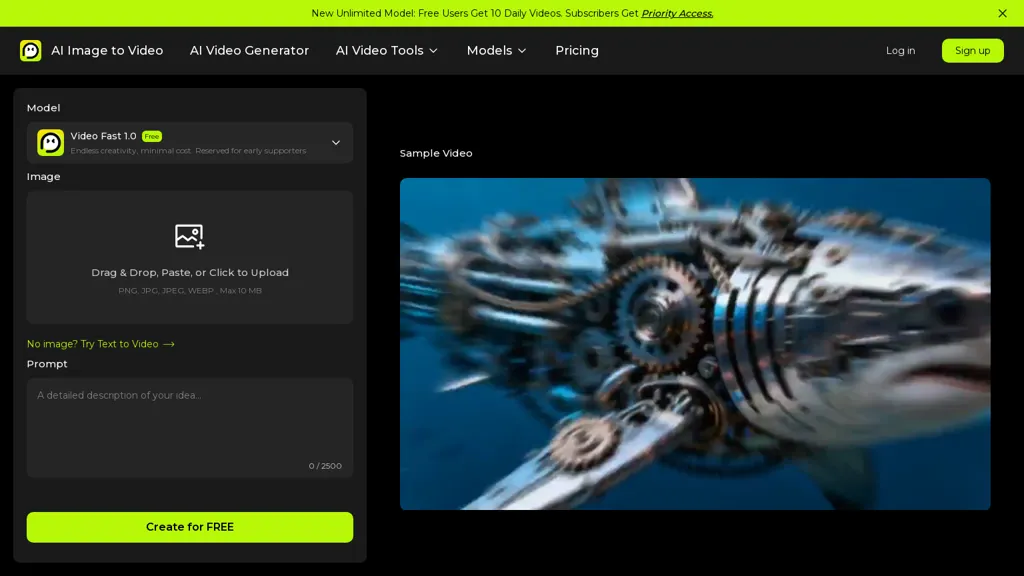
AIImageToVideo Pro converts static images and text prompts into short AI-generated videos using selectable models (Veo, Kling, Wan, Hailuo) with configurable trade-offs in duration, resolution and audio synchronization.
The tool accepts JPG, PNG and WEBP uploads via drag-and-drop or paste, includes cropping and aspect-ratio presets, and offers output resolutions from 480p up to 1080p.Multi-input prompts let users combine image assets and descriptive text for precise motion cues and scene direction.
Editing controls cover text overlays, font choices, color and opacity, caption backgrounds, and text edge styles for branded captions and localized captions.Model options are labeled for different use cases (Veo variants for higher-resolution outputs, Kling for fluid motion, Wan for faster generation, Hailuo for motion control and artistic styles) so creators can select based on target duration and visual needs.
Outputs include HD export without watermarks, preview playback, and export formats suited for social media, marketing, and short-form storytelling.
AIImageToVideo Pro details
- Company
- PIXINSIGHT TECHNOLOGY LTD
- Jurisdiction
- United State
- Built for
- Individuals
AIImageToVideo Pro tech specs
- Works with
- OpenAI / GPT OpenAI / Sora Anthropic / Claude Google / Gemini Google / Veo Google / Imagen Google / Nano Banana Luma AI Kling ByteDance / Seedance MiniMax / Hailuo Tencent / Hunyuan Kimi MiniMax
- Integrations
- Zapier Slack Discord Shopify Figma Webflow
AIImageToVideo Pro pricing
Freemium- Auto-renewal
- Yes
Verify on the official pricing page.
View plansAIImageToVideo Pro's key features
-
Converts static images and text prompts into short AI-generated videos with configurable duration, resolution, and audio synchronization
-
Selectable model variants (Veo, Kling, Wan, Hailuo) optimized for different trade-offs such as resolution, motion fluidity, speed, and artistic/motion control
-
Accepts JPG, PNG, and WEBP uploads via drag-and-drop or paste, with cropping and aspect-ratio presets (1:1, 3:4, 4:3, 9:16, 16:9) and output resolutions from 480p to 1080p
-
Supports multi-input prompts to combine multiple image assets and descriptive text for precise motion cues and scene direction
-
Editing controls for text overlays including font selection, color and opacity, caption backgrounds and text edge styles, plus preview playback and export formats for social media
AIImageToVideo Pro use cases
-
Create shareable short social videos from product photos using AIImageToVideo Pro's selectable models and aspect presets, adding audio‑synced motion cues and captioned text overlays for TikTok, Instagram Reels and Stories with HD export and no watermark
-
Turn event or travel photo collections into engaging captioned highlights and mini-stories by combining multiple images and text prompts, using artistic motion control and multi‑input motion cues for dynamic pacing, then export 1080p videos with customizable crop presets for cross‑platform promotion
-
Produce on‑brand promotional clips or tutorial snippets from screenshots and step‑by‑step images, automatically syncing voiceover or music, choosing Veo/Kling/Wan/Hailuo styles for distinct looks, and applying preset aspect ratios and caption controls to deliver professional, accessible short videos for ads and learning content
AIImageToVideo Pro user reviews
Based on 6 reviews, 50% of users recommend AIImageToVideo Pro, rated highly for quality results.
Liked for
Disliked for
Would you recommend AIImageToVideo Pro?
Who is AIImageToVideo Pro for?
-
Social media creators
-
Social media influencers
-
Content creators
-
Video editors
-
Short-form filmmakers
AIImageToVideo Pro FAQ
Is AIImageToVideo Pro free?
Partly. AIImageToVideo Pro has a free plan with usage limits, and paid plans unlock the full feature set. Plans include Standard at $9.99/mo and Pro at $29.99/mo.
Is AIImageToVideo Pro safe to use?
AIImageToVideo Pro is operated by PIXINSIGHT TECHNOLOGY LTD, registered in United State. It has a substantial audience that is independently measured month to month.
What are the best alternatives to AIImageToVideo Pro?
The closest alternatives to AIImageToVideo Pro are VideoAI, www-veo3.com, imagetovideo-ai.org, VibeVideo.app and Vidful.ai. You can compare them side by side in the alternatives section further down this page.
What does AIImageToVideo Pro do with my data?
AIImageToVideo Pro states that customer content may be used to train its models. Its privacy policy states that personal data is not sold or shared for marketing purposes. Data may be shared with third-party service providers that help run the product.
Does AIImageToVideo Pro auto-renew or offer refunds?
AIImageToVideo Pro subscriptions renew automatically until you cancel.
Who made AIImageToVideo Pro?
AIImageToVideo Pro is built and operated by PIXINSIGHT TECHNOLOGY LTD, a company registered in United State.
Which AI models does AIImageToVideo Pro use?
AIImageToVideo Pro is built on OpenAI / GPT, OpenAI / Sora, Anthropic / Claude, Google / Gemini, Google / Veo, Google / Imagen, Google / Nano Banana, Luma AI, Kling, ByteDance / Seedance, MiniMax / Hailuo, Tencent / Hunyuan, Kimi and MiniMax. Which models you can reach may depend on your plan.
What does AIImageToVideo Pro integrate with?
AIImageToVideo Pro connects with Zapier, Slack, Discord, Shopify, Figma and Webflow.
Compliance, privacy and billing terms are as stated in each product's own published documentation and have not been independently verified by TopAI.tools.


