
Top 29 NeuralBox Alternatives in 2026
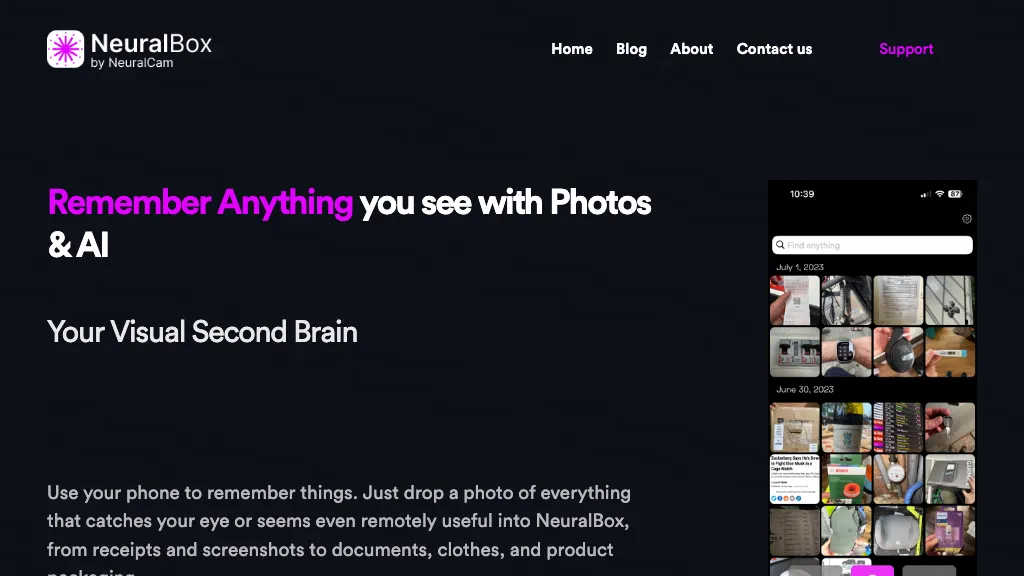
No user reviews yet SubscriptionNeuralBox captures photos instantly via camera, lock‑screen widget, or share extension, auto‑imports screenshots, and offers a scanning mode. AI image recognition and OCR enable keyword searches; similarity browsing groups images by visual traits. Files sync locally or in the cloud.
We've ranked 29 NeuralBox alternatives, including 22 with a free plan. Rankings are based on feature coverage and user feedbacks.
Top-rated alternatives include AutoCropper, Screensnapai, and AI photo sorter.
29 NeuralBox Alternatives & Competitors, Ranked by User Reviews
Click Compare on any tool to compare it side-by-side with NeuralBox.
 #1
AutoCropper
#1
AutoCropper
AutoCropper uses AI to detect, crop, and straighten photos from scans, handling JPEG, PNG, TIFF, and PDF in batches. It splits images into full‑quality files, lets you resize or tag crops, all in the browser with full privacy.
 #2
Screensnapai
#2
Screensnapai
ScreenSnapAI auto‑renames and tags screenshots on macOS, letting users open an AI chat for instant content explanations. Accessible via menu or shortcut, it organizes images with AI‑generated metadata, speeding knowledge capture and retrieval on Intel and Apple Silicon machines.
 #3
AI photo sorter
#3
AI photo sorter
AI Photo Organizer classifies images locally with neural networks, enabling drag‑and‑drop uploads, custom categories, and duplicate detection. It generates a script that moves kept photos into chosen folders and deletes others, all processed on the user’s computer.
 #4
SnapAndSolve
#4
SnapAndSolve
SnapAndSolve uses OCR and language‑model inference to turn photographed questions into quick, accurate answers. Users capture or upload images, crop for focus, and receive concise, context‑aware responses in seconds, supporting multiple languages for students, professionals, and educators.
 #5
AI Describe Picture
#5
AI Describe Picture
Describe Image & Picture extracts text, alt descriptions, and HTML snippets from PNG, JPEG, or WEBP files up to 2 MB, converting visuals into editable Markdown or code, auto‑tagging photos, and generating Flux image variants for creators, developers, and marketers.
 #6
Remio AI
#6
Remio AI
Remio AI is a personal knowledge hub that auto-captures and organizes ideas from multiple sources, offering AI-driven recommendations and secure, device-based storage. It enhances productivity with smart search, tailored insights, and upcoming features like writing aids and advanced reasoning.
- Catch deals before they expire
- Unlock tools matched to you
- Show off your AI stacks
Already a member? Sign in
 #7
photes.io
#7
photes.io
Pixno uses GPT‑4 Vision to extract text, charts, and audio from photos, PDFs, and lecture slides. It summarizes, translates, generates Q&A, exports to Notion, Obsidian, Google Docs, and syncs across devices for real‑time collaboration.
 #8
Text to Image by Photoleap
#8
Text to Image by Photoleap
Photoleap is an iOS‑only photo editing app that uses AI for quick enhancements, background removal, object deletion, collage creation, filters, text‑to‑image, video from stills, 4K upscaling, style transfer, portrait retouching, and hair color simulation.
 #9
ChatPhoto: Ai Image To Text
#9
ChatPhoto: Ai Image To Text
ChatPhoto turns photos into readable text and answers. Upload one or many images, ask questions, and receive translations, captions, and concise narratives in multiple languages. Ideal for quick social‑media copy, product titles, and travel stories.
 #10
The Drive
#10
The Drive
Drive AI automates file organization: drag‑and‑drop documents, PDFs, images, audio, and video; auto‑reads content, renames with clear titles, creates nested folders, and supports email attachment sorting, OCR, speaker detection, secure sharing, and natural‑language commands for teams.
 #11
PhotoAI
#11
PhotoAI
Photo AI transforms uploaded portrait photos into over 100 unique AI‑styled images per selected pack (Tinder, LinkedIn, Polaroid, Avatar, Royal). Users receive downloadable files within hours, suitable for professional headshots or dating‑app profiles.
 #12
AI Photo Editor
#12
AI Photo Editor
AI Photo Editor lets users upload up to ten images or generate new ones from text prompts, instantly editing or converting images into short videos. All processing runs client‑side, supporting face completion and consistent character edits for design and work.
 #13
Keepi
#13
Keepi
Keepi captures and organizes WhatsApp content—texts, links, images, voice notes—using AI to transcribe, summarize, and index. Searchable by keyword or topic, it enables quick reference without leaving WhatsApp for daily use.
 #14
Photify.AI
#14
Photify.AI
Photify AI transforms a single selfie into a stylized image in about two seconds, offering themed packs (cartoon, anime, retro, travel, etc.). Its quick processing, style transfer, and intuitive interface help creators, marketers, and hobbyists generate ready‑to‑use visuals.
 #15
Fotoexamen
#15
Fotoexamen
PhotoExamen uses OCR and AI to analyze exam and assignment images, offering step‑by‑step solutions for multiple choice, short answer, math, and language tasks. It auto‑generates concept maps, quizzes, transcribes audio, and summarizes texts for study support.
 #16
Keep it shot
#16
Keep it shot
Keep It Shot is a macOS app that auto‑generates descriptive names for screenshots, builds a local index for quick keyword search, allows bulk renaming with two clicks, and can revert to original filenames if needed. OCR adds metadata.
 #17
AI Renamer
#17
AI Renamer
AI Renamer automates file renaming by analyzing content, including EXIF data, and offers features like smart recognition, custom rules, and batch processing. It supports various formats and provides both local and cloud processing options for flexibility.
 #18
PhotoSolve
#18
PhotoSolve
PhotoSolve uses AI to read academic problem images and delivers step‑by‑step solutions for math, science, and language tasks. It offers browser, mobile, and desktop extensions, flashcards, quizzes, and multilingual support with privacy safeguards.
 #19
Receipt AI
#19
Receipt AI
Receipt AI captures receipts via SMS, email, or upload, extracts date, vendor, amount, line items, and renames, categorizes, encrypts, and syncs them to QuickBooks or Xero. It supports multiple formats, 39 languages, detects duplicates, and allows direct approval in accounting software.
 #20
Tagbox
#20
Tagbox
Tagbox automatically organizes photos, videos, PDFs, and editable files using computer vision for face, object, and scene tagging. Its search engine offers advanced filters and full‑text queries. Team collaboration and secure storage enable efficient asset management.
 #21
RapidScan.AI
#21
RapidScan.AI
RapidScan AI automates data extraction from various documents using advanced OCR technology, reducing manual entry errors. It offers real-time processing, structured data organization, mobile accessibility, multi-user collaboration, and seamless integration with accounting and ERP systems.
 #22
Picture translate
#22
Picture translate
Picture Translate extracts text from images using OCR and instantly translates it into one of 100+ languages. It displays results in the browser, lets you copy or download a translated PNG, and operates securely without installation.
 #23
PicKey ai
#23
PicKey ai
PicKey lets users log in by uploading a photo that AI recognises even if objects shift, combining it with a 3D collectible to create a unique Master Key. It supports fingerprints, facial ID, password regeneration, and temporary sharing with contacts.
 #24
MacCopilot
#24
MacCopilot
MacCopilot lets macOS users select any screen area, capture screenshots, and chat with AI models—GPT‑4o, Claude, Gemini, or local Ollama—to receive instant visual analysis, code reviews, design feedback, and contextual insights directly on‑screen. Hotkeys and history improve workflow.
 #25
CaptionMaster
#25
CaptionMaster
Generate one‑click captions for photos in any language. Upload an image, pick a target platform, and receive a tailored caption from a library of 100+ categories. Copy or download the text directly for use on social media.
 #26
1PhotoAI
#26
1PhotoAI
PhotoAI transforms a single selfie into high‑resolution stylized headshots, avatars, or themed images using over 2,000 preset styles. It offers fast, batch processing, AI photo enhancement, and integrates with social‑media workflows for quick profile and marketing updates.
 #27
TheDrive AI
#27
TheDrive AI
Drive AI automates document ingestion, OCR, indexing and content-aware organization across email, cloud, Slack/Teams and mobile scans. A natural-language assistant performs searches and file operations, while providing collaborative permissions, audit trails and enterprise-grade security.
 #28
Docaroo.ai
#28
Docaroo.ai
Docaroo is a secure document management system combining encrypted cloud storage, two-factor authentication and role-based permissions with Roo AI for OCR, indexing and natural-language search, plus mobile scanning, auto-tagging, expiry reminders and secure sharing.
 #29
AIImagetoText
#29
AIImagetoText
AIImagetoText is a free tool that extracts both printed and handwritten text from images, scans, and notes. It supports batch processing and multiple languages while ensuring your uploaded images are never stored or shared.
Frequently Asked Questions
Why look for NeuralBox alternatives?
Common reasons users switch from NeuralBox:
- Cost: NeuralBox is a Subscription tool starting from $5.99/mo — users often look for more affordable or free options.
- Feature gaps: teams needing specific capabilities like Generate Images may find a more focused alternative better suited to their workflow.
- Flexibility: exploring alternatives helps find tools that better match your team size, integrations, and budget.
What is the best alternative to NeuralBox?
AutoCropper ranks as the top NeuralBox alternative. AutoCropper uses AI to detect, crop, and straighten photos from scans, handling JPEG, PNG, TIFF, and PDF in batches. It splits images into full‑qualit It is available on a Freemium plan starting from $18.
How do the top NeuralBox alternatives compare?
| Tool | Pricing | Starting Price | User Rating |
|---|---|---|---|
| NeuralBox this tool | Subscription | $5.99/mo | — |
| AutoCropper | Freemium | $18 | — |
| Screensnapai | Freemium | — | — |
| AI photo sorter | Freemium | — | — |
| SnapAndSolve | Freemium | — | — |
| AI Describe Picture | Freemium | — | 100% (1) |
Are there free NeuralBox alternatives?
Yes, 22 free alternatives found in our list: AutoCropper, Screensnapai, AI photo sorter. and 19 more — use the pricing filter above to see them all.
What should I look for in a NeuralBox alternative?
- Core capabilities: confirm the tool supports Generate Images, Analyze Images, Organize Images.
- Pricing transparency: look for clear free plan, trial period, or tiered pricing — avoid tools that hide costs.
- User reviews: check both the satisfaction percentage and the number of reviews; a high score from few users is less reliable.
- Integrations: verify it connects with your existing stack before committing.
- Support and updates: active development and responsive support are strong signals of a maintained product.
Which NeuralBox alternative has the highest user rating?
AI Describe Picture has the highest satisfaction score among NeuralBox alternatives, with 100% positive from 1 user review. It is available on a Freemium plan.
What are NeuralBox alternatives used for?
- Generate Images
- Analyze Images
- Organize Images
- Extract Texts
- Automate Storages