
Top 23 AI Renamer Alternatives in 2026
100% positive · 1 user review FreemiumAI Renamer automates file renaming by analyzing content, including EXIF data, and offers features like smart recognition, custom rules, and batch processing. It supports various formats and provides both local and cloud processing options for flexibility.
We've ranked 23 AI Renamer alternatives, including 19 with a free plan. Rankings are based on feature coverage and user feedbacks.
Top-rated alternatives include Bulk Rename Utility, The Drive, and FileZen.
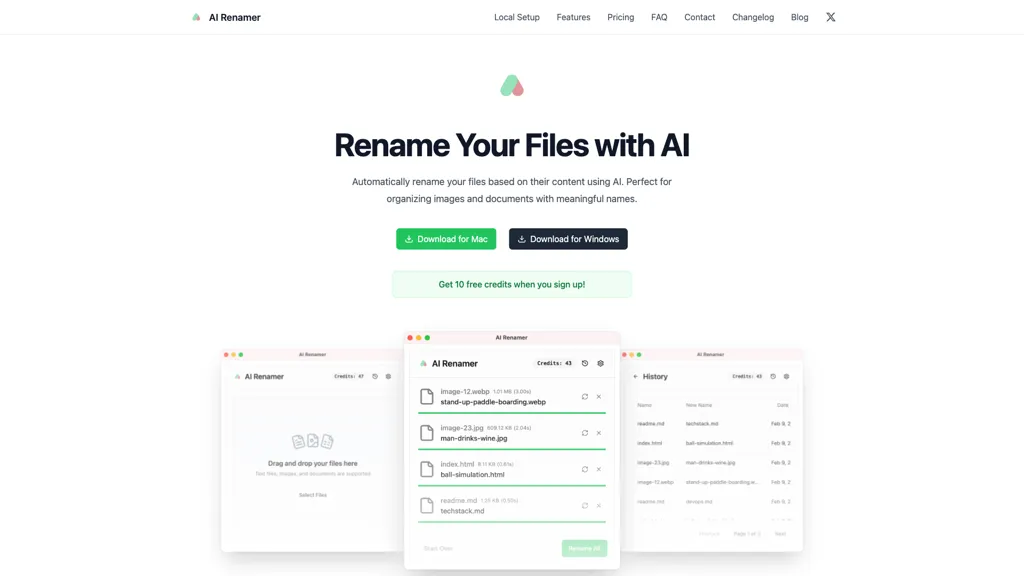
23 AI Renamer Alternatives & Competitors, Ranked by User Reviews
Click Compare on any tool to compare it side-by-side with AI Renamer.
 #1
Bulk Rename Utility
#1
Bulk Rename Utility
Web‑based AI bulk renamer that processes files locally, interpreting natural‑language instructions for batch renaming, numbering, or pattern rules. Supports Windows, macOS, and browsers via the File System Access API, offering preview, instant execution, and photo tagging by date or event.
 #2
The Drive
#2
The Drive
Drive AI automates file organization: drag‑and‑drop documents, PDFs, images, audio, and video; auto‑reads content, renames with clear titles, creates nested folders, and supports email attachment sorting, OCR, speaker detection, secure sharing, and natural‑language commands for teams.
 #3
FileZen
#3
FileZen
FileZen AI automates document and image organization by categorizing files based on content and enabling AI-driven bulk renaming. It supports multiple file types and offers both online and local deployment for enhanced security and privacy.
 #4
AI photo sorter
#4
AI photo sorter
AI Photo Organizer classifies images locally with neural networks, enabling drag‑and‑drop uploads, custom categories, and duplicate detection. It generates a script that moves kept photos into chosen folders and deletes others, all processed on the user’s computer.
 #5
Tagbox
#5
Tagbox
Tagbox automatically organizes photos, videos, PDFs, and editable files using computer vision for face, object, and scene tagging. Its search engine offers advanced filters and full‑text queries. Team collaboration and secure storage enable efficient asset management.
 #6
AutoCropper
#6
AutoCropper
AutoCropper uses AI to detect, crop, and straighten photos from scans, handling JPEG, PNG, TIFF, and PDF in batches. It splits images into full‑quality files, lets you resize or tag crops, all in the browser with full privacy.
- Catch deals before they expire
- Unlock tools matched to you
- Show off your AI stacks
Already a member? Sign in
 #7
LocalFile.io
#7
LocalFile.io
AI‑powered bulk rename tool runs locally in the browser, letting users define custom tasks, preview changes, and apply features like lowercase extensions, numeric prefixes, size‑based sorting, and segment swapping. Ideal for photographers, developers, archivists, and data scientists.
 #8
TheDrive AI
#8
TheDrive AI
Drive AI automates document ingestion, OCR, indexing and content-aware organization across email, cloud, Slack/Teams and mobile scans. A natural-language assistant performs searches and file operations, while providing collaborative permissions, audit trails and enterprise-grade security.
 #9
AI Stock Keywords
#9
AI Stock Keywords
AI Stock Keywords automatically generates XMP‑compatible titles, descriptions, and keywords for JPEG, PNG, MP4, and MOV files. Bulk processing up to 500 files, exportable as CSV or ZIP, streamlines metadata creation for stock platforms.
 #10
aiimageedit.ai
#10
aiimageedit.ai
AI Image Editor is a free online tool that utilizes AI to edit and enhance photos. It supports various image formats and batch processing, offering customizable transformations, aspect ratio adjustments, and precise edits for diverse visual content.
 #11
AI Keywording Tool
#11
AI Keywording Tool
Pixify Studio automatically generates titles, descriptions, and keyword tags for images and videos. It supports drag‑and‑drop, folder uploads, and FTP, processes large batches with a single credit per asset, and stores metadata on Amazon S3.
 #12
AI Finder
#12
AI Finder
AI Finder is a macOS file‑management agent that uses GPT to locate documents by content, tags, timestamps, and duplicate status. It supports natural‑language and voice queries, PDF interaction, and local processing for privacy.
 #13
Image upscaling
#13
Image upscaling
AI‑powered image editor that runs entirely in the browser, offering smart crop, AI expand, format conversion, lossless compression, watermarking, color adjustment, filter, GIF creation, side‑by‑side comparison, and batch workflow design—all processed locally with WebAssembly for speed and privacy.
 #14
Keep it shot
#14
Keep it shot
Keep It Shot is a macOS app that auto‑generates descriptive names for screenshots, builds a local index for quick keyword search, allows bulk renaming with two clicks, and can revert to original filenames if needed. OCR adds metadata.
 #15
FileFolder
#15
FileFolder
FileFolder.org automates file naming, tagging, and sorting across teams. It offers semantic search, a chat interface for document queries, drag‑drop uploads, smart labeling, and advanced filters, cutting search time and enhancing collaboration.
 #16
Screensnapai
#16
Screensnapai
ScreenSnapAI auto‑renames and tags screenshots on macOS, letting users open an AI chat for instant content explanations. Accessible via menu or shortcut, it organizes images with AI‑generated metadata, speeding knowledge capture and retrieval on Intel and Apple Silicon machines.
 #17
AIBanana.net
#17
AIBanana.net
AIBanana.net is an AI image generator that creates and edits images from text descriptions in seconds. It specializes in high-identity accuracy, batch processing, and smart prompts for professional e-commerce and marketing content.
 #18
AI Image Editor
#18
AI Image Editor
AI Image Editor.ai is a professional tool for creating and editing images with precise text rendering and multi-image blending. It enables conversational refinements, character consistency, and batch processing for streamlined workflows.
 #19
AI Keywording
#19
AI Keywording
AI Keywording processes up to 10,000 images per upload, using AI to generate titles, descriptions, and keywords for stock photography. Outputs a CSV ready for stock sites or Adobe Bridge, with temporary image copies deleted after processing.
 #20
Dynbox.app
#20
Dynbox.app
Dynbox is an AI file organizer that streamlines local and cloud file management with automatic sorting, advanced search, and customizable folders. It allows natural language interactions for file edits while prioritizing data privacy and integration with existing cloud services.
 #21
Ai photo tags
#21
Ai photo tags
AITag.Photo automatically generates captions, keyword tags, and story outlines for images using advanced AI. It supports single or bulk uploads, API integration, and enhances organization, SEO, and content creation for photographers and marketers.
 #22
piXme
#22
piXme
Pixme is a cloud-based photo management tool that centralizes image organization and sharing. Its AI-driven tagging and image recognition features streamline searching, while multi-user access enhances collaboration across teams, improving workflow efficiency.
 #23
Picture Picker
#23
Picture Picker
Picture Picker is an AI-driven image management tool that captures images via browser extension, syncs libraries across devices, supports one-click collection and bulk downloads, natural-language image search and automatic categorization, color palette extraction, format conversion, and compression.
Frequently Asked Questions
Why look for AI Renamer alternatives?
Common reasons users switch from AI Renamer:
- Feature gaps: teams needing specific capabilities like Rename files may find a more focused alternative better suited to their workflow.
- Flexibility: exploring alternatives helps find tools that better match your team size, integrations, and budget.
What is the best alternative to AI Renamer?
Bulk Rename Utility ranks as the top AI Renamer alternative. Web‑based AI bulk renamer that processes files locally, interpreting natural‑language instructions for batch renaming, numbering, or pattern rules. Su It is available on a Free plan.
How do the top AI Renamer alternatives compare?
| Tool | Pricing | Starting Price | User Rating |
|---|---|---|---|
| AI Renamer this tool | Freemium | — | 100% (1) |
| Bulk Rename Utility | Free | — | — |
| The Drive | Freemium | — | 100% (1) |
| FileZen | Freemium | — | 50% (1) |
| AI photo sorter | Freemium | — | — |
| Tagbox | Subscription | $6.67/mo | — |
Are there free AI Renamer alternatives?
Yes, 19 free alternatives found in our list: Bulk Rename Utility, The Drive, FileZen. and 16 more — use the pricing filter above to see them all.
What should I look for in a AI Renamer alternative?
- Core capabilities: confirm the tool supports Rename files, Organize images, Organize documents.
- Pricing transparency: look for clear free plan, trial period, or tiered pricing — avoid tools that hide costs.
- User reviews: check both the satisfaction percentage and the number of reviews; a high score from few users is less reliable.
- Integrations: verify it connects with your existing stack before committing.
- Support and updates: active development and responsive support are strong signals of a maintained product.
Which AI Renamer alternative has the highest user rating?
The Drive has the highest satisfaction score among AI Renamer alternatives, with 100% positive from 1 user review. It is available on a Freemium plan.
What are AI Renamer alternatives used for?
- Rename files
- Organize images
- Organize documents
- Generate names
- Automate renaming