Best Uluch Alternatives in 2026
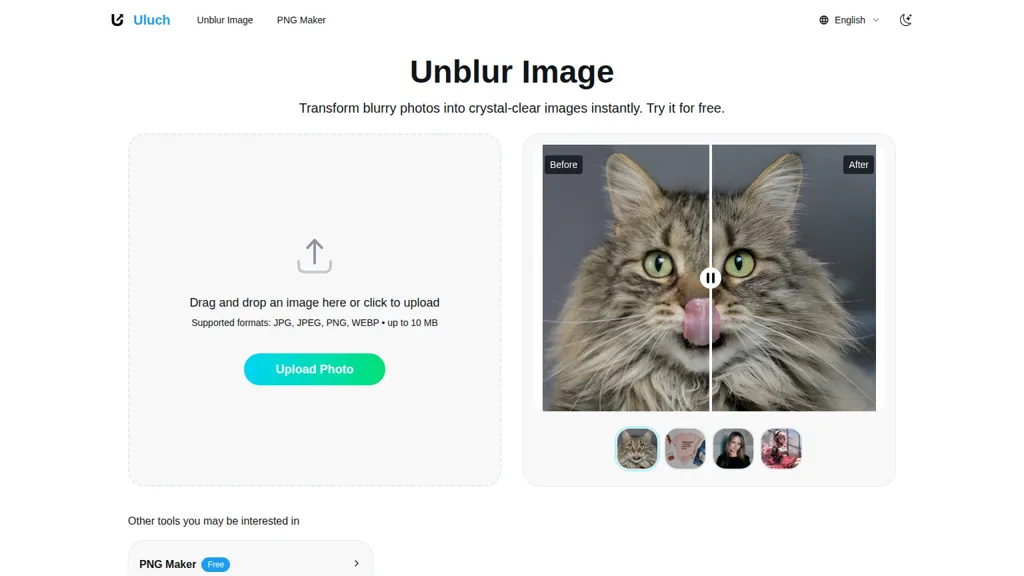
No user reviews yet FreeUnblur Image AI is a web-based tool that enhances blurry photos by restoring sharp details. With a user-friendly drag-and-drop interface, it supports multiple image formats to quickly improve clarity for various applications, from personal memories to marketing visuals.
We've ranked 29 Uluch alternatives, including 23 with a free plan. Rankings are based on feature coverage and user feedbacks.
Top-rated alternatives include AIEnhancer.ai, AVCLabs Photo Enhancer AI Online, and RestorePhotos.
29 Uluch Alternatives & Competitors, Ranked by User Reviews
Click Compare on any tool to compare it side-by-side with Uluch.
#1
AIEnhancer.ai
AIEnhancer.ai is a free online tool that instantly transforms blurry, low-quality images into high-resolution 4K photos. Simply upload your picture to apply AI-powered upscaling, noise reduction, and color correction, then preview and download the enhanced result.
#2
AVCLabs Photo Enhancer AI Online
The AI tool is an online image enhancement platform that automatically improves the quality of images using deep learning algorithms, allowing users to upscale, denoise, restore, and refine faces in photos.
#3
RestorePhotos
Face Photo Restorer uses AI to enhance and restore old or blurry face photos, supporting batch uploads. It outputs high‑resolution images with corrected color, reduced noise, and sharpened detail, and offers real‑time previews for comparison.
#4
BlurBackground AI
AI Background Blur & Remove allows users to effortlessly blur or remove backgrounds from images using AI technology. It supports formats like PNG, JPG, and WEBP, ensuring high-quality results for product photography, portraits, and social media content.
#5
AI Image Enlarger
Imglarger is an image enhancer that upsamples photos up to 8×, supports batch processing, and offers background, object, and face retouch tools. It converts WebP, JPEG, PNG, SVG, JFIF formats and lets users adjust brightness, contrast, and saturation via web or mobile.
#6
Imgupscaler AI
Imgupscaler is an AI tool for enhancing image quality by upscaling images to 4K resolution. It supports multiple formats and restores details while reducing noise, making it suitable for e-commerce, social media, and graphic design.
- Personalized recommendations
- Custom collections
- Save favorites
Already a member? Sign in
#7
EnhancePhoto AI
Enhancephoto.ai is a web-based AI tool that improves low-resolution images to high-quality versions up to 16k. It restores missing details without blurring and enables users to enhance three images simultaneously without registration.
#8
imagewith.ai
Imagewith.AI offers web‑based AI tools for image enhancement, background removal, object deletion, upscaling, photo restoration, and portrait improvement. Deep‑learning algorithms increase resolution, reduce noise, clean artifacts, and preserve fine detail for designers, photographers, and archivists.
#9
ImageUpscaling.net
Free AI Image Enhancer upscale images up to 25MP by a factor of four, improving resolution and detail. It features various enhancement modes, including face restoration, and supports batch processing while ensuring user data privacy.
#10
PhotoEnhanceAI
PhotoEnhance AI: Innovative tool with advanced image upscaling, face restoration, background removal, night enhancement, scratch & object removal for seamless photo transformation via AI-enhanced detailing.
#11
AI Image Editor-
AI Image Editor is an online tool for editing and enhancing images with pixel-level precision. It supports various formats, offers text editing, artistic style transfers, and allows quick generation of image variations for efficient workflow.
#12
Image Upscaler AI
Image Upscaler AI enlarges photos, cartoons, and images up to 400 % using AI while preserving aspect ratio. Users upload via drag‑and‑drop, receive high‑resolution downloads within seconds, with files kept temporarily for privacy.
#13
AI Image Enhancer
AI‑powered Image Enhancer Online upsizes and restores photos and videos to 4K/8K, applies style filters, face/background edits, and batch drag‑and‑drop processing. It serves hobbyists, photographers, designers, and marketers seeking quick, high‑quality image improvements.
#14
AI photo restorer
Upload an old or damaged photo, and the AI removes scratches, dust, and tears, restores colors and sharpness, and can upscale up to 4×. Portrait mode enhances facial detail and skin tone, useful for families, photographers, retouchers, and historians.
#15
HitPaw Online Photo Enhancer
HitPaw AI Photo Enhancer upsamples images up to 8×, removes blur and noise, sharpens detail, and restores color for JPG, PNG, and WebP files. Works on web, desktop, and mobile with batch processing, aiding photographers, designers, and archivists.
#16
Image Enhancer AI
Image Enhancer AI upsamples photos, preserves detail, and outputs high‑resolution images. It also removes backgrounds, retouches fashion shots, converts B&W to color, and generates new visuals via chat or batch processing for photographers, designers, and e‑commerce teams.
#17
Topaz Photo AI
This tool uses deep learning to enhance photos by reducing noise, sharpening, upscaling, and recovering faces.
#18
PicPicAI
PicPicAI automatically removes backgrounds, sharpens portraits, upscales and extends images, and restores old photos, delivering polished results in seconds for e‑commerce, social media, and design workflows, with optional Flux AI art generation.
#19
AI Image Sharpener by Media.io
AI Photo Enhancer sharpens blur, upscales low‑resolution images, and restores details in old photos. It supports JPG, PNG, WebP, BMP via drag‑and‑drop, delivering artifact‑free, instant previews and downloadable outputs.
Image Editor Online is an AI-powered tool that edits your photos using simple text prompts. It allows you to remove backgrounds, adjust poses, transfer styles, and continuously refine your images in one place.
#21
AILab Tools
The AI Lab provides an advanced tool with image and facial enhancements features such as photo colorization, object and background removal, cartoon creation, retouching portraits, adjusting facial expressions, and API and platform for developers.
#22
HitPaw Photo AI
AI image enhancer that upscales up to 4×, removes noise, sharpens blur, and can enhance faces or colorize. Handles .png/.jpg/.webp/.tif/.bmp/.raw and outputs the same formats. Windows, macOS and Photoshop plugin supported.
#23
Photiu Image Upscaler
Photiu Image Upscaler is an AI tool that instantly enhances image resolution and quality for sharper details. It supports drag-and-drop or URL uploads of JPG, PNG, and WebP files, ideal for photographers, e-commerce, and digital content.
#24
Fix Blur
FixBlur restores photos by removing blur and enhancing details. It accepts standard image formats up to 2 MB, processes five images at once, and returns results in 5–10 seconds, with automatic deletion after an hour for privacy.
#25
Upscale.media
Upscale.media is a browser-based AI upscaler that increases image and short-video resolution up to 2×/4×/8×, reconstructs detail, reduces noise/artifacts, and offers deblur, sharpen, colorisation, face restoration, batch processing and API access.
#26
Topaz Gigapixel AI
Gigapixel AI is a powerful image upscaling and detail enhancement tool that uses deep learning to increase image resolution up to 600%, improve print quality, restore old photos, and enhance natural details.
#27
Let’s Enhance
LetsEnhance is an AI image editor that upscales up to 512 MP, sharpens, restores, and removes compression artifacts from JPG, PNG, or WebP files. It supports batch processing, high‑resolution outputs for prints and AI art, preserving natural texture without watermarks.
#28
anvsoft.com
AVCLabs Video Enhancer AI uses deep learning to upscale, denoise, sharpen, colorize, and interpolate frames, automatically detecting and refining faces. It supports batch conversion, preview comparison, multiple formats, preserves frame rates, and leaves originals unaltered.
#29
VanceAI
VanceAI offers AI‑driven image enhancement tools—upscaling, sharpening, denoising, background removal, restoration, and cartoonization. Supports batch processing and a Windows desktop app, enabling quick, detail‑preserving edits for photographers, designers, and e‑commerce sellers.
Frequently Asked Questions
Why look for Uluch alternatives?
Common reasons users switch from Uluch:
- Feature gaps: teams needing specific capabilities like Enhance images may find a more focused alternative better suited to their workflow.
- Flexibility: exploring alternatives helps find tools that better match your team size, integrations, and budget.
What is the best alternative to Uluch?
Based on 4 user reviews, AIEnhancer.ai (75% positive) ranks as the top Uluch alternative. AIEnhancer.ai is a free online tool that instantly transforms blurry, low-quality images into high-resolution 4K photos. Simply upload your picture to It is available on a Freemium plan.
How do the top Uluch alternatives compare?
| Tool | Pricing | Starting Price | User Rating |
|---|---|---|---|
| Uluch this tool | Free | — | — |
| AIEnhancer.ai | Freemium | — | 75% (4) |
| AVCLabs Photo Enhancer AI Online | Subscription | — | 100% (2) |
| RestorePhotos | Freemium | — | 100% (1) |
| BlurBackground AI | Free | — | — |
| AI Image Enlarger | Freemium | — | 76.2% (21) |
Are there free Uluch alternatives?
Yes, 23 free alternatives found in our list: AIEnhancer.ai, RestorePhotos, BlurBackground AI. and 20 more — use the pricing filter above to see them all.
What should I look for in a Uluch alternative?
- Core capabilities: confirm the tool supports Enhance images, Restore photos, Remove blur.
- Pricing transparency: look for clear free plan, trial period, or tiered pricing — avoid tools that hide costs.
- User reviews: check both the satisfaction percentage and the number of reviews; a high score from few users is less reliable.
- Integrations: verify it connects with your existing stack before committing.
- Support and updates: active development and responsive support are strong signals of a maintained product.
Which Uluch alternative has the highest user rating?
AVCLabs Photo Enhancer AI Online has the highest satisfaction score among Uluch alternatives, with 100% positive from 2 user reviews. It is available on a Subscription plan.
What are Uluch alternatives used for?
- Enhance images
- Restore photos
- Remove blur
- Optimize portraits
- Sharpen details