
Top 29 Supadash Alternatives in 2026
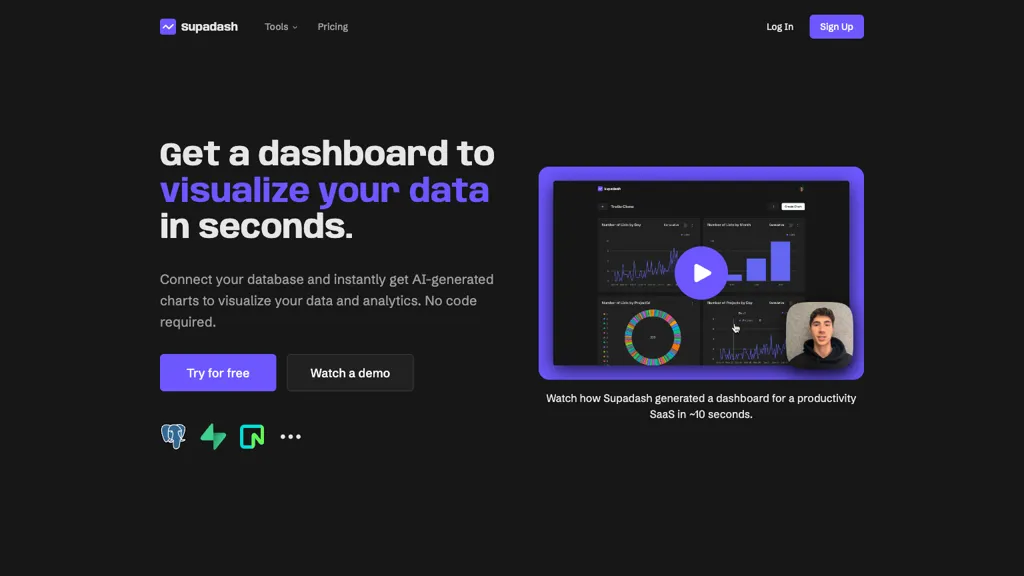
No user reviews yet SubscriptionSupadash lets users connect to SQL databases like PostgreSQL or Supabase and automatically turns SELECT results into time‑series and bar charts without manual coding. It supports unlimited charts per project, offers AI‑generated layouts, and stores no user data.
We've ranked 29 Supadash alternatives, including 21 with a free plan. Rankings are based on feature coverage and user feedbacks.
Top-rated alternatives include basedash.com, BlazeSQL, and SQOR.ai.
29 Supadash Alternatives & Competitors, Ranked by User Reviews
Click Compare on any tool to compare it side-by-side with Supadash.
 #1
basedash.com
#1
basedash.com
Basedash lets teams ask plain‑English questions of their data warehouses and SaaS sources, automatically generating validated SQL, executing it, and visualizing results in dashboards. It supports 750+ integrations, enforces SOC 2 compliance, and offers an embedding API for internal products.
 #2
BlazeSQL
#2
BlazeSQL
BlazeSQL AI analyzes SQL schemas and generates queries from plain‑language input, supporting Snowflake, BigQuery, PostgreSQL, MySQL, and Redshift. It learns from interactions, tracks accuracy, returns results and visualizations locally, and offers an API for embedding.
 #3
SQOR.ai
#3
SQOR.ai
No-Code KPI Dashboard AI by Sqor Value enables users to create customizable KPI dashboards without coding, offering drag-and-drop functionality and integration with various data sources for real-time performance monitoring and strategic planning.
 #4
Chat2DB
#4
Chat2DB
Chat2DB converts natural‑language prompts into optimized SQL for over 40 databases. It offers a GUI editor, visual tables, ER diagrams, error‑correction, secure local execution, audit trails, and collaborative dashboard sharing for developers, analysts, and non‑technical users.
 #5
Text2SQL.AI
#5
Text2SQL.AI
Text2SQL.ai transforms natural‑language questions into optimized SQL queries for MySQL, PostgreSQL, Oracle, SQL Server, MongoDB, and others, using the supplied schema. It offers a public API, a local desktop app, version control, auto‑generated charts, and follow‑up query support.
 #6
Tidb
#6
Tidb
The AI tool offers serverless, scalable, and pay-as-you-go features with AI-generated SQL and HTAP functionalities through various sign-up options.
- Catch deals before they expire
- Unlock tools matched to you
- Show off your AI stacks
Already a member? Sign in
 #7
Bricks
#7
Bricks
Bricks AI transforms CSV, Excel, Google Sheets, and database files into instant interactive dashboards and reports. It auto‑creates charts, lets users edit data via natural‑language commands, refreshes with one click, and offers reusable templates with encrypted privacy.
 #8
Graphy.app
#8
Graphy.app
Graphy transforms raw data from Google Sheets, CSV, Excel, or APIs into AI‑generated charts, auto‑highlighting insights. It supports multiple chart types, branding, annotations, real‑time updates, and export/embed options for marketing, finance, and consulting teams.
 #9
Rise of Machine
#9
Rise of Machine
AI2sql converts natural‑language questions into SQL for PostgreSQL, MySQL, SQL Server, and Snowflake, letting analysts retrieve data without code. It integrates via API into pipelines and dashboards, offering real‑time query previews for quick validation.
 #10
Supaboard AI
#10
Supaboard AI
Supaboard is a project management tool that facilitates real-time collaboration, task tracking, and customizable workflows. Its comprehensive reporting features help teams analyze performance and adapt to various project needs, enhancing overall workflow efficiency.
 #11
AskYourDatabase
#11
AskYourDatabase
AskYourDatabase is an AI-powered chatbot that allows you to interact with SQL databases. Ask questions and get instant insights without complex code. Features include data visualization, schema design, and migration. Connect securely to your favorite databases.
 #12
Datayaki
#12
Datayaki
Datayaki lets users ask plain‑English questions of spreadsheets, CSVs, and cloud databases (Postgres, Supabase, Snowflake, Firebase) directly in the browser. It keeps data local, offers explainable AI, and supports secure, collaborative dashboards.
 #13
SQL Notes
#13
SQL Notes
Datascale converts SQL into interactive diagrams, revealing keys and joins without database changes. Engineers trace lineage, design systems, assess normalization, and collaborate with AI to draft specs and refactor plans.
 #14
Monitr
#14
Monitr
Monitr is an AI‑powered analytics platform that connects to PostgreSQL or APIs, converts natural language into optimized SQL, and auto‑generates real‑time dashboards. It supports collaborative workspaces and enterprise‑grade security for secure, efficient data exploration.
 #15
Datasquirrel.ai
#15
Datasquirrel.ai
DataSquirrel.ai automates data cleaning, analysis, and visualization for business users, enabling quick chart creation, KPI dashboards, and custom reports without coding. It supports scheduled refreshes, GDPR compliance, and interactive sharing for teams and consultants.
 #16
Athena Global
#16
Athena Global
Athena AI consolidates SQL, NoSQL, and file data for real‑time synchronization with hashing/blockchain integrity and live query preview. It offers 21 visual charts, granular permissions, dashboards, alerts, scheduled reports, and API integration.
 #17
Db pilot
#17
Db pilot
DB Pilot is a database GUI client that simplifies SQL query management for major databases. It features an AI assistant for writing and debugging queries, data import from 250+ sources, and intuitive editing and navigation tools.
 #18
Shape
#18
Shape
Shape turns plain‑English questions into SQL‑driven insights, delivering accurate answers, visual charts, and real‑time dashboards via API, Slack, or Teams bots. It offers secure, compliant analytics for analysts, marketers, and product managers without coding.
 #19
Analytics Model
#19
Analytics Model
Analytics Model consolidates data from 500+ connectors, supports on‑premises and cloud sources, and offers natural‑language querying to generate charts, pivot tables, and dashboards automatically, enabling non‑coding analysts to obtain instant insights, receive alerts, and integrate via APIs.
 #20
Spreadsite
#20
Spreadsite
DashGPT turns spreadsheets into interactive dashboards without code. Upload data, use a prompt, and AI generates editable charts, tables, and filterable views. Share, embed, and collaborate across teams, suitable for business analytics.
 #21
QueryLab
#21
QueryLab
QueryLab is an AI tool that simplifies database interaction, enabling users to create and query databases like PostgreSQL and MongoDB using natural language. It also supports dynamic visualizations and external data integration for enhanced analysis.
 #22
Excel Dashboard Ai
#22
Excel Dashboard Ai
ExcelDashboard AI transforms Excel data into interactive dashboards and reports with minimal effort. Users can generate insights using plain English, automate visualizations, and customize analyses, making it suitable for both beginners and experienced data analysts.
 #23
TurboSQL
#23
TurboSQL
TurboSQL is an AI-driven SQL GUI that enables fast database management with near-zero query delays. It features an AI query assistant, inline editing, and supports multiple databases, prioritizing a secure, local-first environment for user data.
 #24
Analyst Intelligence
#24
Analyst Intelligence
The Analyst Intelligence Platform automates SQL generation, data cleaning, and predictive analytics without coding. Integrated with BigQuery, Excel, and Sheets, it streamlines consolidation, currency conversion, KPI calculation, and cohort analysis, boosting accuracy and reducing manual effort.
 #25
Chat With Your Database
#25
Chat With Your Database
Chat With Your Database lets users query any PostgreSQL database using natural language. It generates SQL, runs it, returns raw results, and automatically summarizes insights. The open‑source, MIT‑licensed tool supports operational commands and community contributions on GitHub.
 #26
Kvery.io
#26
Kvery.io
Kvery.io is an AI‑powered SQL editor that turns natural language into precise queries for MySQL, PostgreSQL, and SQL Server. It auto‑generates dashboards, secure REST APIs, schedules reports, and supports role‑based collaboration with enterprise security.
 #27
Sqlai.ai
#27
Sqlai.ai
SQLAI.ai turns natural‑language prompts into SQL/NoSQL queries for 30+ database engines, offering live schema integration, syntax validation, index‑aware optimization, consistent formatting, step‑by‑step explanations, diagrams, and auto‑completion to reduce errors and speed development.
 #28
Easy Charts
#28
Easy Charts
Easy Charts is an AI-powered tool for data visualizations and charts generation without the need for downloads. It offers unlimited chart generation, easy exports, and customization options, making charting effortless for all user levels.
 #29
plotsalot.app
#29
plotsalot.app
PlotsAlot provides AI-assisted data analysis and visualization, turning CSV/Excel/SPSS/JSON/PDF/image uploads into interactive charts and full-stack dashboards via natural-language queries. Features include conversational data chat, predictive analytics, automated reporting, and reusable dashboards.