
What is Datasquirrel.ai?
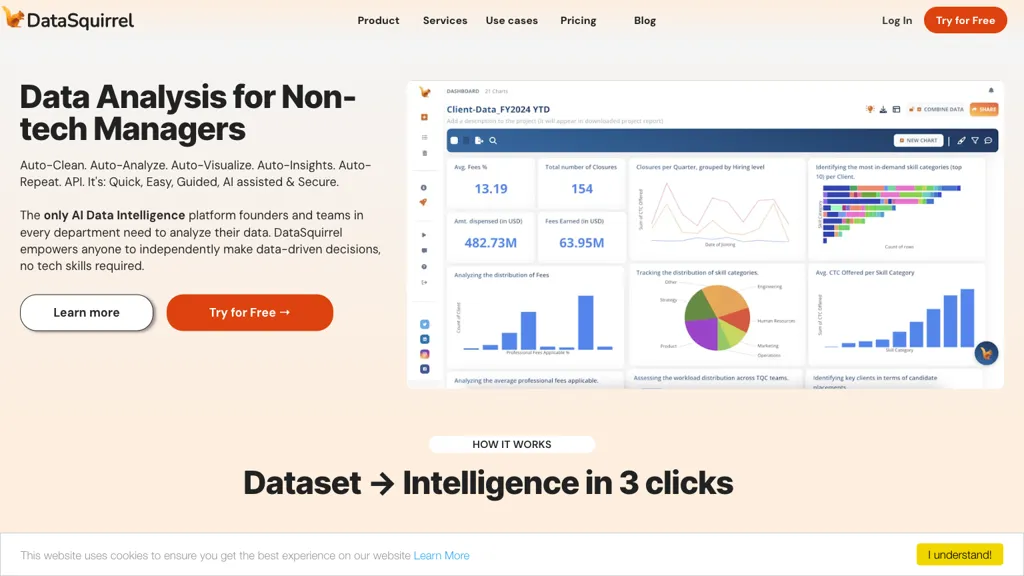
DataSquirrel.ai provides automated data cleaning, analysis, visualization, and insight generation for non‑technical business users.
Users can upload CSV, Excel, Google Sheets, or connect via API, and the platform auto‑cleans inconsistencies, merges multiple tabs, and normalizes currency and format errors.
The AI engine produces charts, heat‑maps, pivot tables, and KPI dashboards within three clicks, enabling instant storytelling without formulas or coding.
Custom reports can be tailored for managers, teams, or consultants, then shared as interactive dashboards, PDFs, or embedded links with comment and annotation features.
Automated workflows schedule data refreshes daily, weekly, monthly, or yearly, keeping reports current and saving repetitive effort.
The web‑based interface complies with GDPR and PDPA, anonymizes data by default, and never forwards raw data to external language models.
The tool supports root‑cause analysis, quick RCA, and on‑demand analysis for fast decision making across departments.
Integration of a single‑click “Explore & Play” panel allows users to apply date grouping, filtering, theming, and segmentation without technical setup.
DataSquirrel.ai replaces manual pivot tables, vLOOKUP, and SQL queries with a self‑service AI workflow that keeps analysts focused on insight generation.
It is suitable for managers, collaborative teams, and consulting engagements that require rapid, repeatable, and secure data reporting.
Datasquirrel.ai details
- Company
- DataSquirrel Pte Ltd
- Jurisdiction
- Singapore
- Built for
- Individuals
- Stated compliance
- GDPR
Compliance as stated in Datasquirrel.ai's own published documentation.
Datasquirrel.ai tech specs
- Works with
- OpenAI / GPT
Datasquirrel.ai pricing
PaidDatasquirrel.ai's key features
-
Automated 1‑click data analysis
-
Instant Go Auto graph generation
-
Automated data cleaning & standardization
-
Automatic data categorization
-
Customizable chart themes
-
Drag‑and‑drop CSV/Excel import
-
Collaborative commenting & sharing
Datasquirrel.ai use cases
-
Generate weekly sales KPI dashboards for remote sales teams, automatically refreshing data every midnight and sharing interactive visuals via secure links
-
Create compliance‑ready GDPR audit reports for a fintech client, leveraging automated data cleaning and scheduled refreshes to keep data up‑to‑date
-
Develop root‑cause analysis visualizations for customer churn, enabling non‑technical managers to spot trends and drill down into key drivers without writing code
Datasquirrel.ai user reviews
Would you recommend Datasquirrel.ai?
Who is Datasquirrel.ai for?
-
Data analysts
-
Business managers
-
Strategic planners
-
Dashboard viewers
-
Visual learners
Datasquirrel.ai FAQ
How much does Datasquirrel.ai cost?
Datasquirrel.ai is a paid product with no free plan. Plans include Lite at $15 mo and Pro at $29 mo.
Is Datasquirrel.ai safe to use?
Datasquirrel.ai states GDPR compliance in its own published documentation. Datasquirrel.ai is operated by DataSquirrel Pte Ltd, registered in Singapore.
What are the best alternatives to Datasquirrel.ai?
The closest alternatives to Datasquirrel.ai are Equals, Bricks, Graphy.app, Excel Dashboard Ai and Excelmatic. You can compare them side by side in the alternatives section further down this page.
What does Datasquirrel.ai do with my data?
Its privacy policy states that personal data is not sold or shared for marketing purposes. Data may be shared with third-party service providers that help run the product.
Does Datasquirrel.ai auto-renew or offer refunds?
Datasquirrel.ai subscriptions renew automatically until you cancel.
Does Datasquirrel.ai have an API?
Yes. Datasquirrel.ai offers an API, so you can call it from your own applications instead of using the interface directly.
Who made Datasquirrel.ai?
Datasquirrel.ai is built and operated by DataSquirrel Pte Ltd, a company registered in Singapore.
Which AI models does Datasquirrel.ai use?
Datasquirrel.ai is built on OpenAI / GPT. Which models you can reach may depend on your plan.
Compliance, privacy and billing terms are as stated in each product's own published documentation and have not been independently verified by TopAI.tools.


