
Top 29 Selects - cutback.video Alternatives in 2026
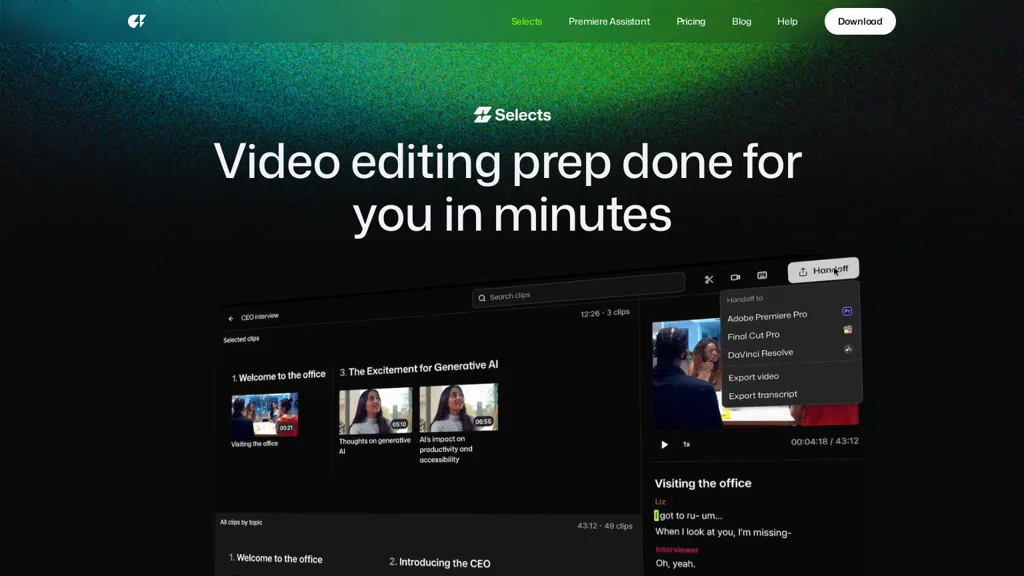
80% positive · 5 user reviews Free trialSelects - cutback.video is an AI-powered rough cut tool that automatically organizes raw footage into chapters and creates story-driven edits. It streamlines video prep with multi-cam sync, natural language search, and seamless handoff to professional editing software.
We've ranked 29 Selects - cutback.video alternatives, including 21 with a free plan. Rankings are based on feature coverage and user feedbacks.
Top-rated alternatives include Autocut.com, Edit on the Spot, and CapCut.
29 Selects - cutback.video Alternatives & Competitors, Ranked by User Reviews
Click Compare on any tool to compare it side-by-side with Selects - cutback.video.
 #1
Autocut.com
#1
Autocut.com
AutoCut AI is a Premiere Pro and DaVinci Resolve extension that automates routine editing—removing silences, auto‑captions, speaker‑driven angle cuts, context zooms, key moment extraction, stock integration, duplicate discard, profanity filtering, chapter markers, and social‑media resizing.
 #2
Edit on the Spot
#2
Edit on the Spot
Streamline your video editing process with Edit Spot AI tool. Automate trimming, branding, and enhance content creatively in minutes. Connect recordings or web conferencing platforms for instant editing. Coming soon: multi-segment social media clips.

CapCut is an AI-powered video editor & design tool with social media templates, background removal, upscaling, color correction, portrait generation, text-to-speech, voice changers, and team collaboration support - accessible online and for Mac download.
 #4
ChatCut
#4
ChatCut
ChatCut is a browser and ChatGPT-plugin video editor that uses transcript-based editing to remove fillers, trim and reorder talking-head footage, assemble coherent cuts, generate motion graphics, B-roll, captions (100+ languages) and AI music, and export timelines.
 #5
Opus Clip
#5
Opus Clip
OpusClip is an AI-powered video tool that transforms long videos into shareable short clips with one click. It uses AI to identify compelling moments, generate captions, and optimize for social media.
 #6
AICut
#6
AICut
aicut.pro automates short‑form video creation for YouTube Shorts, TikTok, and Instagram Reels. It offers ready‑made viral templates, prompt cloning, AI voice‑overs, background swaps, image generation, auto‑posting, and a community forum for support.
- Catch deals before they expire
- Unlock tools matched to you
- Show off your AI stacks
Already a member? Sign in
 #7
FastCut
#7
FastCut
FastCut uses AI to transform raw footage into short‑form videos for TikTok, Reels, Shorts, and social ads. It trims clips, removes silence, adds captions, selects B‑rolls, and provides music and overlays, cutting editing time by up to 90%.
 #8
CinemaFlow AI
#8
CinemaFlow AI
CinemaFlow AI converts scripts into full videos with one-click automated scene selection and AI cinematography. It offers customizable templates and cinematic styles, advanced editing with real-time previews, adjustable SD–4K rendering, and team collaboration controls.
 #9
Snapcut.ai
#9
Snapcut.ai
Snapcut.ai is an AI-driven video editing tool that transforms long videos into engaging short clips. It identifies key moments, reframes for various platforms, and adds animated captions, streamlining the editing process for social media content creators.
 #10
FireCut
#10
FireCut
FireCut is an AI‑powered plugin for Premiere Pro and DaVinci Resolve that cuts silence, filler words, profanity, and repetitions. It auto‑generates multilingual captions, adds chapter markers, auto‑zoom, B‑roll, music, voiceover transcription, and short‑video exports for social media.
 #11
Supercut AI
#11
Supercut AI
Supercut is an asynchronous video messaging platform that records screen and webcam (up to 4K), auto-edits and chapters recordings, provides branded shareable links with embedded CTAs, analytics and engagement tracking, collaboration tools, and enterprise-grade security.
 #12
ClipZap AI
#12
ClipZap AI
Clipzap.ai is a free AI video workflow editor that enables users to clip, edit, and translate videos in multiple languages. It features face-swapping, video generation, and integration with audio/video products for streamlined content creation.
 #13
TopView.ai
#13
TopView.ai
AI Video Agent converts text, product images or URLs, and reference clips into full‑scripted, brand‑aligned videos, automatically planning scenes, adding visual effects, and allowing prompt‑based refinement for fast marketing and social content creation.
 #14
Channel1 AI
#14
Channel1 AI
Channel 1 captures, ingests, and analyzes raw video and audio, turning them into searchable, structured resources. It automates editing and final cuts with AI agents, supports multi‑format distribution, translations, and global scaling for broadcasters and brands.
 #15
AnyClip
#15
AnyClip
AnyClip automates video tagging, subtitles, and chapter creation, enabling searchable, measurable content. It extracts highlights, clusters topics, and builds contextual playlists. Facial recognition and brand‑safety filters keep compliant, while interactive players support live captions and AI‑driven ads.
 #16
Wondershare Filmora ES
#16
Wondershare Filmora ES
Wondershare Filmora® is an AI-driven video editing software that offers intuitive drag-and-drop editing, automatic scene detection, and audio synchronization, alongside templates and effects, making it suitable for beginners and experienced editors alike.
 #17
Roll
#17
Roll
Roll AI Video Production Studio leverages AI technology to simplify video creation on smartphones. With real-time effects and automated editing, it delivers professional-quality videos for podcasts, webinars, interviews, and more in minutes.
 #18
SNAPVID
#18
SNAPVID
SNAPVID.AI automates cutting long videos into 30‑second clips, removes filler pauses, adds multi‑language subtitles, offers 4K output, AI‑generated B‑roll, audio cleanup, and batch processing with a credit‑based monthly reset for creators.
 #19
Wave.Video
#19
Wave.Video
Wave.video is an all-in-one AI video editing and creation platform that allows users to create, edit, and distribute videos, offering features such as online editing, live streaming, thumbnail maker, and customizable live streaming studios.
 #20
Wisecut AI
#20
Wisecut AI
Wisecut uses AI to turn long recordings into short social clips by detecting highlights, cutting silences, auto-reframing, adding captions and translations, auto zoom and transitions, audio cleanup, and storyboard editing for faster multilingual content production.
 #21
Imagine.art
#21
Imagine.art
ImagineArt unifies AI‑driven image, video, and audio creation and editing, enabling prompt‑based generation, upscale tools, drag‑and‑drop video workflows, 4K cinematic rendering, and real‑time team collaboration for streamlined media production for artists, designers, and creators.
 #22
Rubbrband
#22
Rubbrband
The AI Content Studio streamlines the agency pipeline with AI‑driven ideation, storyboarding, scriptwriting, shot‑listing, and editing, plus AI music composition. It enables rapid revisions, real‑time collaboration, and scalable remote talent for high‑concept commercials.
 #23
VCut
#23
VCut
vcut.lol is an AI-powered video editing tool that streamlines production by automating error correction and enhancement. It quickly extracts key moments, enabling creators to focus on content while reducing time spent on editing tasks.
 #24
2Short.Ai
#24
2Short.Ai
2short.ai automatically extracts the most engaging segments from long videos to create 1080p YouTube Shorts, using facial‑tracking, one‑click animated subtitles, and flexible aspect ratios. It supports multiple languages, direct Drive/URL imports, and brand presets for consistent visuals.
 #25
Clipfly
#25
Clipfly
Clipfly turns text prompts into videos, animates images, and adds lifelike touches to photos. With an AI storyboard, one‑click enhancer, background removal, subtitles, and audio integration, it streamlines branded content, social clips, and personal memories.
 #26
vverse.ai
#26
vverse.ai
VideoVerse automates sports and entertainment highlight creation, using AI to detect key moments and generate ready‑to‑publish clips. It offers content moderation, interactive web story generation, an online editor, and real‑time multi‑platform distribution for rapid, high‑quality short‑form content.
 #27
Spikes Studio
#27
Spikes Studio
Spikes Studio automates video editing, turning raw footage into platform‑ready clips for TikTok, Instagram Reels, and YouTube Shorts. It detects high‑impact moments, adds multilingual captions, auto‑resizes, schedules posts, tracks analytics, and supports team collaboration.
 #28
Vizard
#28
Vizard
Vizard.ai automatically transcribes footage, spots highlights, and creates TikTok, Reels, and Shorts‑ready clips with one click. It provides text trimming, timeline precision, vertical resizing, multilingual captions, brand templates, collaborative workspaces, and API integration.
 #29
Short AI
#29
Short AI
Short AI automates short video creation for TikTok, YouTube Shorts, and Instagram, converting long videos into clips. It extracts key moments, adds captions, and supports multi-language script generation and automated social media scheduling.
Frequently Asked Questions
Why look for Selects - cutback.video alternatives?
Common reasons users switch from Selects - cutback.video:
- Cost: Selects - cutback.video is a Free trial tool — users often look for more affordable or free options.
- Feature gaps: teams needing specific capabilities like Organize footage may find a more focused alternative better suited to their workflow.
- Flexibility: exploring alternatives helps find tools that better match your team size, integrations, and budget.
What is the best alternative to Selects - cutback.video?
Based on 1 user review, Autocut.com (100% positive) ranks as the top Selects - cutback.video alternative. AutoCut AI is a Premiere Pro and DaVinci Resolve extension that automates routine editing—removing silences, auto‑captions, speaker‑driven angle cuts, It is available on a Paid plan.
How do the top Selects - cutback.video alternatives compare?
| Tool | Pricing | Starting Price | User Rating |
|---|---|---|---|
| Selects - cutback.video this tool | Free trial | — | 80% (5) |
| Autocut.com | Paid | — | 100% (1) |
| Edit on the Spot | Freemium | — | — |
| CapCut | Free trial | — | 77.8% (27) |
| ChatCut | Subscription | $25 | — |
| Opus Clip | Freemium | — | 50% (2) |
Are there free Selects - cutback.video alternatives?
Yes, 21 free alternatives found in our list: Edit on the Spot, CapCut, Opus Clip. and 18 more — use the pricing filter above to see them all.
What should I look for in a Selects - cutback.video alternative?
- Core capabilities: confirm the tool supports Organize footage, Sync video audio, Build assembly cut.
- Pricing transparency: look for clear free plan, trial period, or tiered pricing — avoid tools that hide costs.
- User reviews: check both the satisfaction percentage and the number of reviews; a high score from few users is less reliable.
- Integrations: verify it connects with your existing stack before committing.
- Support and updates: active development and responsive support are strong signals of a maintained product.
Which Selects - cutback.video alternative has the highest user rating?
Autocut.com has the highest satisfaction score among Selects - cutback.video alternatives, with 100% positive from 1 user review. It is available on a Paid plan.
What are Selects - cutback.video alternatives used for?
- Organize footage
- Sync video audio
- Build assembly cut
- Automate editing
- Optimize timelines