
Top 29 resize.aiai Alternatives in 2026
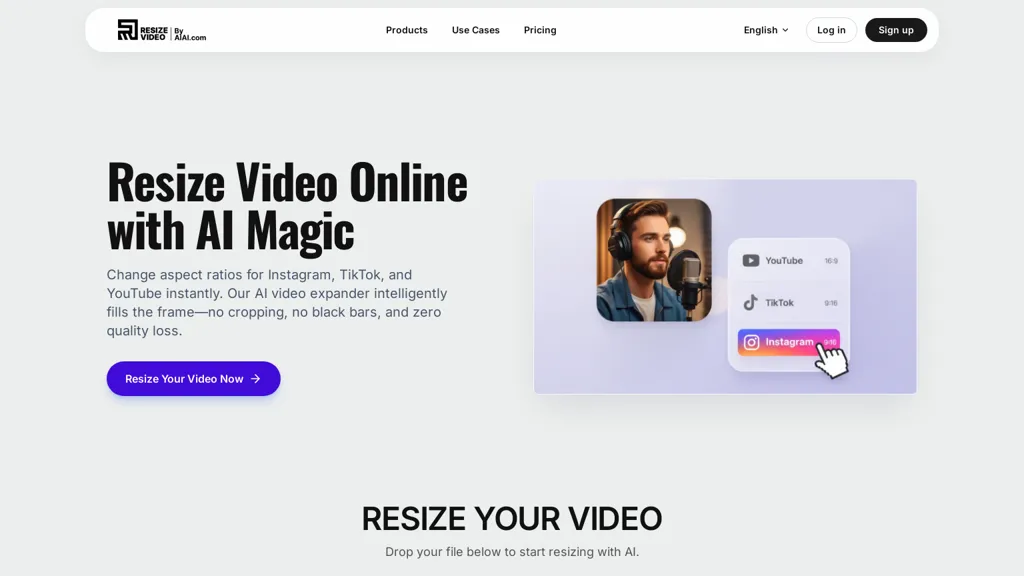
100% positive · 2 user reviews FreemiumResize.ai is an AI-powered tool that automatically converts horizontal or square videos into the vertical 9:16 format for TikTok and mobile platforms. It uses smart cropping to keep subjects in focus and offers batch processing to save time for creators and marketing teams.
We've ranked 29 resize.aiai alternatives, including 24 with a free plan. Rankings are based on feature coverage and user feedbacks.
Top-rated alternatives include InstaSize, AI Video Cut, and Vizard.
29 resize.aiai Alternatives & Competitors, Ranked by User Reviews
Click Compare on any tool to compare it side-by-side with resize.aiai.
 #1
InstaSize
#1
InstaSize
Instasize is an AI-powered photo editor and image resizer that optimizes visuals for specific social media platforms like Instagram, YouTube, and TikTok. It offers background removal, 4K upscaling, and batch processing to streamline content creation for creators, marketers, and e-commerce teams.
 #2
AI Video Cut
#2
AI Video Cut
AI Video Cut uses prompt‑based AI to transform long videos into short, platform‑optimized clips. It auto‑detects faces, crops frames, adds multilingual captions, and supports multiple aspect ratios for fast, high‑quality content creation.
 #3
Vizard
#3
Vizard
Vizard.ai automatically transcribes footage, spots highlights, and creates TikTok, Reels, and Shorts‑ready clips with one click. It provides text trimming, timeline precision, vertical resizing, multilingual captions, brand templates, collaborative workspaces, and API integration.
 #4
ImageToVideo AI
#4
ImageToVideo AI
ImageToVideo AI converts JPG, PNG, or WebP images into MP4 videos. Users can crop, resize to social‑media ratios, choose speed/quality presets, apply 50+ templates, add AI music, and edit motion via a prompt editor—all watermark‑free.
 #5
2Short.Ai
#5
2Short.Ai
2short.ai automatically extracts the most engaging segments from long videos to create 1080p YouTube Shorts, using facial‑tracking, one‑click animated subtitles, and flexible aspect ratios. It supports multiple languages, direct Drive/URL imports, and brand presets for consistent visuals.
 #6
AIImageToVideo Pro
#6
AIImageToVideo Pro
AIImageToVideo Pro is an AI tool that transforms static images and text prompts into short videos using models like Veo and Kling, offering control over motion, duration, and resolution. It features editing for text overlays and captions, with export options for creating watermark-free content for social media and marketing.
- Catch deals before they expire
- Unlock tools matched to you
- Show off your AI stacks
Already a member? Sign in

Clipdrop is an AI image editor that adjusts aspect ratios, extends boundaries, and adds background space while preserving detail. It offers background removal, object cleanup, relighting, universal resizing, upscale, and text‑to‑image generation for photographers and designers.
 #8
Remaker AI
#8
Remaker AI
remaker ai offers web and mobile AI image and video editing for creators and teams, including upscaling, background removal, object erasing, face swap, text-to-image, lip-sync, batch processing and templates for short-form social content.
 #9
Videoleap
#9
Videoleap
Videoleap is a cross‑platform editor with AI background removal, infinite‑zoom, text‑to‑video, audio cutting, subtitles, and built‑in filters. It offers templates for TikTok, Reels, Shorts, and ads, plus a drag‑and‑drop interface for quick professional videos on web or mobile.
 #10
Qlip.ai
#10
Qlip.ai
Qlip automatically extracts short, vertical or square clips from longer videos, preserving focus on key moments. It applies brand templates, generates speech‑to‑text transcripts with speaker tags, and offers an API for clip creation, aspect‑ratio conversion, subtitle burning, and transcription.
 #11
Makefilm
#11
Makefilm
Makefilm is an AI tool for generating 9:16 TikTok and short-form vertical videos from text or images using templates, batch creation, a 16M asset library, AI voiceovers in 50+ languages, auto-subtitles, drag-and-drop editing, and export presets.
 #12
ExtendImage
#12
ExtendImage
ExtendImageAI enlarges photos beyond original borders while preserving sharpness and color continuity. It offers aspect‑ratio adjustments, freeform selection, and variant generation for marketing, posters, and social media. Convert vertical shots to landscape instantly.
 #13
Thumbnails.ai
#13
Thumbnails.ai
AI Thumbnail Creator automatically generates YouTube and social‑media thumbnails in about 30 seconds from a title or image. It offers multiple style templates, supports 16:9, 9:16, 1:1 ratios, and lets users create up to eight variations with editing options.
 #14
VideoCompress.ai
#14
VideoCompress.ai
VideoCompress.ai is a free online tool that drastically reduces video file sizes by up to 80% using advanced H.265 encoding. It allows you to preview the compression in real-time while ensuring your files are secured with end-to-end encryption.
 #15
Opus Clip
#15
Opus Clip
OpusClip is an AI-powered video tool that transforms long videos into shareable short clips with one click. It uses AI to identify compelling moments, generate captions, and optimize for social media.
 #16
Videofaceswap.ai
#16
Videofaceswap.ai
Face Swap AI replaces faces in videos using facial recognition and blending. It accepts local files or YouTube/TikTok/X links, swaps single or multiple faces, processes quickly, outputs 4K/HD, and emails when ready.
 #17
Vmake Video Enhancer
#17
Vmake Video Enhancer
Vmake AI Video Enhancer upsamples MP4, MOV, AVI, etc. to 2K/4K/AI 4K+, removes artifacts, improves low‑light, reduces noise, and offers watermark/text removal, background elimination, and subtitle generation, giving creators, e‑commerce, and gamers sharper, cleaner videos.
 #18
cre8tiveAI
#18
cre8tiveAI
cre8tiveAI is an online AI platform that streamlines photo, illustration, and video editing with deep‑learning models. It upscales images, refines faces, generates icons and illustrations, converts photos to 3‑D video, creates line art, colorizes black‑and‑white photos, and compresses PNGs.
 #19
anvsoft.com
#19
anvsoft.com
AVCLabs Video Enhancer AI uses deep learning to upscale, denoise, sharpen, colorize, and interpolate frames, automatically detecting and refining faces. It supports batch conversion, preview comparison, multiple formats, preserves frame rates, and leaves originals unaltered.
 #20
Short AI
#20
Short AI
Short AI automates short video creation for TikTok, YouTube Shorts, and Instagram, converting long videos into clips. It extracts key moments, adds captions, and supports multi-language script generation and automated social media scheduling.
 #21
TopView.ai
#21
TopView.ai
AI Video Agent converts text, product images or URLs, and reference clips into full‑scripted, brand‑aligned videos, automatically planning scenes, adding visual effects, and allowing prompt‑based refinement for fast marketing and social content creation.
 #22
TensorPix
#22
TensorPix
TensorPix enhances SD video to 4K 60FPS, removes artifacts from VHS and old footage, offers real‑time call improvement, batch processing, API integration, and cloud GPU processing—no local install needed.
 #23
Shorts Generator ai
#23
Shorts Generator ai
Shorts Generator AI converts text or links into ready‑to‑post vertical videos for YouTube, TikTok, and Instagram. It auto‑creates scripts, selects visuals, compiles clips in under a minute, and offers export options, auto‑publishing, and quick repurposing of existing content.
 #24
Snapcut.ai
#24
Snapcut.ai
Snapcut.ai is an AI-driven video editing tool that transforms long videos into engaging short clips. It identifies key moments, reframes for various platforms, and adds animated captions, streamlining the editing process for social media content creators.
 #25
Revid.ai
#25
Revid.ai
Revid AI creates short, vertical videos for TikTok, Instagram Reels, and YouTube Shorts. It auto‑generates scripts from text or URLs, offers voiceover options, multilingual support, auto captions, and workflow automation for scheduled publishing.
 #26
KWIKmotion
#26
KWIKmotion
AI‑driven cropping converts landscape footage to portrait in one click, preserving key subjects. Supports batch processing, real‑time preview, and export to Instagram, TikTok, YouTube Shorts. Integrates with editing suites for streamlined, efficient workflows.
 #27
Vireel AI
#27
Vireel AI
Vireel AI is a short-form video generator offering TikTok dance templates and regionally localized social media assets. It transforms text prompts into dynamic clips, animates still images, and integrates multiple AI video models with built-in editing and motion control tools.
 #28
AIImagetoVideo.video
#28
AIImagetoVideo.video
Image Video AI converts photos (JPG/PNG/WEBP) into short MP4 videos up to 1080p using multiple AI models, enabling text-guided motion, style and duration, animating faces, bodies, objects or avatars with fast, simple workflows and commercial usage.
 #29
Reap.video
#29
Reap.video
Reap is an AI video repurposing tool that extracts engaging clips from long videos, offers accurate auto-captioning, adjusts aspect ratios, and provides editing features, making it efficient for creating shareable content across social media platforms.
Frequently Asked Questions
Why look for resize.aiai alternatives?
Common reasons users switch from resize.aiai:
- Feature gaps: teams needing specific capabilities like Optimize Videos may find a more focused alternative better suited to their workflow.
- Flexibility: exploring alternatives helps find tools that better match your team size, integrations, and budget.
What is the best alternative to resize.aiai?
InstaSize ranks as the top resize.aiai alternative. Instasize is an AI-powered photo editor and image resizer that optimizes visuals for specific social media platforms like Instagram, YouTube, and TikT It is available on a Freemium plan.
How do the top resize.aiai alternatives compare?
| Tool | Pricing | Starting Price | User Rating |
|---|---|---|---|
| resize.aiai this tool | Freemium | — | 100% (2) |
| InstaSize | Freemium | — | — |
| AI Video Cut | Freemium | — | 50% (2) |
| Vizard | Freemium | — | 82.6% (23) |
| ImageToVideo AI | Paid | — | 50% (6) |
| 2Short.Ai | Freemium | $9.9/mo | 66.7% (3) |
Are there free resize.aiai alternatives?
Yes, 24 free alternatives found in our list: InstaSize, AI Video Cut, Vizard. and 21 more — use the pricing filter above to see them all.
What should I look for in a resize.aiai alternative?
- Core capabilities: confirm the tool supports Optimize Videos, Edit Videos, Translate Videos.
- Pricing transparency: look for clear free plan, trial period, or tiered pricing — avoid tools that hide costs.
- User reviews: check both the satisfaction percentage and the number of reviews; a high score from few users is less reliable.
- Integrations: verify it connects with your existing stack before committing.
- Support and updates: active development and responsive support are strong signals of a maintained product.
Which resize.aiai alternative has the highest user rating?
Qlip.ai has the highest satisfaction score among resize.aiai alternatives, with 100% positive from 1 user review. It is available on a Free plan starting from $30.
What are resize.aiai alternatives used for?
- Optimize Videos
- Edit Videos
- Translate Videos
- Change Aspect Ratios
- Generate Gifs