
Top 29 ChatGPT Notepad Alternatives in 2026
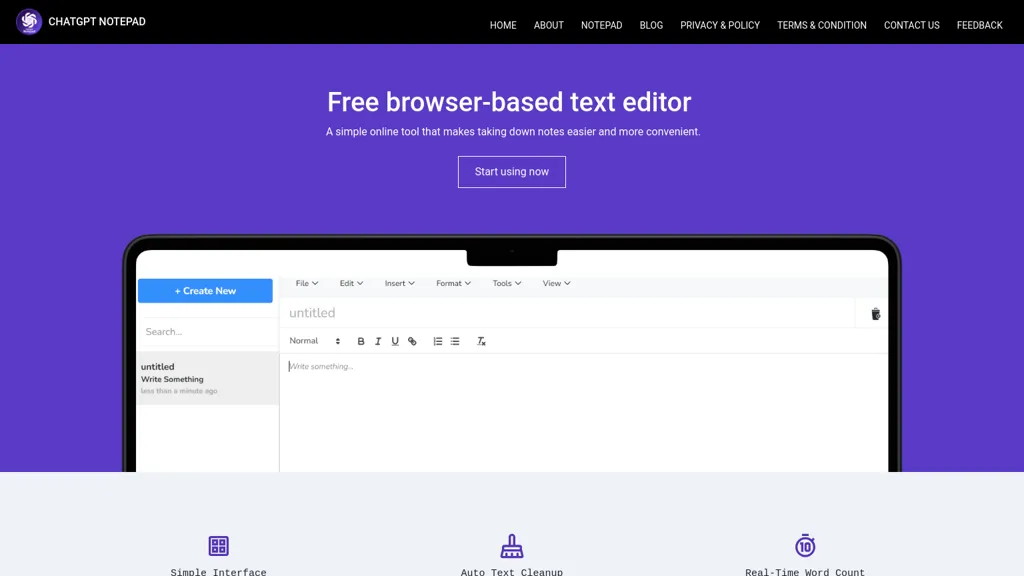
100% positive · 1 user review FreeChatGPT Notepad is a browser‑based plain‑text editor that lets users create, edit, and manage multiple notes without registration. It offers undo, redo, cut/copy/paste, find‑replace, spell check, real‑time word count, AI‑content cleanup, and .txt export, compatible with major browsers.
We've ranked 29 ChatGPT Notepad alternatives, including 24 with a free plan. Rankings are based on feature coverage and user feedbacks.
Top-rated alternatives include WPS office, NaturalReader, and Speechnotes.
29 ChatGPT Notepad Alternatives & Competitors, Ranked by User Reviews
Click Compare on any tool to compare it side-by-side with ChatGPT Notepad.
 #1
WPS office
#1
WPS office
AI Text Generator creates original drafts, blog posts, emails, reports, and social captions from prompts, keywords or source text. Browser-based, it lets users set length, tone and audience, refine outputs, and copy or download results.

NaturalReader AI converts PDFs, Word, ePub, web pages, and OCR text into natural‑sounding audio in 90+ languages. It supports voice cloning, offline playback, mobile and Chrome extension access, and includes captions and dyslexia‑friendly fonts.
 #3
Speechnotes
#3
Speechnotes
Speechnotes is a web‑based speech‑to‑text tool for real‑time dictation and batch transcription in multiple languages. It offers speaker tagging, timestamps, subtitle export, and imports from Google Drive, YouTube, or local files. Export to text, markdown, PDF while preserving privacy.
 #4
Dictanote
#4
Dictanote
Dictanote is a voice‑to‑text note‑taking app that supports over 50 languages and 80 dialects, letting users add punctuation, smileys, and technical terms via speech. It syncs notes across Windows, Linux, macOS, Android, iPhone, encrypts data, retains no audio recordings.
 #5
Notepad
#5
Notepad
Notepad is a versatile web‑based editor that handles Markdown, code, images, HTML, and PDFs in one interface, auto‑detecting file types and offering syntax‑highlighted execution, drag‑and‑drop design, photo editing, and PDF annotation for students, developers, and creators.
 #6
AudioNotes
#6
AudioNotes
Audionotes AI tool for effortless voice-to-text conversion, organization, summarization, and content generation.
- Catch deals before they expire
- Unlock tools matched to you
- Show off your AI stacks
Already a member? Sign in
 #7
Text2Note
#7
Text2Note
text2note is an AI tool that converts text notes into structured formats, facilitating better organization and accessibility. It supports various export options, allowing efficient sharing and archiving of notes from multiple content types.
 #8
Goodnotes
#8
Goodnotes
GoodNotes is a digital notebook that records voice, text, or handwriting and supports collaboration. AI transcribes audio, summarizes meetings, turns notes into searchable flashcards, and syncs audio to slides for students and teachers across iOS, macOS, Windows, Android, and Web.
 #9
Quetext
#9
Quetext
Quetext is an all‑in‑one writing platform offering plagiarism detection, AI content detection, real‑time grammar and spell correction, summarization, paraphrasing, and citation generation. It supports PDF, DOC, TXT files with bulk uploads for students, teachers, researchers, and creators.
 #10
TextBuddy
#10
TextBuddy
Textbuddy is an AI‑powered rewriter and plain‑English editor that flags long sentences, complex words, passive voice, and filler words, providing a readability score. It offers synonyms, CEFR language levels, keyword repetition stats, and supports over 50 languages.
 #11
NeatScribe
#11
NeatScribe
NeatScribe is a browser-based transcription tool that converts audio/video into editable text with timestamps and speaker labels. It supports 98 languages and exports in multiple formats for subtitles, notes, and publishing.
 #12
ParagraphAI
#12
ParagraphAI
ParagraphAI offers real‑time grammar correction, one‑tap email drafting, and instant summarization of web pages and PDFs. It provides multilingual translation, customizable tone filters, a template library, and an instruction engine for repetitive tasks across mobile, desktop, and Chrome.
 #13
summarizer.org
#13
summarizer.org
AI Summarizer quickly condenses essays, reports, and articles into short paragraphs or bullet lists. Paste text, upload DOCX/TXT/image, or give a URL; adjust summary length or set custom styles. Supports Spanish, French, German, Portuguese, and offers private, downloadable .docx outputs.
 #14
Letterly.app
#14
Letterly.app
Letterly instantly transcribes spoken audio into polished text, supports 90+ languages, and offers 25+ rewrite styles for emails, blogs, tweets, or bullet points. It works offline, integrates via Zapier/webhooks, and tags content for quick retrieval.
 #15
VoiceToText
#15
VoiceToText
Voice to Text offers real‑time multilingual transcription of audio and video files, automatically punctuating and adding emojis. It includes inline editing, formatting options, and exports to TXT, DOCX, and more, supporting all major browsers for seamless workflow integration.
 #16
InstaText
#16
InstaText
InstaText is an AI editing assistant that highlights suggestions for clarity, flow, word choice, and grammar. Users can accept or reject each change, select dialect, formality, or add custom terms. It works on Chrome, Gmail, Slack, Docs, Overleaf, and Word.
 #17
TalkNotes
#17
TalkNotes
TalkNotes records audio, accurately transcribes it, and formats the text into meeting notes, task lists, email drafts, blog posts, or flashcards. It supports 50+ languages, offers editing, exporting, Zapier integration, and workflow templates.
 #18
XNote
#18
XNote
Xnote combines traditional writing on paper with AI technology to capture and convert notes into searchable digital content, enhancing organization and retrieval. This tool supports a seamless workflow for students, professionals, and creatives.
 #19
Voice Writer
#19
Voice Writer
Voice Writer is a browser extension that transcribes speech to text in real time, automatically correcting grammar and adapting style. Supporting more than 30 languages, it works on any site with low latency and no account required.
 #20
online word editor
#20
online word editor
Online Word Editor is a versatile AI writing assistant that allows users to generate, rewrite, translate, and summarize text, facilitating faster content creation and refinement for students, professionals, and content creators across various writing skill levels.
 #21
Clearly Reader
#21
Clearly Reader
Clearly Reader cleans web pages by removing ads and distractions, offers adjustable readability settings, built‑in text‑to‑speech, clipping and bookmarking, AI‑driven summarization, and export to PDF, Word, Markdown, and third‑party services for students, researchers, and casual readers.
 #22
Pen2txt
#22
Pen2txt
Pen2txt is a cutting-edge AI tool that accurately converts handwritten notes into digital text, recognizing multiple languages and imperfect handwriting. It seamlessly transforms images of handwritten documents into editable text while correcting spelling and grammar errors.
 #23
TakeNote
#23
TakeNote
TakeNote AI accurately transcribes audio and video with automatic punctuation, delivers concise meeting summaries, and identifies speakers. It offers sentiment analysis, supports multiple languages, handles noisy backgrounds and strong accents, and operates securely in browsers like Chrome and Edge.
 #24
EasyNoteAI
#24
EasyNoteAI
EasyNoteAI converts audio, video, PDFs into structured notes, offering real‑time transcription, summaries, quizzes, flashcards, mind‑maps, and interactive questioning. Users upload lectures, YouTube links, or research papers; the platform generates summaries, key‑point lists, and supports multilingual translation for students, professionals, and researchers worldwide.
 #25
Voicepen
#25
Voicepen
VoicePen turns spoken audio into editable text on iPhone, iPad, Watch, and Mac. Record or upload up to two hours; transcriptions appear in 30 seconds, support 80+ languages, auto‑label speakers, offer 25 rewrite styles, summaries, and PDF/DOCX exports, syncing via iCloud.
 #26
AIChatOnline.org
#26
AIChatOnline.org
AIChatOnline.org is a browser‑based AI assistant that processes text, images, and documents, aiding writers, researchers, and developers to draft content, refine tone, summarize reports, debug code, and browse over 50k integrated AI tools—all without installation and with session‑only privacy.
 #27
Txt Muse
#27
Txt Muse
Txt Muse is an AI text editor that generates initial drafts from a title and description, offers autocomplete to ease writer’s block, rewrites highlighted passages with alternative phrasings, and supports collaborative drafting for consistent brand messaging.
 #28
Read Easy.ai
#28
Read Easy.ai
Read Easy.ai transforms complex text into readable content for users. Word/Outlook add‑ins analyze manuscripts, while a Chrome extension simplifies webpages in multiple languages. Developers embed its API in React, Vue, Swift, WordPress for readability scoring and dyslexia‑friendly formatting.
 #29
SlaxNote
#29
SlaxNote
Slax Note records speech with a tap, transcribes it using AI, auto‑punctuates, removes filler words, and applies style presets such as summaries or tweets. It shares editable text or images, works offline for recording, supports English, Chinese, German, Japanese.
Frequently Asked Questions
Why look for ChatGPT Notepad alternatives?
Common reasons users switch from ChatGPT Notepad:
- Feature gaps: teams needing specific capabilities like generate text may find a more focused alternative better suited to their workflow.
- Flexibility: exploring alternatives helps find tools that better match your team size, integrations, and budget.
What is the best alternative to ChatGPT Notepad?
WPS office ranks as the top ChatGPT Notepad alternative. AI Text Generator creates original drafts, blog posts, emails, reports, and social captions from prompts, keywords or source text. Browser-based, it l It is available on a Freemium plan.
How do the top ChatGPT Notepad alternatives compare?
| Tool | Pricing | Starting Price | User Rating |
|---|---|---|---|
| ChatGPT Notepad this tool | Free | — | 100% (1) |
| WPS office | Freemium | — | — |
| NaturalReader | Freemium | — | 78.6% (28) |
| Speechnotes | Freemium | $1.9/mo | 68.4% (19) |
| Dictanote | Freemium | — | — |
| Notepad | Freemium | — | — |
Are there free ChatGPT Notepad alternatives?
Yes, 24 free alternatives found in our list: WPS office, NaturalReader, Speechnotes. and 21 more — use the pricing filter above to see them all.
What should I look for in a ChatGPT Notepad alternative?
- Core capabilities: confirm the tool supports generate text, enhance text, Automate Text Cleanups.
- Pricing transparency: look for clear free plan, trial period, or tiered pricing — avoid tools that hide costs.
- User reviews: check both the satisfaction percentage and the number of reviews; a high score from few users is less reliable.
- Integrations: verify it connects with your existing stack before committing.
- Support and updates: active development and responsive support are strong signals of a maintained product.
Which ChatGPT Notepad alternative has the highest user rating?
TextBuddy has the highest satisfaction score among ChatGPT Notepad alternatives, with 100% positive from 1 user review. It is available on a Subscription plan.
What are ChatGPT Notepad alternatives used for?
- generate text
- enhance text
- Automate Text Cleanups
- analyze text