Best SVG Bloom Alternatives in 2026
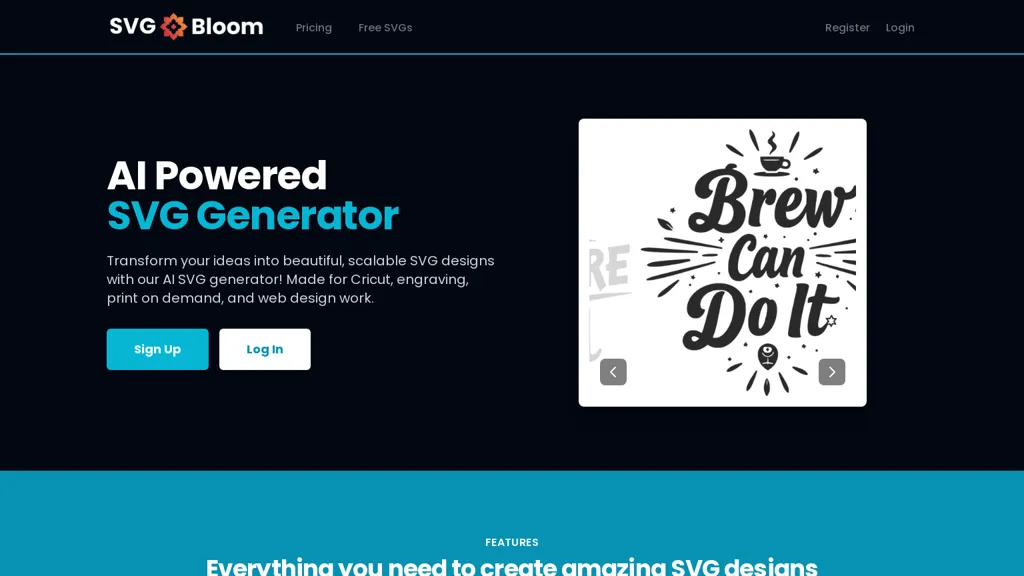
75% positive · 4 user reviews FreemiumAI SVG Generator creates crisp black‑and‑white SVGs from text prompts in seconds. Users specify text, subject, and complexity, receiving up to four design variations. Outputs are optimized for cutting, laser engraving, and web use, and are easily edited.
We've ranked 29 SVG Bloom alternatives, including 20 with a free plan. Rankings are based on feature coverage and user feedbacks.
Top-rated alternatives include VectorArt.ai, illustroke, and neoSVG.
29 SVG Bloom Alternatives & Competitors, Ranked by User Reviews
Click Compare on any tool to compare it side-by-side with SVG Bloom.
#1
VectorArt.ai
VectorArt.ai is an AI tool that simplifies vector image creation for websites, businesses, and apps. It allows users to generate custom logos, icons using text or sketch prompts, offers various illustration styles, provides SVG downloads, and features a free image gallery for inspiration.
#2
illustroke
Illustroke turns text prompts into instantly generated SVG vector illustrations across 40+ styles, offering scalable, editable assets suitable for logos, icons, and UI graphics. Built‑in editor lets users tweak shapes and colors, then save or load projects from the cloud.
#3
neoSVG
neoSVG turns text prompts into high‑quality SVGs using AI‑driven Bézier curves, supporting monochrome or color outputs. It offers fast or high‑quality rendering, real‑time preview, and an API for integration into responsive web, mobile, print, AR/VR, UI/UX, and logo workflows.
#4
AI Generate SVG by SVG.la
AI Generate SVG is a web tool that creates high-quality, scalable SVG files by combining text prompts with reference images. It's user-friendly, suitable for various design needs, and offers unlimited design creation across multiple platforms.
#5
SVGMaker
SVGMaker is an AI-powered tool for generating, editing, and converting SVG graphics from text prompts or raster images. It enables customizable vector designs with effects, style presets, and seamless integration for web graphics, logos, and illustrations.
#6
Blackink AI
BlackInk AI turns text prompts and images into custom tattoo designs in seconds. Users can adjust style, shape, detail, and body placement, generate cover‑ups, and download high‑resolution graphics—all in over 100 supported languages.
- Personalized recommendations
- Custom collections
- Save favorites
Already a member? Sign in
#7
ColorifyAI
Colorify AI turns text prompts or uploaded photos into black‑and‑white coloring pages in under three seconds, offering seven art styles and multiple sizes. Users download PNG or PDF, keep a temporary history, and use files commercially without login.
#8
Canva AI
Canva's AI Image Generators turns text into visuals with customizable art styles and features like Magic Media, Create an Image, and automated reviews.
#9
iColoring AI
iColoring AI is a user-friendly online tool that transforms text prompts or images into customizable black-and-white coloring pages. It offers daily credits, supports multiple styles, and allows instant downloads in PNG or PDF formats for children, educators, and parents.
#10
SVGverseAI
SVGVerseAI is a web-based tool that converts images to scalable vector graphics (SVG) using AI-driven styles. It facilitates logo and icon creation while supporting project management and community sharing for designers and content creators.
#11
PNGMaker
PNGmaker.ai generates transparent PNGs from text prompts in about ten seconds, letting designers, developers, marketers, and creators quickly produce logos, icons, and graphics in multiple sizes for seamless project integration.
#12
SVG AI
SVG AI is a browser-based platform that converts PNG, JPG, and WebP files into scalable vector graphics. It utilizes AI for custom designs while ensuring file encryption and immediate deletion after processing for user privacy.
#13
LogoAI.ai
LogoAI.ai quickly generates customizable logos from text, symbols, and industry tags, offering full control over colors, fonts, layout, and icons. It delivers high‑resolution vector and raster files ready for web, print, and social media use, with unrestricted commercial rights.
#14
Vectorizer AI
Vectorizer.ai is an AI-powered tool that converts raster images into vector images quickly and easily.
#15
SVG.io
PicTrix.ai is an AI studio that generates pixel, grayscale, and color SVG images in a single workflow. It offers prompt‑driven control, clean outputs, a history view, reusable settings, and API access for production use.
#16
AI Vector.ai
AI Vector.ai is a tool that instantly converts PNG, JPG, and WEBP images into SVG format using advanced algorithms for high-quality, watermark-free results. It requires no account, offers unlimited daily conversions, and ensures your files are never stored.
#17
VectorUbi
VectorUbi generates high‑quality SVG illustrations in under five seconds from text prompts, supporting consistent styles for designers, developers, and marketers. Batch creation, unlimited downloads, and easy editing in Illustrator or Figma streamline rapid prototyping and branding tasks.
#18
AILogoMaker
AI Logo Maker creates custom logos from text prompts, offering editable templates, fonts, colors, and icons. Users preview, download PNG/JPG/PDF/SVG files, and keep full commercial rights, saving time for designers and non‑designers alike.
#19
Tattoos AI
TattoosAI turns text prompts into tattoo designs across 18 styles—geometric, watercolor, Japanese, etc. Users customize colors, download concepts, and preview placements. A surprise button selects random styles for quick inspiration.
#20
Svgtrace.com
SvgTrace converts raster images to multi‑layer SVGs with AI, extracting each color into separate layers for high‑quality vector graphics. Its upscaling improves low‑res images, and a built‑in editor lets users edit layers. Drag‑and‑drop uploads enable quick use.
#21
SVGStud.io
SVGStud.io is an AI tool providing semantic searching and creating of scalable vector graphics (SVGs) based on text descriptions or Image conversion.
#22
Sketch Logo AI
Sketch Logo AI transforms sketches or text prompts into 3‑D logo designs. It offers 4,000+ fonts, 30,000 icons, PNG and SVG outputs, and lets beginners and professionals iterate quickly for branding, marketing, and illustration needs.
#23
PNGmaker.io
PNG Maker turns typed text into high‑resolution PNG images with transparent backgrounds. Users can set fonts, sizes, colors, and background opacity, review, and download ready‑for‑web graphics. It works directly in the browser and supports batch creation.
#24
AI Line Art
Creates print-ready line drawings and coloring pages from text prompts or photos, offering multiple styles (sketch, woodcut, continuous line, 3D), image-to-line-art colorization, prompt-based controls, batch generation, and high-resolution exports for design and illustration.
#25
MakeLogoAI
MakeLogoAI is an AI-powered tool that generates unique logos for new projects, offering multiple concept options and delivering HD and transparent background logos in less than 24 hours.
#26
Ai illustration generator
Ilus AI is an illustration generator that enables users to create consistent images using prompt-based techniques. It supports fine-tuning with example images and exporting in SVG and PNG formats, ideal for maintaining brand identity across various projects.
#27
Vectorizer.io
Image Vectorizer transforms raster PNG, BMP, JPEG files into scalable vector formats (SVG, EPS, DXF) using AI noise removal and color simplification. It sharpens edges, converts pixels to geometric primitives, and outputs high‑resolution vectors for logos, apparel, tattoos, and billboards.
LOGO.com offers an AI‑driven web logo maker that generates hundreds of concepts from a name and slogan. Users edit elements with a drag‑and‑drop editor and download high‑resolution files, brand assets, and social media graphics.
#29
BrandCrowd
AI Logo Generator instantly crafts logos from a business name, drawing from 145,000 pre‑designed options. Users filter, refine color, font, layout, and export high‑resolution PNG, JPG, SVG, EPS, and PDF files for print or digital use.
Frequently Asked Questions
Why look for SVG Bloom alternatives?
Common reasons users switch from SVG Bloom:
- Feature gaps: teams needing specific capabilities like Generate Svgs may find a more focused alternative better suited to their workflow.
- Flexibility: exploring alternatives helps find tools that better match your team size, integrations, and budget.
What is the best alternative to SVG Bloom?
Based on 1 user review, VectorArt.ai (100% positive) ranks as the top SVG Bloom alternative. VectorArt.ai is an AI tool that simplifies vector image creation for websites, businesses, and apps. It allows users to generate custom logos, icons It is available on a Free trial plan starting from $29/mo.
How do the top SVG Bloom alternatives compare?
| Tool | Pricing | Starting Price | User Rating |
|---|---|---|---|
| SVG Bloom this tool | Freemium | $9.99 | 75% (4) |
| VectorArt.ai | Free trial | $29/mo | 100% (1) |
| illustroke | Paid | — | — |
| neoSVG | Subscription | $15/mo | 100% (2) |
| AI Generate SVG by SVG.la | Freemium | — | — |
| SVGMaker | Freemium | — | 100% (5) |
Are there free SVG Bloom alternatives?
Yes, 20 free alternatives found in our list: VectorArt.ai, AI Generate SVG by SVG.la, SVGMaker. and 17 more — use the pricing filter above to see them all.
What should I look for in a SVG Bloom alternative?
- Core capabilities: confirm the tool supports Generate Svgs, Generate Variations, Optimize Vectors.
- Pricing transparency: look for clear free plan, trial period, or tiered pricing — avoid tools that hide costs.
- User reviews: check both the satisfaction percentage and the number of reviews; a high score from few users is less reliable.
- Integrations: verify it connects with your existing stack before committing.
- Support and updates: active development and responsive support are strong signals of a maintained product.
Which SVG Bloom alternative has the highest user rating?
VectorArt.ai has the highest satisfaction score among SVG Bloom alternatives, with 100% positive from 1 user review. It is available on a Free trial plan starting from $29/mo.
What are SVG Bloom alternatives used for?
- Generate Svgs
- Generate Variations
- Optimize Vectors
- Generate Designs