Best ImageTool Alternatives in 2026
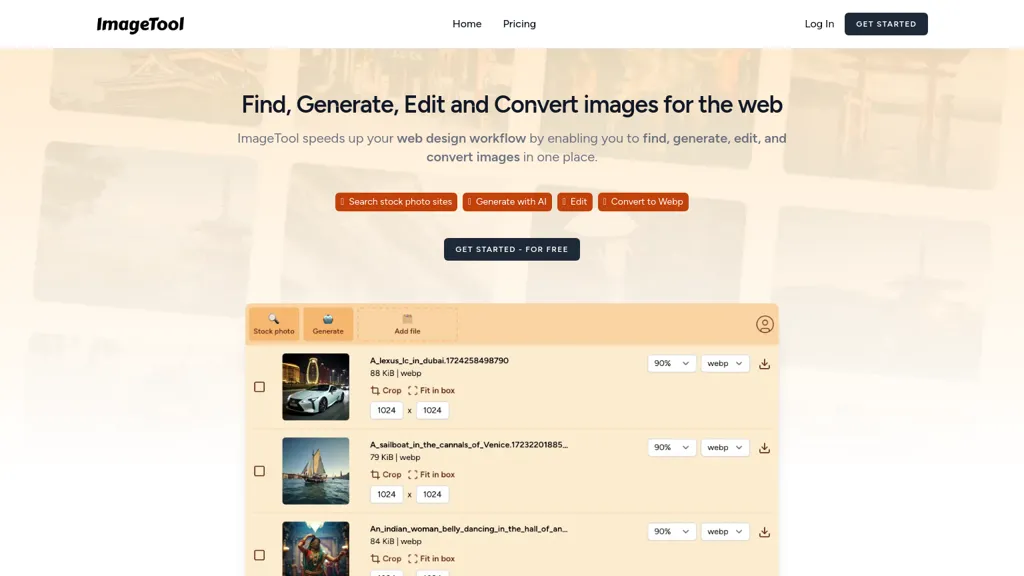
No user reviews yet FreeImageTool aggregates free stock photos from Unsplash, Pexels, and Pixabay, offers AI image generation, and allows bulk upload, crop, compress, resize, and export to WebP/AVIF, simplifying web asset workflows for web designers and developers.
We've ranked 29 ImageTool alternatives, including 23 with a free plan. Rankings are based on feature coverage and user feedbacks.
Top-rated alternatives include StockImg AI, StockCake, and Designer Clone AI.
29 ImageTool Alternatives & Competitors, Ranked by User Reviews
Click Compare on any tool to compare it side-by-side with ImageTool.
#1
StockImg AI
Stockimg AI generates logos, illustrations, stock photos, and social media graphics, letting users create, edit, and schedule posts for over ten platforms from a single interface. Its API integration and on‑demand engine streamline visual content production.
#2
StockCake
StockCake delivers millions of AI‑generated stock photos with free commercial licensing. Search, instant download, on‑the‑fly editing, and variation creation streamline designers’ workflows. Prompt‑based generation and curated collections support tailored visual content.
#3
Designer Clone AI
Stockimg AI generates logos, illustrations, and social‑media assets from text prompts, offering background removal, bulk scheduling, and cross‑platform publishing via an integrated calendar. A mobile app allows on‑the‑go daily editing.
#4
There is a logo for that
Stockimg AI produces logos, illustrations, photos, and social‑media assets from text prompts and builds short video clips with audio and subtitles. Users edit, schedule, and publish across multiple platforms, streamlining content creation for agencies, marketers, and creators.
#5
Img Upscaler
ImgUpscaler enlarges JPG, PNG, WebP images up to 400 % using super‑resolution, producing 16k × 16k outputs with minimal detail loss. Batch up to 5 images, offers basic editing, deletes uploads after 24 h, free commercial use.
#6
Everypixel
Stock image finder that provides a variety of use cases for finding the best licensed images at the lowest price.
- Personalized recommendations
- Custom collections
- Save favorites
Already a member? Sign in
#7
AI Image Enlarger
Imglarger is an image enhancer that upsamples photos up to 8×, supports batch processing, and offers background, object, and face retouch tools. It converts WebP, JPEG, PNG, SVG, JFIF formats and lets users adjust brightness, contrast, and saturation via web or mobile.
#8
Impossible Images
The AI-powered Stock Image Library generates customized stock images for websites. Its advanced algorithms help users quickly locate high-quality, visually appealing images to improve their online content and enhance the overall website appearance.
#9
RF AI Images
123rf Image Editor is a comprehensive AI tool for effortless photo editing, offering features like image scaling, background removal, object removal, and seamless background remixing. It also includes an AI writer for content creation and an image enlarger for ratio adjustments. Efficiently enhance and edit your visuals with this user-friendly tool.
#10
Upscalepics
Upscalepics lifts image resolution up to 8× with one click via a machine‑learning model, supporting JPG, PNG, and WebP files up to 4000 px. It offers custom dimensions, bulk uploads, and outputs up to 256 MP for print‑ready quality.
#11
PhotoGrid
PhotoGrid is a browser‑based AI photo editor that offers one‑click enhancement, background removal, and upscaling. It lets users build collages from 20,000 templates, add stickers, text, custom backgrounds, and convert images into short video clips.
Pixlr is a browser‑based photo editor that uses AI for background removal, generative fill, and object deletion. It offers cropping, color correction, collages, templates, and social media layouts across desktop, tablet, and mobile.
#13
ProfilePicture.AI
PFP.AI produces studio‑quality profile pictures from a single high‑definition photo, offering preset styles for professional, minimalist, fashion, corporate, or creative looks. It outputs a gallery of JPG, PNG, or WebP images, with privacy data deleted after 24 hours.
#14
StockPhoto
StockPhoto.app uses AI to create varied versions of uploaded images while preserving key elements. Designers and marketers can generate fresh visuals on demand; images are processed in base64, never stored, and are accessible via an API with webhook callbacks.
#15
Shutterstock Image generator
Shutterstock Generate is an AI image generator that creates high-quality illustrations in various styles from user prompts. It offers editing options and supports commercial use, while ensuring ethical practices by compensating original content contributors.
#16
Smart Upscaler
AI-driven image upscaler that enlarges photos to 7680 × 7680 px, supporting JPEG, PNG, WebP and up to 500 images per batch. It offers an API for sharpening, noise reduction, and a Mac app with background removal, photographers, designers, marketers, and social media managers.
#17
PhotoEditor.ai
PhotoEditor.ai edits JPG, PNG, HEIC, and WEBP images up to 15 MB in a browser or mobile app. It offers portrait transformation, background removal, detail enhancement, and 4K upscaling, delivering instant downloads for photographers, marketers, and designers.
#18
Photiu Image Upscaler
Photiu Image Upscaler is an AI tool that instantly enhances image resolution and quality for sharper details. It supports drag-and-drop or URL uploads of JPG, PNG, and WebP files, ideal for photographers, e-commerce, and digital content.
#19
AI Keywording Tool
Pixify Studio automatically generates titles, descriptions, and keyword tags for images and videos. It supports drag‑and‑drop, folder uploads, and FTP, processes large batches with a single credit per asset, and stores metadata on Amazon S3.
#20
StockLibrary.ai
StockLibrary provides AI-generated stock photos organized by various styles, enabling users to create culturally accurate visuals for diverse projects. Its royalty-free licensing allows flexible usage, while a brand profile feature ensures customization to match brand identity.
#21
Upscale.media
Upscale.media is a browser-based AI upscaler that increases image and short-video resolution up to 2×/4×/8×, reconstructs detail, reduces noise/artifacts, and offers deblur, sharpen, colorisation, face restoration, batch processing and API access.
#22
Background Remover
AI Background Remover deletes backgrounds from JPG, PNG, WebP images while preserving resolution, handling up to 500 at once. Users can replace with color, gallery, or upload; ideal for designers, marketers, and e‑commerce workflows.
#23
Imgupscaler AI
Imgupscaler is an AI tool for enhancing image quality by upscaling images to 4K resolution. It supports multiple formats and restores details while reducing noise, making it suitable for e-commerce, social media, and graphic design.
Clipdrop is an AI image editor that adjusts aspect ratios, extends boundaries, and adds background space while preserving detail. It offers background removal, object cleanup, relighting, universal resizing, upscale, and text‑to‑image generation for photographers and designers.
#25
AI Product Photos by CreatorKit
The AI tool generates professional product photos with a proven increase in sales and no quality loss. It is free to use and powered by Diffusion Model for optimal performance.
Pixelbin is an AI-powered tool for real-time image transformation, optimized digital asset management, and unique visual experiences.
#27
AI Face Swap
AIFaceSwap lets you swap faces in photos, GIFs, and videos without sign‑up. It supports JPG, PNG, WebP, batch processing, and gender swapping. Results are watermark‑free, auto‑deleted after 24 hours, and mobile‑friendly.
#28
pixu.ai
Pixu.ai is a cutting-edge AI tool for creating authentic images with 100% face likeness in seconds. It offers Portrait, Freestyle, and Composition modes for image creation, along with features like Face Swapper, Image Art, and Photo Restoration.
#29
Caricaturer.io
AI caricature generator that accepts JPEG/PNG/WebP up to 10 MB and uses text prompts for expression, pose, clothing, hairstyle, background. It creates high‑resolution, watermark‑free caricatures in multiple styles via drag‑and‑drop, preview, download. Works locally with no registration.
Frequently Asked Questions
Why look for ImageTool alternatives?
Common reasons users switch from ImageTool:
- Feature gaps: teams needing specific capabilities like Generate Images may find a more focused alternative better suited to their workflow.
- Flexibility: exploring alternatives helps find tools that better match your team size, integrations, and budget.
What is the best alternative to ImageTool?
Based on 21 user reviews, StockImg AI (61.9% positive) ranks as the top ImageTool alternative. Stockimg AI generates logos, illustrations, stock photos, and social media graphics, letting users create, edit, and schedule posts for over ten platf It is available on a Subscription plan starting from $12/mo.
How do the top ImageTool alternatives compare?
| Tool | Pricing | Starting Price | User Rating |
|---|---|---|---|
| ImageTool this tool | Free | — | — |
| StockImg AI | Subscription | $12/mo | 61.9% (21) |
| StockCake | Free | — | 64.5% (31) |
| Designer Clone AI | Subscription | $12/mo | 92.9% (14) |
| There is a logo for that | Paid | — | 84.2% (19) |
| Img Upscaler | Free | — | 75% (20) |
Are there free ImageTool alternatives?
Yes, 23 free alternatives found in our list: StockCake, Img Upscaler, Everypixel. and 20 more — use the pricing filter above to see them all.
What should I look for in a ImageTool alternative?
- Core capabilities: confirm the tool supports Generate Images, Edit Images, Optimize Images.
- Pricing transparency: look for clear free plan, trial period, or tiered pricing — avoid tools that hide costs.
- User reviews: check both the satisfaction percentage and the number of reviews; a high score from few users is less reliable.
- Integrations: verify it connects with your existing stack before committing.
- Support and updates: active development and responsive support are strong signals of a maintained product.
Which ImageTool alternative has the highest user rating?
Everypixel has the highest satisfaction score among ImageTool alternatives, with 100% positive from 1 user review. It is available on a Freemium plan.
What are ImageTool alternatives used for?
- Generate Images
- Edit Images
- Optimize Images
- Translate Images