Best HoverNotes Alternatives in 2026
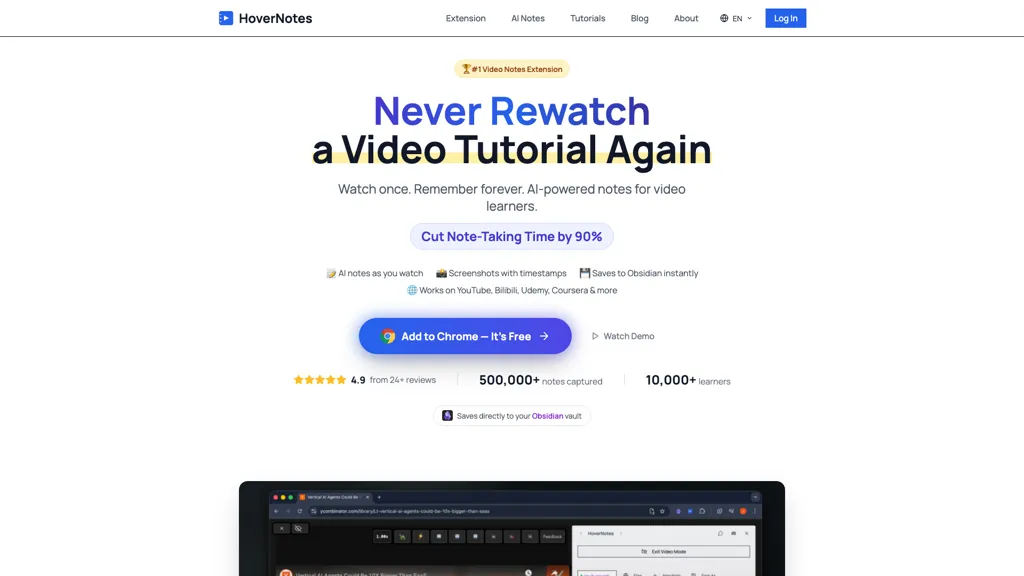
100% positive · 1 user review Free trialHoverNotes is an AI browser extension that enhances note-taking for videos by capturing key concepts, screenshots, and timestamps. It integrates with Obsidian for organized storage, making it ideal for students and professionals engaged in technical subjects.
We've ranked 29 HoverNotes alternatives, including 22 with a free plan. Rankings are based on feature coverage and user feedbacks.
Top-rated alternatives include EasyNoteAI, Snipo, and Tube Memo.
29 HoverNotes Alternatives & Competitors, Ranked by User Reviews
Click Compare on any tool to compare it side-by-side with HoverNotes.
#1
EasyNoteAI
EasyNoteAI converts audio, video, PDFs into structured notes, offering real‑time transcription, summaries, quizzes, flashcards, mind‑maps, and interactive questioning. Users upload lectures, YouTube links, or research papers; the platform generates summaries, key‑point lists, and supports multilingual translation for students, professionals, and researchers worldwide.
#2
Snipo
Snipo is a browser extension that imports video content from YouTube, Udemy, Coursera, Skillshare, and LinkedIn Learning into Notion. It records timestamped notes, screenshots, transcripts, auto‑creates flashcards, links playlists, and offers keyboard‑controlled playback for streamlined study.
#3
Tube Memo
TubeMemo: AI browser extension that extracts YouTube transcripts, highlights key points, produces summaries, mind maps, flashcards; supports annotations, multi‑language, library, drafts for blogs, tweets, study guides; useful for professionals, students, creators, educators, journalists.
#4
AudioNotes
Audionotes AI tool for effortless voice-to-text conversion, organization, summarization, and content generation.
#5
Goodnotes
GoodNotes is a digital notebook that records voice, text, or handwriting and supports collaboration. AI transcribes audio, summarizes meetings, turns notes into searchable flashcards, and syncs audio to slides for students and teachers across iOS, macOS, Windows, Android, and Web.
#6
Summarify.app
Summarify AI gives YouTube video summaries in‑app and via Chrome, offering text, bullet, outline styles with timestamps for quick navigation. It supports export to PDF, Markdown, TXT, etc., helping students, researchers, creators save time and organize content.
- Personalized recommendations
- Custom collections
- Save favorites
Already a member? Sign in
#7
Youlearn
AI tutor that transforms PDFs, videos, slides, and recordings into study notes, quizzes, podcasts, and personalized exams, providing key takeaways, answer breakdowns, progress tracking, and interactive chat support for learners and educators.
#8
Videohighlight
Video Highlight delivers AI‑driven summaries, searchable transcripts, and timestamped key points for YouTube, Vimeo, Dailymotion, and private files in 37+ languages. It supports annotations, exports to Notion, Word, Markdown, CSV, Readwise, and enables collaborative sharing.
#9
Eightify
Eightify uses AI to extract key ideas from YouTube videos, delivering timestamped bullet‑point summaries, full transcripts, and comment insights via a Chrome extension and mobile apps. It supports 40+ languages, helping users preview, note‑take, and share content efficiently.
#10
Cousology
AI Homework Helper lets students upload documents, notes, and webpages to chat with the AI, generate quizzes, flashcards, and concise notes, convert lectures into podcasts, transcribe sessions, and solve problems via a Chrome extension across many subjects.
#11
StudyX.ai
StudyX is an AI‑powered platform that converts lecture recordings, PDFs, and videos into organized notes, generates spaced‑repetition flashcards, creates custom quizzes from uploaded content, and supports text, image, PDF, and YouTube inputs across web, Discord, and a browser extension.
#12
MemosAI
Memos AI streamlines note-taking with advanced features like speech-to-text transcription, note summarization, and language translation. Enhance productivity and stay organized during fast-paced lectures or meetings with this efficient tool.
#13
Transcript
Transcript is an AI study platform with a Chrome extension, mobile app, and synced notebook. It offers instant answers, step‑by‑step solutions, source references, flashcards, handwritten question scanning, lecture summaries, and interactive quizzes for students.
#14
AI-Powered Notes Taker
AI Notes offers AI-powered note-taking with automated summaries, key-concept extraction, grammar checks, smart tagging and organization, real-time sync and AES-256 encryption, plus Markdown, multilingual translation, and PDF/HTML export to streamline collaboration.
#15
VideoIQ AI
VideoIQ AI transforms YouTube videos into concise summaries and timestamped answers, enabling users to engage deeply with content. Its chat functionality allows for precise questions and citations, enhancing study efficiency and learning effectiveness.
#16
ThetaWave AI
ThetaWave AI captures lecture audio, YouTube videos, and documents, transcribing them into searchable notes with tables, formulas, and charts. It generates quizzes, flashcards, mind maps, podcasts, and videos for flexible review.
#17
SpeakNotes
SpeakNotes transcribes and summarizes audio and video into structured text, supporting over 50 languages and 15+ formats with 95%+ accuracy. It auto‑detects speakers, offers customizable summary styles, and integrates with Notion, Slack, and Obsidian for workflow automation.
#18
Nex.social
Nex AI Knowledge Copilot is a browser extension that highlights and summarizes lengthy YouTube videos and articles, enabling quick comprehension and retention of key points, thus enhancing productivity and streamlining the online reading and viewing experience.
#19
Noteey
Noteey is an infinite-canvas visual knowledge manager combining notes, mind maps, flowcharts and moodboards with multimedia support, timestamped audio/video transcripts and summaries, PDF annotation, database-style organization, offline storage, and presentation/drawing tools.
#20
Tubly
Tubly, a Chrome extension, uses the YouTube API to deliver AI‑generated summaries of subscribed channel videos. It extracts key transcript points, offers timestamps and chapter markers, and lets users save highlights and download transcripts.
#21
Clipmate AI
Clipmate is an AI-first Second Brain for your Bookmarks, Screenshots, and all your other saved stuff. Turn information overload into your superpower.
#22
AlphaNotes
AlphaNotes turns YouTube videos, articles, and lectures into structured summaries and study notes. It extracts key points, simplifies concepts, and creates PDF exports, quizzes, and assessments—all via real‑time ChatGPT integration.
#23
vidIQ
vidIQ delivers real‑time YouTube analytics, keyword research, AI‑powered thumbnail creation, and competitive insights. Its AI coach refines titles and descriptions, while clipping tools produce short videos. Available via Chrome or mobile, it boosts visibility and engagement for creators.
#24
AskVideo
AskVideo.ai converts any public YouTube clip into a searchable knowledge base. By generating a timestamped transcript, users can ask natural‑language queries and retrieve precise answers, reducing search time and enhancing learning for students, professionals, and creators.
#25
Read AI
Read AI records, transcribes, and summarizes meetings, emails, and chats across Google Meet, Zoom, Teams, and in‑person sessions. It extracts action items, delivers searchable notes, offers contextual answers from integrated data, supports 20+ languages, and meets SOC II, GDPR, HIPAA compliance.
#26
Summarize-Youtube Video Summarizer
Summarize.ing instantly condenses YouTube videos into concise summaries, segmented sections, mind maps, and keyword lists. It generates 8‑10 Q&A pairs for review, aiding students, educators, and professionals in quick comprehension and decision‑making.
#27
Ace it
Ace It converts handwritten or digital notes into flashcards, quizzes, and concise summaries, tailoring content to individual study styles. It suggests related YouTube videos and streamlines preparation, aiding retention through focused practice.
#28
Reflect AI
Reflect Notes uses GPT‑4 and Whisper to transcribe speech, summarize meetings, outline articles, and stores notes as a graph with backlinks. It syncs cross‑platform, encrypts end‑to‑end, and integrates browsers, Kindle, Readwise, Google Calendar, Outlook, Zapier, and APIs for automation.
#29
SpeedNote AI
SpeedNote AI cleans typo‑laden text, automatically formatting lecture notes, meeting minutes, essays, and more. With a single keyboard shortcut, it extracts key points, restructures sentences, and produces searchable, consistent notes ready for study or sharing.
Frequently Asked Questions
Why look for HoverNotes alternatives?
Common reasons users switch from HoverNotes:
- Cost: HoverNotes is a Free trial tool — users often look for more affordable or free options.
- Feature gaps: teams needing specific capabilities like Generate notes may find a more focused alternative better suited to their workflow.
- Flexibility: exploring alternatives helps find tools that better match your team size, integrations, and budget.
What is the best alternative to HoverNotes?
Based on 1 user review, EasyNoteAI (100% positive) ranks as the top HoverNotes alternative. EasyNoteAI converts audio, video, PDFs into structured notes, offering real‑time transcription, summaries, quizzes, flashcards, mind‑maps, and interac It is available on a Subscription plan starting from $8.39/mo.
How do the top HoverNotes alternatives compare?
| Tool | Pricing | Starting Price | User Rating |
|---|---|---|---|
| HoverNotes this tool | Free trial | — | 100% (1) |
| EasyNoteAI | Subscription | $8.39/mo | 100% (1) |
| Snipo | Free | — | — |
| Tube Memo | Free | — | — |
| AudioNotes | Freemium | — | 50% (1) |
| Goodnotes | Freemium | $0.58/mo | 67.9% (28) |
Are there free HoverNotes alternatives?
Yes, 22 free alternatives found in our list: Snipo, Tube Memo, AudioNotes. and 19 more — use the pricing filter above to see them all.
What should I look for in a HoverNotes alternative?
- Core capabilities: confirm the tool supports Generate notes, Capture screenshots, Extract timestamps.
- Pricing transparency: look for clear free plan, trial period, or tiered pricing — avoid tools that hide costs.
- User reviews: check both the satisfaction percentage and the number of reviews; a high score from few users is less reliable.
- Integrations: verify it connects with your existing stack before committing.
- Support and updates: active development and responsive support are strong signals of a maintained product.
Which HoverNotes alternative has the highest user rating?
EasyNoteAI has the highest satisfaction score among HoverNotes alternatives, with 100% positive from 1 user review. It is available on a Subscription plan starting from $8.39/mo.
What are HoverNotes alternatives used for?
- Generate notes
- Capture screenshots
- Extract timestamps
- Organize notes
- Translate text