
Top 29 MimicPhoto Alternatives in 2026
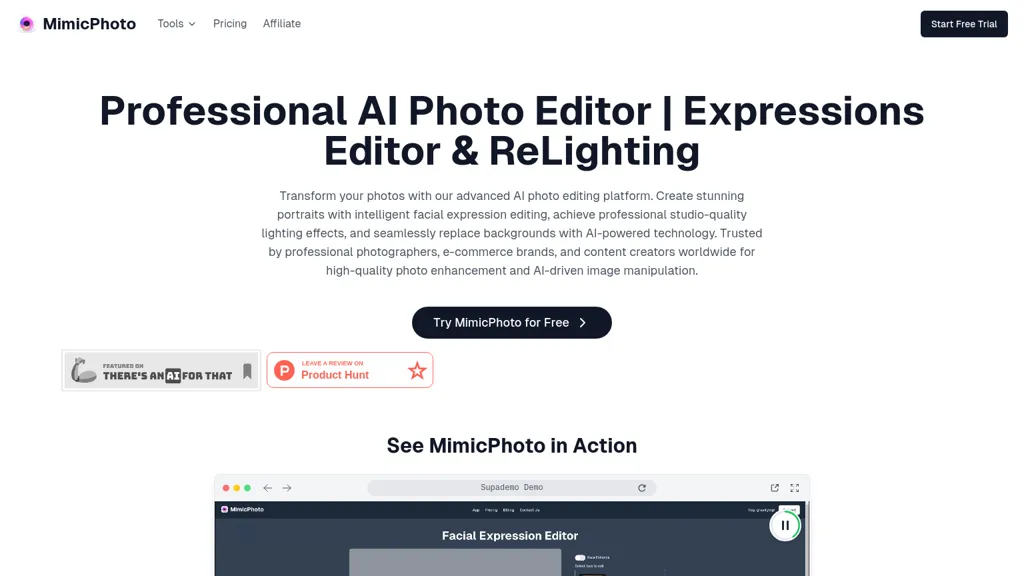
50% positive · 6 user reviews Free trialMimicPhoto is a professional AI photo editor that transforms photos with advanced tools like facial expression editing, studio-quality lighting, and seamless background replacement. It also features LivePortrait and AI Hug Generator for dynamic animations, delivering hyper-realistic results for portraits, e-commerce, and social media.
We've ranked 29 MimicPhoto alternatives, including 17 with a free plan. Rankings are based on feature coverage and user feedbacks.
Top-rated alternatives include BestPhotoAI, PhotoEditor.ai, and Airbrush AI Headshots.
29 MimicPhoto Alternatives & Competitors, Ranked by User Reviews
Click Compare on any tool to compare it side-by-side with MimicPhoto.
 #1
BestPhotoAI
#1
BestPhotoAI
BestPhotoAI is an AI photo studio offering over 40 tools to enhance, create, or transform images. Upload a photo, choose a style like anime or professional headshot, and receive a high-resolution edit in under an hour.
 #2
PhotoEditor.ai
#2
PhotoEditor.ai
PhotoEditor.ai edits JPG, PNG, HEIC, and WEBP images up to 15 MB in a browser or mobile app. It offers portrait transformation, background removal, detail enhancement, and 4K upscaling, delivering instant downloads for photographers, marketers, and designers.
 #3
Airbrush AI Headshots
#3
Airbrush AI Headshots
Headshot AI Generator is an AI-powered tool that quickly produces professional headshots with advanced editing capabilities. Whether you need to retouch photos, create avatars, or enhance images, this tool offers customization options and fast results, perfect for improving your online presence effortlessly.
 #4
AI Portrait Gen
#4
AI Portrait Gen
AI Portrait Gen is an intuitive tool that transforms ordinary photos into stunning, professional-like portraits using advanced AI technology. Users can easily customize their portraits with various settings and preferences, all while ensuring their privacy and security.
 #5
PhotoAI
#5
PhotoAI
Photo AI transforms uploaded portrait photos into over 100 unique AI‑styled images per selected pack (Tinder, LinkedIn, Polaroid, Avatar, Royal). Users receive downloadable files within hours, suitable for professional headshots or dating‑app profiles.
 #6
Reshot AI
#6
Reshot AI
Reshot AI is a real-time photo editing tool for enhancing facial expressions and poses in high-resolution images. It features precision eye editing, expression sculpting, and 3D pose manipulation, ideal for content creators and photographers.
- Catch deals before they expire
- Unlock tools matched to you
- Show off your AI stacks
Already a member? Sign in
 #7
HeyPhoto
#7
HeyPhoto
HeyPhoto is an AI‑powered photo editor that lets users swap faces, generate new faces, upscale images, and remove backgrounds with one click, offering facial attribute adjustments and support for common image formats up to 5 MB.
 #8
The Multiverse AI
#8
The Multiverse AI
Transforms selfies into up to 100 high‑resolution professional headshots in 30 minutes. Offers text‑based editing for clothing, background, lighting, and facial details. Ideal for LinkedIn, resumes, portfolios, and corporate teams.
 #9
PicStudio.AI
#9
PicStudio.AI
PicStudio.AI turns uploaded selfies into realistic headshots in minutes. It trains on multiple photos to produce corporate, casual, or editorial styles, offers upscaling, background removal, version control, and full commercial ownership of results.
 #10
AILab Tools
#10
AILab Tools
The AI Lab provides an advanced tool with image and facial enhancements features such as photo colorization, object and background removal, cartoon creation, retouching portraits, adjusting facial expressions, and API and platform for developers.
 #11
Expression Editor
#11
Expression Editor
Expression Editor uses AI technology to edit facial expressions in photos and videos, allowing users to adjust head positions, eye details, and mouth shapes for natural-looking results, enhancing professional headshots and social media profiles effortlessly.
 #12
Remaker AI
#12
Remaker AI
remaker ai offers web and mobile AI image and video editing for creators and teams, including upscaling, background removal, object erasing, face swap, text-to-image, lip-sync, batch processing and templates for short-form social content.
 #13
PicAI
#13
PicAI
PicAI converts user selfies into studio‑grade, high‑resolution portraits using Flux‑based AI models. Users upload photos and receive photorealistic images ready for social media, marketing, or creative work, with customizable style and royalty‑free ownership.
 #14
PortraitPhoto.ai
#14
PortraitPhoto.ai
HeadshotPro turns selfies into studio‑grade portraits using multiple reference images for realistic facial geometry. Teams manage a centralized gallery, customize lighting, background, and apparel, and download commercial‑ready photos for corporate, real‑estate, medical, legal, entertainment, education, and dating use.
 #15
iFoto
#15
iFoto
AI Photo Studio automates e‑commerce image editing: background removal, resolution enhancement, lossless compression, profile passport creation, hairstyle preview, object cleanup, old‑photo restoration, colorization, AI fashion model generation, clothing recolor, background changes, and file conversion to PDF/Word/PPT for streamlined product photography.
 #16
Pixelfox AI
#16
Pixelfox AI
Pixelfox AI is an online AI-powered photo editor that offers advanced features like background removal, face swaps, and image enhancement. It’s designed for both personal and professional use, requiring no downloads.
 #17
ImageAI
#17
ImageAI
Image AI is a platform offering AI-powered tools for image and video processing, including face swapping, virtual outfit try-ons, image-to-video conversion, background removal, and text-to-image generation, making professional and creative editing seamless and efficient.
 #18
BeautyPlus
#18
BeautyPlus
BeautyPlus - Versatile AI tool for effortless photo & video editing; offers face reshaping, filter & sticker additions; perfect for enhancing selfies & videos.
 #19
1PhotoAI
#19
1PhotoAI
PhotoAI transforms a single selfie into high‑resolution stylized headshots, avatars, or themed images using over 2,000 preset styles. It offers fast, batch processing, AI photo enhancement, and integrates with social‑media workflows for quick profile and marketing updates.
 #20
HitPaw Photo AI
#20
HitPaw Photo AI
AI image enhancer that upscales up to 4×, removes noise, sharpens blur, and can enhance faces or colorize. Handles .png/.jpg/.webp/.tif/.bmp/.raw and outputs the same formats. Windows, macOS and Photoshop plugin supported.
 #21
AI Photo Editor
#21
AI Photo Editor
AI Photo Editor lets users upload up to ten images or generate new ones from text prompts, instantly editing or converting images into short videos. All processing runs client‑side, supporting face completion and consistent character edits for design and work.
 #22
FaceAI.art
#22
FaceAI.art
Face AI is an online face-swap suite for photos, videos, and GIFs, offering single and multi-face swaps, frame-by-frame video replacement, templates and one-click workflows, plus upscaling, morphing, meme generator, and batch edits and privacy controls.
 #23
AI Face Studio
#23
AI Face Studio
AI Face Studio lets users swap faces, change clothing, edit expressions, and convert faces into anime, 3D, cartoon, emoji, or sticker formats. It supports multi‑face edits in photos and videos, delivering high‑definition outputs for print, web, or games.
 #24
Video Studio AI
#24
Video Studio AI
Video Studio AI turns text prompts or uploaded photos into short, realistic animated videos with natural facial expressions, head movement, and blinking. Output is ready within minutes in 4K or stylized Disney‑like formats, using a three‑step web workflow.
 #25
face swapper online
#25
face swapper online
AI Face Swap Online lets users replace faces in photos and videos with realistic, high‑resolution results in seconds. The neural‑network preserves skin texture and lighting, while optional reface AI provides pose and expression editing.
 #26
123RF
#26
123RF
123rf Image Editor is a comprehensive AI tool for effortless photo editing, offering features like image scaling, background removal, object removal, and seamless background remixing. It also includes an AI writer for content creation and an image enlarger for ratio adjustments. Efficiently enhance and edit your visuals with this user-friendly tool.
 #27
PicPicAI
#27
PicPicAI
PicPicAI automatically removes backgrounds, sharpens portraits, upscales and extends images, and restores old photos, delivering polished results in seconds for e‑commerce, social media, and design workflows, with optional Flux AI art generation.
 #28
PicTools.AI
#28
PicTools.AI
PicTools.AI is a web‑based photo editor that lets users upload images and apply changes via text prompts or over 100 one‑click AI filters—background removal, outfit changes, smile addition, restoration, and artistic styles—without design skills.
 #29
AI Image Editor-
#29
AI Image Editor-
AI Image Editor is an online tool for editing and enhancing images with pixel-level precision. It supports various formats, offers text editing, artistic style transfers, and allows quick generation of image variations for efficient workflow.
Frequently Asked Questions
Why look for MimicPhoto alternatives?
Common reasons users switch from MimicPhoto:
- Cost: MimicPhoto is a Free trial tool starting from $16/mo — users often look for more affordable or free options.
- User satisfaction: MimicPhoto holds a 50% positive rating — some users report unmet expectations.
- Feature gaps: teams needing specific capabilities like Edit facial expressions may find a more focused alternative better suited to their workflow.
- Flexibility: exploring alternatives helps find tools that better match your team size, integrations, and budget.
What is the best alternative to MimicPhoto?
Based on 5 user reviews, BestPhotoAI (80% positive) ranks as the top MimicPhoto alternative. BestPhotoAI is an AI photo studio offering over 40 tools to enhance, create, or transform images. Upload a photo, choose a style like anime or profess It is available on a Freemium plan.
How do the top MimicPhoto alternatives compare?
| Tool | Pricing | Starting Price | User Rating |
|---|---|---|---|
| MimicPhoto this tool | Free trial | $16/mo | 50% (6) |
| BestPhotoAI | Freemium | — | 80% (5) |
| PhotoEditor.ai | Paid | — | 100% (1) |
| Airbrush AI Headshots | Paid | — | — |
| AI Portrait Gen | Paid | $10 | 80% (5) |
| PhotoAI | Freemium | — | 50% (1) |
Are there free MimicPhoto alternatives?
Yes, 17 free alternatives found in our list: BestPhotoAI, PhotoAI, Reshot AI. and 14 more — use the pricing filter above to see them all.
What should I look for in a MimicPhoto alternative?
- Core capabilities: confirm the tool supports Edit facial expressions, Replace backgrounds, Generate dynamic videos.
- Pricing transparency: look for clear free plan, trial period, or tiered pricing — avoid tools that hide costs.
- User reviews: check both the satisfaction percentage and the number of reviews; a high score from few users is less reliable.
- Integrations: verify it connects with your existing stack before committing.
- Support and updates: active development and responsive support are strong signals of a maintained product.
Which MimicPhoto alternative has the highest user rating?
PhotoEditor.ai has the highest satisfaction score among MimicPhoto alternatives, with 100% positive from 1 user review. It is available on a Paid plan.
What are MimicPhoto alternatives used for?
- Edit facial expressions
- Replace backgrounds
- Generate dynamic videos
- Add animations to photos
- Enhance images