
What is TabMate?
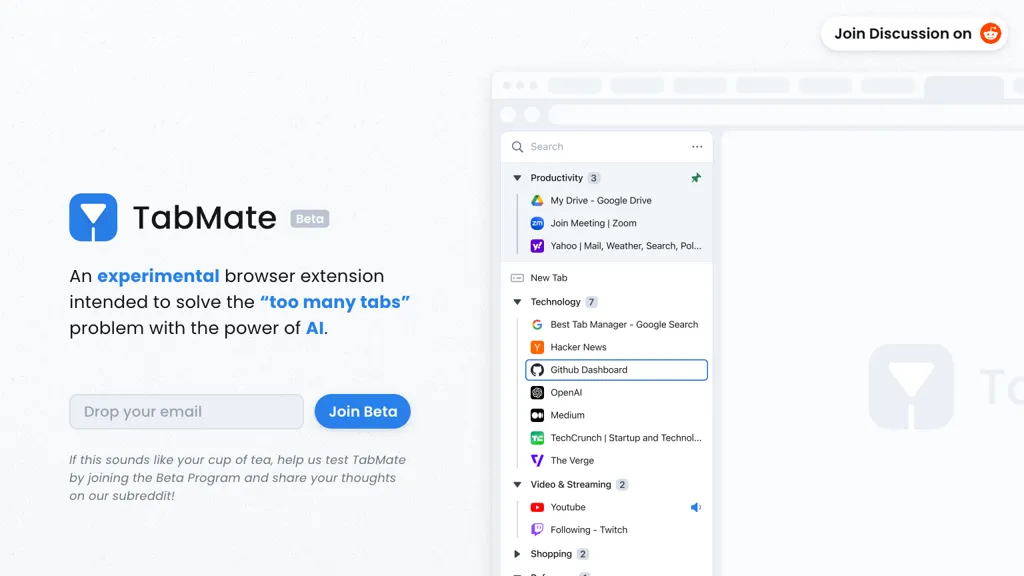
TabMate is an AI‑powered browser tab manager that automatically categorizes tabs by domain and date in Chrome, Edge, Brave, Vivaldi, and other Chromium‑based browsers.
It groups tabs into customizable collections, allowing users to pin important groups and individual tabs at the top of the list.
Keyboard shortcuts enable quick navigation and organization without relying on the mouse.
The extension supports dark and black mode, text labels, and color coding for visual distinction of tab groups.
Users can declutter or reorganize tabs on macOS or Windows, improving workspace clarity for professionals, students, and researchers.
TabMate pricing
FreeThis tool is free to use, with no credit card required.
Verify on the official pricing page.
Get started freeTabMate's key features
-
Customizable AI-generated groups
-
Pin tabs and groups
-
Keyboard shortcut navigation
-
Dark and black mode
-
Group by date and domain
-
Nested group tree structures
-
Text and color labels
TabMate use cases
-
Organize research tabs by domain and date for academic projects, using keyboard shortcuts and color‑coded labels to quickly switch between topics without cluttering the browser.
-
Streamline daily workflows by pinning essential productivity tools, grouping them into a 'Work' collection, and accessing them with a single shortcut for faster task transitions.
-
Maintain a distraction‑free browsing experience with dark mode and decluttered tab view, automatically sorting news sites and social media into separate collections to focus on high‑priority tasks.
TabMate user reviews
Would you recommend TabMate?
Who is TabMate for?
-
Chrome browsers
-
Digital organizers
-
Browser analysts
-
Tab managers
-
System administrators
TabMate FAQ
Is TabMate free?
Yes. TabMate is free to use and does not require a credit card.
What are the best alternatives to TabMate?
The closest alternatives to TabMate are TabCrunch, Phew ai tab, Pinbot, DeepTab and Pola Browser. You can compare them side by side in the alternatives section further down this page.


