
What is StoryVid?
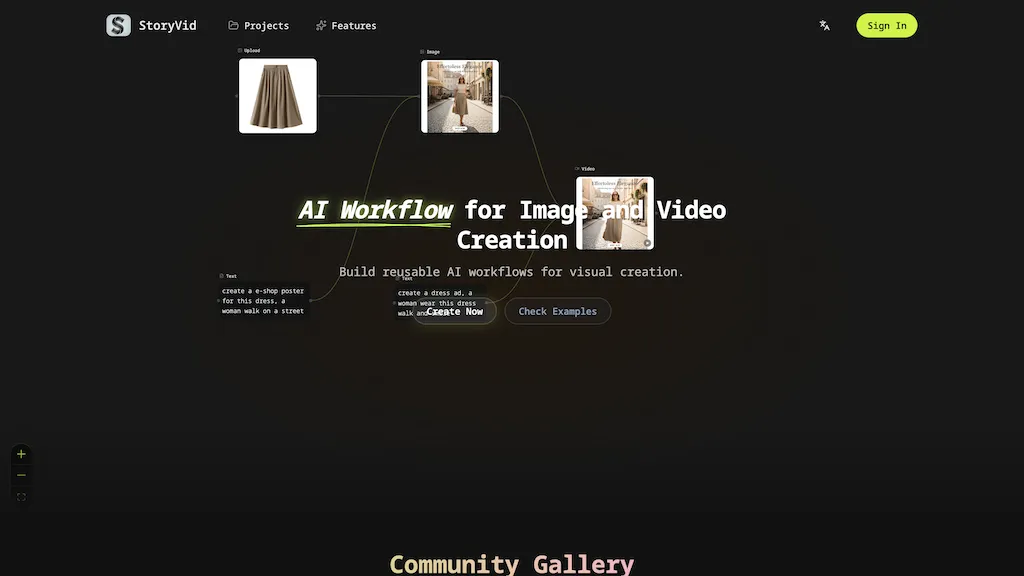
StoryVid is an AI visual workflow platform for creating images and videos using a flowchart-style, node-based editor.It supports text-to-image, image-to-image, and image-to-video generation with explicit parameter control for each node.
Users can build, save, and reuse workflow templates to produce consistent assets across campaigns.Batch processing and bulk export enable parallel generation of multiple inputs for e-commerce ads, short videos, and commercial content production.
A template library and community gallery provide ready-made workflows and examples for faster onboarding.Traceable, shareable workflows and card-based interactions support collaboration and lower the learning curve for creative teams and agencies.
StoryVid details
- Jurisdiction
- the jurisdiction in which storyvid.ai operates
- Built for
- Individuals
StoryVid tech specs
- Works with
- OpenAI / Sora Google / Veo Google / Nano Banana
StoryVid pricing
FreemiumStoryVid offers a free plan with paid upgrades available.
Verify on the official pricing page.
View plansStoryVid's key features
-
Flowchart-style node-based editor for creating images and videos
-
Supports text-to-image, image-to-image, and image-to-video generation with explicit per-node parameter control
-
Build, save, and reuse workflow templates and a template library/community gallery of ready-made workflows
-
Batch processing and bulk export for parallel generation
-
Traceable, shareable workflows with card-based interactions for collaboration
StoryVid use cases
-
Create on-brand social media content campaigns by chaining text-to-image and image-to-video nodes in Storyvid, using reusable workflow templates and per-node controls to lock in consistent color, typography and motion while batch-processing multiple sizes and variations for rapid, scalable publishing without coding
-
Develop high-volume product imagery and short videos for e-commerce by running image-to-image and image-to-video pipelines on hundreds of SKUs, applying shared templates and per-node parameter presets for consistent lighting and styling, and exporting ready-to-publish assets to accelerate catalog updates
-
Produce collaborative storyboards and animated pitches by generating concept art with text-to-image, refining frames via per-node edits, assembling sequences into image-to-video timelines, and sharing workflows for real-time team review and fast iteration to deliver polished client-ready videos
StoryVid user reviews
Based on 4 reviews, 50% of users recommend StoryVid, rated highly for value for money.
Liked for
Disliked for
Would you recommend StoryVid?
Who is StoryVid for?
-
Content creators
-
Video producers
-
Freelance designers
-
Creative teams
-
Product photographers
StoryVid FAQ
Is StoryVid free?
Partly. StoryVid has a free plan with usage limits, and paid plans unlock the full feature set.
What are the best alternatives to StoryVid?
The closest alternatives to StoryVid are Imagine.art, Flow AI Video, AI Canvas, VideoAI and VideoGen.io. You can compare them side by side in the alternatives section further down this page.
What does StoryVid do with my data?
Its privacy policy states that personal data is not sold or shared for marketing purposes. Data may be shared with third-party service providers that help run the product.
Which AI models does StoryVid use?
StoryVid is built on OpenAI / Sora, Google / Veo and Google / Nano Banana. Which models you can reach may depend on your plan.
Compliance, privacy and billing terms are as stated in each product's own published documentation and have not been independently verified by TopAI.tools.


