
What is SpeechGen?
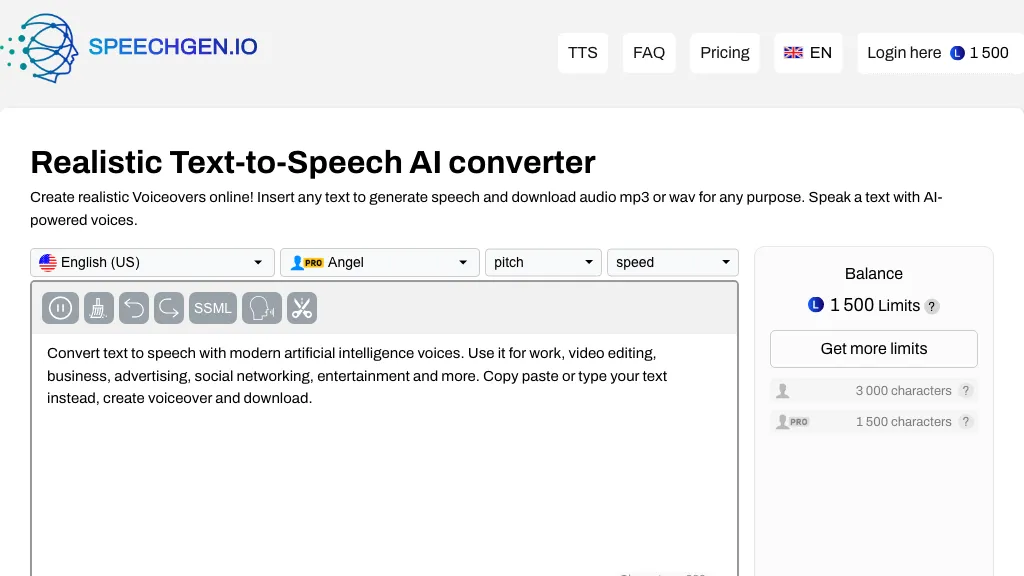
SpeechGen.io is an online text‑to‑speech platform that converts up to 2 million characters into audio using a library of 5,000 neural‑voice models across 150 languages. The interface supports voice selection, adjustable speed, pitch, and volume, and allows insertion of SSML tags for precise pauses, emphasis, and sound effects.
Users can embed background music from an AI library or upload their own tracks, and generate multi‑speaker files by tagging dialogue within a single document. The built‑in editor offers smart caching, enabling free regeneration of previously synthesized text.
SpeechGen.io provides downloadable audio in MP3, WAV, FLAC, and other formats, and exposes a REST API for integration with n8n, Zapier, or custom workflows. The platform includes tools for converting PDFs, DOCX, subtitles, and video files to speech, and for transcribing audio back to text in 140 languages.
SpeechGen details
- Built for
- Individuals
SpeechGen tech specs
- Works with
- OpenAI / Whisper
- Payment Processors
- Stripe PayPal
- Integrations
- Zapier n8n
SpeechGen pricing
PaidVerify on the official pricing page.
View plansSpeechGen's key features
-
5,000+ realistic voices
-
150 languages supported
-
Multiple speaker dialogue support
-
Smart Cache zero-cost regeneration
-
Built-in background music library
-
SSML tag insertion
-
REST API integration
SpeechGen use cases
-
Create engaging e‑learning audio modules from course transcripts in multiple languages, allowing adjustable voice parameters for clarity and learner engagement
-
Generate dynamic podcast intros and outros with background music and multi‑speaker tagging, using SSML for smooth transitions
-
Convert customer support knowledge‑base articles into downloadable audio guides so users can access information hands‑free on mobile devices
SpeechGen user reviews
Based on 29 reviews, 76% of users recommend SpeechGen, rated highly for ease of use.
Liked for
Disliked for
Would you recommend SpeechGen?
Who is SpeechGen for?
-
Video editors
-
Content creators
-
Business owners
-
Marketers
-
Advertisers
SpeechGen FAQ
How much does SpeechGen cost?
SpeechGen is a paid product with no free plan. Plans include 25,000 limits at $4.99, 65,000 limits at $9.99 ($13 23% off), 200,000 limits at $24.99 ($40 38% off) and 500,000 limits at $49.99 ($100 50% off).
Is SpeechGen safe to use?
SpeechGen carries the TopAI.tools verified mark, which we award after a manual review of pricing transparency, published terms, public following and working functionality. It has a substantial audience that is independently measured month to month.
Is SpeechGen good?
SpeechGen has a 76% recommendation rate from 29 reviewers on TopAI.tools. Reviewers rate it highest on ease of use and value for money.
What are the best alternatives to SpeechGen?
The closest alternatives to SpeechGen are Free Text-To-Speech, AiVOOV, TexttoSpeech.im, notevibes.com and lovevoice AI. You can compare them side by side in the alternatives section further down this page.
What does SpeechGen do with my data?
Its privacy policy states that personal data is not sold or shared for marketing purposes. Data may be shared with third-party service providers that help run the product.
Does SpeechGen have an API?
Yes. SpeechGen offers an API, so you can call it from your own applications instead of using the interface directly.
Which AI models does SpeechGen use?
SpeechGen is built on OpenAI / Whisper. Which models you can reach may depend on your plan.
What does SpeechGen integrate with?
SpeechGen connects with Zapier and n8n.
Compliance, privacy and billing terms are as stated in each product's own published documentation and have not been independently verified by TopAI.tools.


