
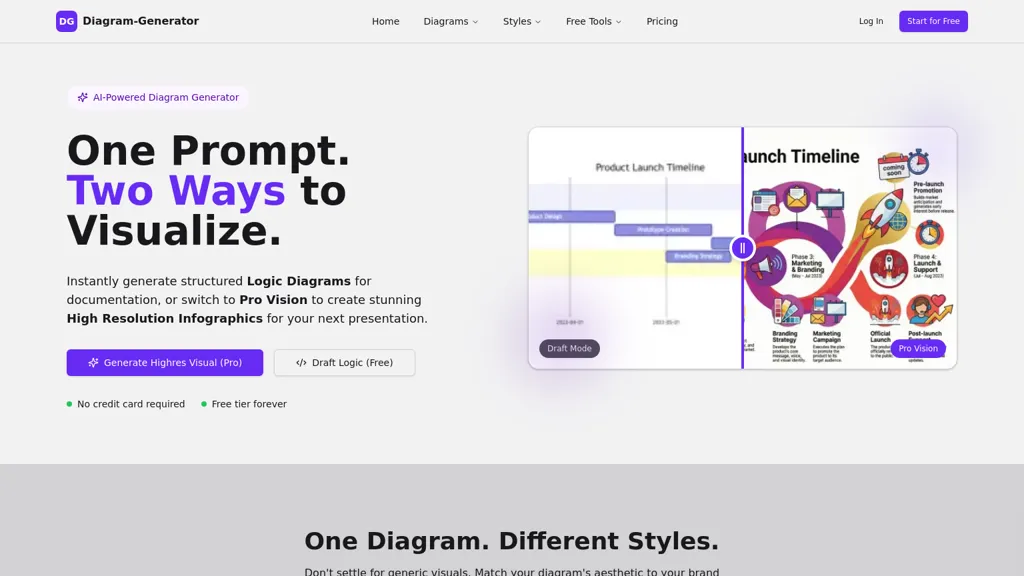
What is AI Diagram Generator?
Diagram Generator is an AI diagram generator that converts text prompts into structured logic diagrams, flowcharts, UML, ER, network diagrams and presentation-ready infographics.It provides a draft mode for quick text/ascii sketches and a render mode for high-resolution outputs up to 4K suitable for slides and reports.
The platform supports 16+ diagram types including flowchart, sequence, class, state, Gantt, mind map, Sankey, Venn, AWS architecture, organizational and funnel diagrams, and exports editable Mermaid code.
A style picker offers content-based templates (corporate, modern tech, editorial, 3D isometric, blueprint, hand-drawn, cyberpunk, paper cutout, retro pixel) to match visual identities.Pro mode adds web grounding for current data and layout- and lighting-aware rendering, plus a draft → refine → render workflow for iterative design.
Typical use cases include product documentation, technical architecture, marketing infographics, project planning and executive presentations, with options for public or private galleries and commercial licensing.
AI Diagram Generator details
- Built for
- Individuals
- Stated compliance
- SOC 2
Compliance as stated in AI Diagram Generator's own published documentation.
AI Diagram Generator tech specs
- Works with
- Anthropic / Claude Google / Nano Banana
- Cloud
- AWS
- Payment Processors
- Stripe
- Integrations
- Discord Figma
AI Diagram Generator pricing
Free trialAI Diagram Generator offers a free trial before requiring payment.
- Refund window
- 14 days
Verify on the official pricing page.
Start free trialAI Diagram Generator's key features
-
Converts text prompts into structured diagrams (logic diagrams, flowcharts, UML, ER, network diagrams, infographics)
-
Draft mode for quick text/ASCII sketches and render mode for high-resolution outputs up to 4K
-
Supports multiple diagram types (flowchart, sequence, class, state, Gantt, mind map, Sankey, Venn, AWS architecture, organizational, funnel) and exports editable Mermaid code
-
Style picker with content-based templates (corporate, modern tech, editorial, 3D isometric, blueprint, hand-drawn, cyberpunk, paper cutout, retro pixel)
-
Pro mode with web grounding for current data, layout- and lighting-aware rendering, and a draft→refine→render iterative workflow
AI Diagram Generator use cases
-
Turn plain-text process descriptions into professional flowcharts and UML diagrams for technical documentation, using style templates and layout-aware rendering to create presentation-ready 4K renders and editable Mermaid exports for developer handoff
-
Quickly draft ER diagrams, network maps and Gantt charts from natural-language prompts to plan product architecture and project timelines, then polish visuals with templates and export high-resolution 4K images for stakeholder presentations
-
Convert meeting notes or requirements into polished infographics and consistent diagram sets across reports, leveraging Pro web grounding and editable Mermaid export to iterate designs and maintain layout-aware accuracy
AI Diagram Generator user reviews
Based on 5 reviews, 80% of users recommend AI Diagram Generator, rated highly for ease of use.
Liked for
Disliked for
Would you recommend AI Diagram Generator?
Who is AI Diagram Generator for?
-
Software developers
-
System architects
-
Cloud engineers
-
Product managers
-
Technical writers
AI Diagram Generator FAQ
Is AI Diagram Generator free?
Not permanently. AI Diagram Generator gives you a free trial, after which a paid plan is required.
Is AI Diagram Generator safe to use?
AI Diagram Generator states SOC 2 compliance in its own published documentation.
What are the best alternatives to AI Diagram Generator?
The closest alternatives to AI Diagram Generator are Docugram, Flowchartai.tech, DiagramGPT by Eraser, VDraw AI and DGM. You can compare them side by side in the alternatives section further down this page.
What does AI Diagram Generator do with my data?
Its privacy policy states that personal data is not sold or shared for marketing purposes. Data may be shared with third-party service providers that help run the product.
Does AI Diagram Generator auto-renew or offer refunds?
AI Diagram Generator states a 14-day refund window.
Which AI models does AI Diagram Generator use?
AI Diagram Generator is built on Anthropic / Claude and Google / Nano Banana. Which models you can reach may depend on your plan.
What does AI Diagram Generator integrate with?
AI Diagram Generator connects with Discord and Figma.
Compliance, privacy and billing terms are as stated in each product's own published documentation and have not been independently verified by TopAI.tools.


