
Top 29 PS2 AI Filter Alternatives in 2026
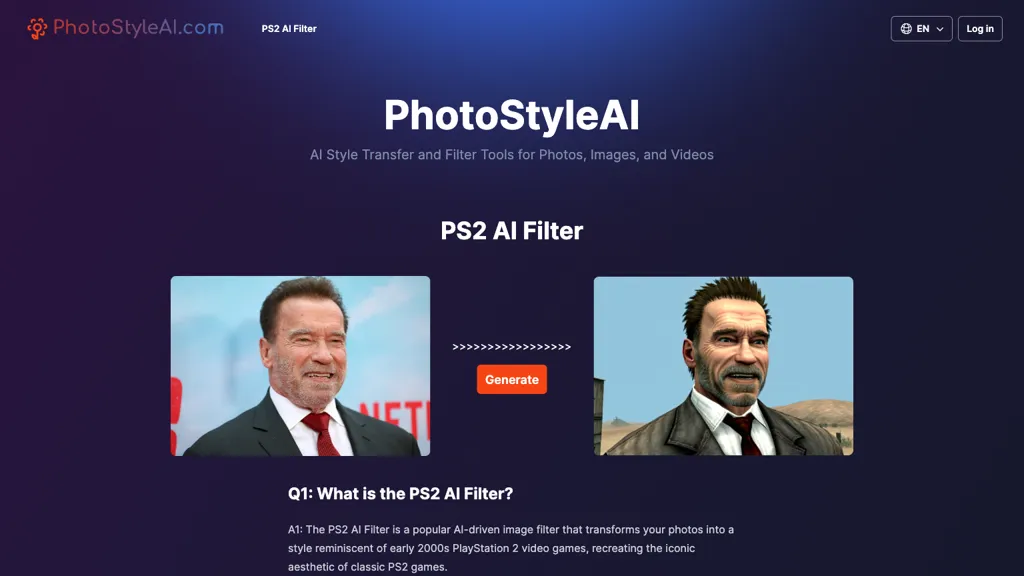
50% positive · 1 user review FreemiumThe "PS2 AI Style Transfer Filter" is an AI image filter that gives photos a nostalgic PlayStation 2 video game vibe. It transforms images effortlessly, offering endless creative opportunities for social media and digital art projects.
We've ranked 29 PS2 AI Filter alternatives, including 20 with a free plan. Rankings are based on feature coverage and user feedbacks.
Top-rated alternatives include AI Filter, A1.art, and Ghibli AI.
29 PS2 AI Filter Alternatives & Competitors, Ranked by User Reviews
Click Compare on any tool to compare it side-by-side with PS2 AI Filter.
 #1
AI Filter
#1
AI Filter
AI Filter applies AI‑driven style transfer to create anime, clay, pixel, sticker, and other artistic renditions. Upload PNG, JPG, JPEG, or WebP, preview styles, add optional English prompts, and download high‑resolution images or share directly.
 #2
A1.art
#2
A1.art
a1.art is an online AI image and video generator offering 250,000 collections and millions of filters for rapid editing. It supports style transfer, batch processing, category search, API integration, asset logging, and high‑resolution output.
 #3
Ghibli AI
#3
Ghibli AI
Ghibli AI is a free online tool that instantly transforms photos into Studio Ghibli-inspired artwork using AI. Simply upload an image to generate and download high-resolution Ghibli-style art in seconds.
 #4
Photify.AI
#4
Photify.AI
Photify AI transforms a single selfie into a stylized image in about two seconds, offering themed packs (cartoon, anime, retro, travel, etc.). Its quick processing, style transfer, and intuitive interface help creators, marketers, and hobbyists generate ready‑to‑use visuals.
 #5
Deep Art Effects
#5
Deep Art Effects
Deep Art AI transforms photos into artworks using style‑transfer algorithms, offering on‑device, privacy‑respecting editing across Windows, macOS, Linux, Android, and iOS. Features include up to 4× upscale, background removal, colorization, preset filters, batch processing, and an API for developers.
 #6
Ai Art Generator
#6
Ai Art Generator
Mobile AI photo editor that instantly applies style transfer, background replacement, and color adjustments. Fast processing enables designers, photographers, and marketers to create professional images in seconds, with automated updates and seamless export to e‑commerce and social‑media platforms.
- Catch deals before they expire
- Unlock tools matched to you
- Show off your AI stacks
Already a member? Sign in
 #7
Restylar
#7
Restylar
Restyle Image to Image AI transforms photos via natural‑language prompts, offering style transfers (paintings, sketches, anime, Disney‑Pixar), scene changes, and object editing. Upload JPG/PNG/WebP, choose resolution ratios, and select Lite, Standard, or Professional quality modes.
 #8
PicTools.AI
#8
PicTools.AI
PicTools.AI is a web‑based photo editor that lets users upload images and apply changes via text prompts or over 100 one‑click AI filters—background removal, outfit changes, smile addition, restoration, and artistic styles—without design skills.
 #9
Face to Many
#9
Face to Many
Transform face photos into artistic styles with Face Many AI. Choose from 3D, emoji, pixel art, video game, claymation, and toy styles instantly. User-friendly interface with privacy focus. Free and paid plans available.
 #10
ARTROBOT
#10
ARTROBOT
ArtRobot transforms photos into paintings or illustrations using over 150 neural‑network styles. Upload an image, pick a style, and receive an HD or 4K output in minutes—ideal for photographers, designers, and social‑media creators.
 #11
Photo AI Studio
#11
Photo AI Studio
AI Photo Studio delivers AI‑powered image and video creation, including generation, background removal, virtual try‑on, style libraries, advanced editing (skin, age, expression, eye color), outpainting, thumbnails, and direct social publishing via a web interface.
 #12
AI Mirror
#12
AI Mirror
Polyverse offers AI‑driven tools for photo and video editing, applying over 100 filters like Van Gogh and cartoon styles. AI Mirror restores and enhances images; Spellai generates high‑resolution images from prompts quickly.
 #13
Deep Dream Generator
#13
Deep Dream Generator
Online AI platform for transforming images and videos into art.
 #14
Ebank
#14
Ebank
AI Art Generator is a web platform that lets users upload images, apply style‑transfer brushes—Anime, Digital Art, Comic, Fantasy, Neon Punk—and choose resolutions from 1:1 to 16:9. It offers 2K upscaling, eye‑fix filtering, and project saving.
 #15
Image to Image AI
#15
Image to Image AI
Image to Image AI is a tool that intelligently edits and transforms your photos based on simple text prompts. It allows for complex alterations like style changes, object removal, and realistic detail enhancement while maintaining consistency.
 #16
AI Anime Image
#16
AI Anime Image
AI Anime Image is a tool that transforms photos into Studio Ghibli-inspired anime artwork using AI, applying vibrant colors and whimsical designs. It supports JPEG, PNG, and WEBP formats, offers three free trials, and prioritizes privacy while planning to expand styles.
 #17
AiSnap
#17
AiSnap
AI Snap applies AI painting techniques to photos and videos, offering a library of styles and one‑tap presets. Users can adjust brush detail, saturation, and composition for quick, on‑the‑fly visual enhancements.
 #18
Hair Filter
#18
Hair Filter
Hair Filter is an AI-powered hairstyle generator that lets you upload a selfie to try on dozens of realistic hairstyles and colors. It provides immediate visual feedback with high-quality images, perfect for experimenting or preparing for a stylist consultation.
 #19
1PhotoAI
#19
1PhotoAI
PhotoAI transforms a single selfie into high‑resolution stylized headshots, avatars, or themed images using over 2,000 preset styles. It offers fast, batch processing, AI photo enhancement, and integrates with social‑media workflows for quick profile and marketing updates.
 #20
Illusion diffusion web
#20
Illusion diffusion web
Illusion Diffusion converts uploaded photos into optical‑illusion artwork using Stable Diffusion and ControlNet. Users set prompts and Illusion Strength, adjust advanced controls, and select patterns to produce high‑quality, shareable visual transformations quickly.
 #21
Best Creator
#21
Best Creator
Best Creator AI transforms photos and videos with over 400 unique filters, including artistic styles and body enhancements, allowing users to create engaging visuals for social media and e-commerce, while supporting various formats for easy sharing.
 #22
AI Face Studio
#22
AI Face Studio
AI Face Studio lets users swap faces, change clothing, edit expressions, and convert faces into anime, 3D, cartoon, emoji, or sticker formats. It supports multi‑face edits in photos and videos, delivering high‑definition outputs for print, web, or games.
 #23
Face to Many(PS2Filters)
#23
Face to Many(PS2Filters)
Face Many is an AI tool that transforms uploaded images into various artistic styles like pixel art and street art. It prioritizes user privacy, supports high-resolution outputs, and is compatible with popular image formats for easy sharing.
 #24
Disney Pixar Image Generator
#24
Disney Pixar Image Generator
Upload JPG, PNG, or WebP (≤1 MB) to convert images into Disney Pixar or Studio Ghibli style artwork. Specify prompts to guide the transformation and receive high‑resolution JPEG or PNG outputs ready for printing or sharing, all in a simple, subscription‑free workflow.
 #25
Ghibliart.co
#25
Ghibliart.co
Ghibliart.co is transforms photos into Studio Ghibli-inspired artwork using AI, applying iconic styles like "Spirited Away" while preserving the original essence. Users can generate high-resolution, vibrant landscapes for printing or sharing.
 #26
Freephotoai
#26
Freephotoai
FreePhotoAI is an online image enhancement tool that enables users to replace backgrounds, apply artistic styles, and utilize filters. It features face style transfer and a virtual try-on option for visualizing outfits on images.
 #27
Ghibli-art.io
#27
Ghibli-art.io
ghibli-art.io is an AI tool that transforms photos into Ghibli-inspired, painterly anime art with cinematic lighting and soft palettes. It supports batch uploads, custom style prompts, and aspect ratios for fast, high-resolution social-media-ready outputs.
 #28
Instanice
#28
Instanice
Instanice AI Photo Filter Tool enhances photos with an array of intelligent filters and effects in seconds. It offers versatile styling options, from vintage to modern, providing innovative visual transformations for your images.
 #29
Partly
#29
Partly
This AI tool converts portrait photos into unique artworks.
Frequently Asked Questions
Why look for PS2 AI Filter alternatives?
Common reasons users switch from PS2 AI Filter:
- User satisfaction: PS2 AI Filter holds a 50% positive rating — some users report unmet expectations.
- Feature gaps: teams needing specific capabilities like Generate images may find a more focused alternative better suited to their workflow.
- Flexibility: exploring alternatives helps find tools that better match your team size, integrations, and budget.
What is the best alternative to PS2 AI Filter?
Based on 1 user review, AI Filter (100% positive) ranks as the top PS2 AI Filter alternative. AI Filter applies AI‑driven style transfer to create anime, clay, pixel, sticker, and other artistic renditions. Upload PNG, JPG, JPEG, or WebP, previ It is available on a Paid plan starting from $4.99.
How do the top PS2 AI Filter alternatives compare?
| Tool | Pricing | Starting Price | User Rating |
|---|---|---|---|
| PS2 AI Filter this tool | Freemium | — | 50% (1) |
| AI Filter | Paid | $4.99 | 100% (1) |
| A1.art | Freemium | — | 80% (15) |
| Ghibli AI | Free | — | 25% (4) |
| Photify.AI | Free | — | 100% (2) |
| Deep Art Effects | Free trial | — | 100% (2) |
Are there free PS2 AI Filter alternatives?
Yes, 20 free alternatives found in our list: A1.art, Ghibli AI, Photify.AI. and 17 more — use the pricing filter above to see them all.
What should I look for in a PS2 AI Filter alternative?
- Core capabilities: confirm the tool supports Generate images, Edit photos, Add concepts.
- Pricing transparency: look for clear free plan, trial period, or tiered pricing — avoid tools that hide costs.
- User reviews: check both the satisfaction percentage and the number of reviews; a high score from few users is less reliable.
- Integrations: verify it connects with your existing stack before committing.
- Support and updates: active development and responsive support are strong signals of a maintained product.
Which PS2 AI Filter alternative has the highest user rating?
AI Filter has the highest satisfaction score among PS2 AI Filter alternatives, with 100% positive from 1 user review. It is available on a Paid plan starting from $4.99.
What are PS2 AI Filter alternatives used for?
- Generate images
- Edit photos
- Add concepts
- Transform images
- Enhance photos