Best Grok Word Alternatives in 2026
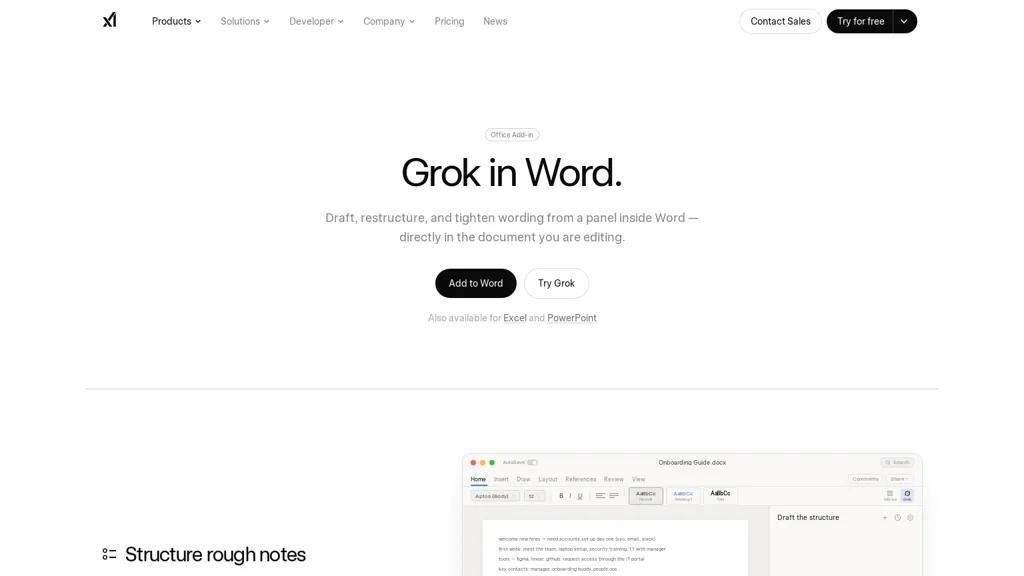
No user reviews yet Free trialGrok Word is a Microsoft Word add-in that embeds an AI writing assistant in a docked panel to tighten and restructure text, convert notes into formatted headings/lists, normalize styles across Word, Excel and PowerPoint files, and apply edits with autosave.
We've ranked 29 Grok Word alternatives, including 20 with a free plan. Rankings are based on feature coverage and user feedbacks.
Top-rated alternatives include AI Perfect Assistant, ParagraphAI, and Microsoft Copilot.
29 Grok Word Alternatives & Competitors, Ranked by User Reviews
Click Compare on any tool to compare it side-by-side with Grok Word.
#1
AI Perfect Assistant
AI Perfect Assistant adds ChatGPT, Gemini, Claude, and 60+ LLMs to Office 365 apps, delivering real‑time grammar, style checks, drafting, summarization, translation, and formula generation to streamline writing, analysis, and teamwork across Word, Excel, PowerPoint, Outlook, Teams, and OneNote.
#2
ParagraphAI
ParagraphAI offers real‑time grammar correction, one‑tap email drafting, and instant summarization of web pages and PDFs. It provides multilingual translation, customizable tone filters, a template library, and an instruction engine for repetitive tasks across mobile, desktop, and Chrome.
Copilot allows users to ask questions, receive complete answers, research topics, and create content.
Notion AI is an integrated AI tool that automates tasks, generates summaries and offers writing assistance within the Notion drag-and-drop text editor. A free trial is available with an add-on subscription for unlimited usage.
#5
Law Insider
Law Insider AI Assistant provides AI-driven contract drafting, clause generation and validation against a public database, plus Word redlining, playbook-based drafting rules, clause search and summarization to accelerate reviews, negotiations and risk assessment.
#6
The-good-AI
AI Essay Writer is a web‑based tool that generates academic essays, outlines, and paragraph suggestions based on topic, type, tone, and citations. It includes grammar checks, AI detection, and reference formatting, aiding students and researchers.
- Personalized recommendations
- Custom collections
- Save favorites
Already a member? Sign in
#7
Wordvice AI
Wordvice AI provides real‑time grammar checking, paraphrasing, translation, summarization, plagiarism and AI‑content detection, plus citation generation across multiple languages. It integrates with Chrome and Word, supporting students, researchers, professionals, teams, and offers on‑demand human editing.
#8
AI-Writer
AI‑Writer.com generates concise, cited answers to academic questions from 100 million open‑science papers, shows source paragraphs, offers BibTeX, supports APA/MLA/Chicago, and lets users build structured reviews via drag‑and‑drop and download them as HTML.
This AI tool is a free online writing assistant with advanced features to enhance writing skills and prevent plagiarism.
#10
QuillWord
Quillword is an AI-driven writing and research assistant that enhances academic efficiency with features like autocompletion, paraphrasing, citation support, collaborative tools, and automated content generation for essays and professional communications.
#11
CoWriter AI
CoWriter AI assists students, researchers, and writers by generating text, providing unlimited suggestions, auto‑formatting citations (APA, MLA, Chicago), offering advanced grammar and plagiarism checks, and supporting interactive drafting with secure, private editing and export options.
#12
ProWritingAid
ProWritingAid is an AI writing assistance tool that offers suggestions for grammar, style, and improvement with the touch of a button.
#13
Word.studio
Word.Studio offers 150+ AI-powered tools for content creation, research, and brand development, providing article, essay, and business plan generators, creative writing aids, marketing support, educational utilities, and graphic asset generators.
#14
Microsoft 365 Co-pilot
Microsoft 365 Copilot is an AI-powered tool that integrates with Microsoft 365 apps to enhance creativity and skill development, featuring a new business chat feature for project summarization. It prioritizes security, compliance, and privacy.
AI Writer offers AI‑powered tools to generate articles, blogs, captions, emails, and ads. Set tone, character limits, and platforms for titles, outlines, and meta descriptions. Built‑in expand, shorten, paraphrase, summarize, grammar, keyword, and translation features streamline editing and ensure quality.
#16
aidocmaker.com
AI Doc Maker produces PDFs, Word, PowerPoint, and Excel files from prompts or uploads, applying layouts, tables, and multilingual formatting. It provides templates for reports, contracts, proposals, and spreadsheets, streamlining document creation for professionals.
#17
HyperWrite
Hyperwrite is an AI-powered writing tool available as a free Chrome extension that generates original paragraphs and helps overcome writer's block, increasing productivity for professionals, students, and creators worldwide.
#18
Writelyai
Write AI is an advanced writing tool that uses machine learning to replicate human-like writing and overcome writer's block, with a free trial and cancellation at any time.
#19
InstaText
InstaText is an AI editing assistant that highlights suggestions for clarity, flow, word choice, and grammar. Users can accept or reject each change, select dialect, formality, or add custom terms. It works on Chrome, Gmail, Slack, Docs, Overleaf, and Word.
#20
Humanize AI Text
Humanize AI Text rewrites AI‑generated drafts into natural, readable prose that passes AI detection tools with a 100% human score. It accepts PDF/DOCX uploads, preserves formatting, supports multiple languages, and lets users freeze keywords for SEO.
#21
Inkwise AI
InkWise is an AI tool for efficient document creation and management, offering content extraction, predictive writing suggestions, and chat functionality for real-time interaction. It features customizable templates and comprehensive reference management for various professional fields.
#22
JotBot AI
JotBot is an AI document assistant that autocompletes text, identifies sources on the fly, and summarizes PDFs or websites inside a word processor. It drafts in your style, enables quick edits, and lets you chat for research or citations.
#23
SlidesPilot
SlidesPilot converts PDFs, Word docs, URLs, and text into editable PowerPoint decks with AI‑generated summaries, charts, tables, diagrams, and royalty‑free images. Users can edit layouts via a block editor and export to PPTX, Google Slides, PDF, PNG, or JPG.
#24
EssayWriter io
EssayWriter is an AI‑powered platform that drafts, edits, and checks essays, offering real‑time writing assistance, integrated academic database citations in APA/MLA/Chicago, plagiarism detection, and PDF/DOC export for students, educators, and researchers.
#25
Lex
Lex.Page is an AI-powered writing assistance tool that offers a Google Docs-style editor, advanced writing suggestions, and a distraction-free environment to help users write faster and more accurately.
#26
AiText - AI Writing Assistant
AIText corrects grammar, spelling, and punctuation while paraphrasing to improve clarity. It enhances vocabulary and sentence structure, generating concise emails, articles, reports, essays, and social posts from brief prompts in over 20 languages. Ideal for students, marketers, and professionals.
#27
Magical AI
Magic AI is a free AI tool that assists with writing tasks using text expansion, autofill, and data extraction features.
#28
Writekit
Writekit plugs into editors to generate content, expand ideas, and support real‑time collaboration. It learns your brand voice from existing material, adapts over time, offers multi‑user drafting, dark mode, 20+ languages, and rapid AI‑generated transitions, streamlining workflow.
#29
AI Cowriter
AI Cowrit is a writing tool that suggests words and phrases as you type, helping you write faster.
Frequently Asked Questions
Why look for Grok Word alternatives?
Common reasons users switch from Grok Word:
- Cost: Grok Word is a Free trial tool — users often look for more affordable or free options.
- Feature gaps: teams needing specific capabilities like Edit Documents may find a more focused alternative better suited to their workflow.
- Flexibility: exploring alternatives helps find tools that better match your team size, integrations, and budget.
What is the best alternative to Grok Word?
Based on 6 user reviews, AI Perfect Assistant (50% positive) ranks as the top Grok Word alternative. AI Perfect Assistant adds ChatGPT, Gemini, Claude, and 60+ LLMs to Office 365 apps, delivering real‑time grammar, style checks, drafting, summarizatio It is available on a Freemium plan.
How do the top Grok Word alternatives compare?
| Tool | Pricing | Starting Price | User Rating |
|---|---|---|---|
| Grok Word this tool | Free trial | — | — |
| AI Perfect Assistant | Freemium | — | 50% (6) |
| ParagraphAI | Free | — | — |
| Microsoft Copilot | Free | — | 82.1% (28) |
| Notion AI | Freemium | — | 80% (20) |
| Law Insider | Subscription | $51/mo | 75.9% (29) |
Are there free Grok Word alternatives?
Yes, 20 free alternatives found in our list: AI Perfect Assistant, ParagraphAI, Microsoft Copilot. and 17 more — use the pricing filter above to see them all.
What should I look for in a Grok Word alternative?
- Core capabilities: confirm the tool supports Edit Documents, Rewrite Content, Format Headings.
- Pricing transparency: look for clear free plan, trial period, or tiered pricing — avoid tools that hide costs.
- User reviews: check both the satisfaction percentage and the number of reviews; a high score from few users is less reliable.
- Integrations: verify it connects with your existing stack before committing.
- Support and updates: active development and responsive support are strong signals of a maintained product.
Which Grok Word alternative has the highest user rating?
Word.studio has the highest satisfaction score among Grok Word alternatives, with 100% positive from 2 user reviews. It is available on a Freemium plan.
What are Grok Word alternatives used for?
- Edit Documents
- Rewrite Content
- Format Headings
- Integrate Workflows
- Manage Versions