
What is AIFormatter?
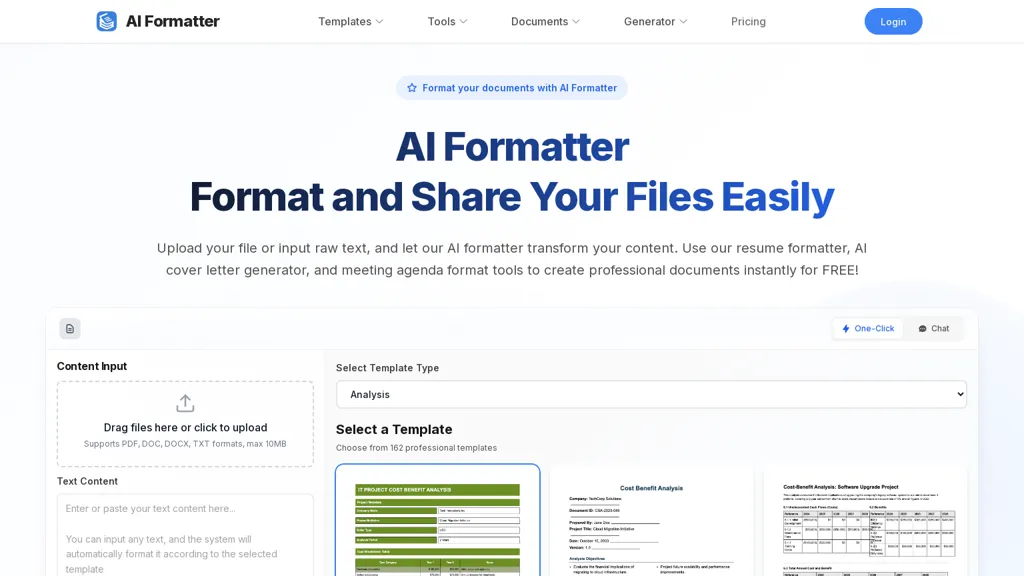
AI Formatter formats documents using AI templates and specialized tools for resumes, cover letters, meeting agendas, invoices, receipts, quotations and business letters.It supports PDF, DOC, DOCX, TXT and raw text uploads (up to 10 MB) and offers a library of 162 professional templates, including ATS-optimized resume and cover letter layouts.
Users upload a file or enter text, select a template type, and the AI applies consistent structure and formatting while preserving original content.Formatted documents open in an online editor for on-page edits, layout adjustments and exporting to PDF or Word for sharing.
Job seekers benefit from the resume formatter and cover letter generator for ATS compatibility; HR and administrative teams can produce meeting agendas, invoices and letters; small businesses and freelancers can generate quotations, receipts and proposals.
Keywords.document formatter, AI resume formatter, cover letter generator, meeting agenda format, invoice generator, templates library.
AIFormatter details
- Jurisdiction
- State of Colorado, USA
- Built for
- Individuals
AIFormatter pricing
FreemiumAIFormatter offers a free plan with paid upgrades available.
- Refund window
- 24 days
- Auto-renewal
- Yes
Verify on the official pricing page.
View plansAIFormatter's key features
-
AI templates and specialized formatting for resumes, cover letters, meeting agendas, invoices, receipts, quotations, and business letters
-
Supports PDF, DOC, DOCX, TXT and raw text uploads (up to 10 MB)
-
Library of 162 professional templates including ATS-optimized resume and cover letter layouts
-
AI preserves original content while applying consistent structure and formatting based on selected template
-
Online editor for on-page edits, layout adjustments, and export to PDF or Word
AIFormatter use cases
-
Create an ATS-optimized resume and matching cover letter by uploading your existing PDF/DOC/DOCX/TXT, preserving content while reformatting to industry-ready layouts from 162 templates and exporting final versions to PDF or Word for easy job applications
-
Draft professional meeting agendas, minutes and business letters in the online editor using pre-built templates—collaborate with colleagues, import notes from uploaded files, and produce consistent, printable PDFs for internal and client use
-
Generate polished invoices, receipts, quotations and proposals using specialized templates that auto-fill client and pricing details, maintain branding, and export compliant PDF/Word documents for billing and record-keeping
AIFormatter user reviews
Based on 6 reviews, 67% of users recommend AIFormatter, rated highly for quality results.
Liked for
Disliked for
Would you recommend AIFormatter?
Who is AIFormatter for?
-
Marketing professionals
-
Document editors
-
Business owners
-
Template designers
-
Small business owners
AIFormatter FAQ
Is AIFormatter free?
Partly. AIFormatter has a free plan with usage limits, and paid plans unlock the full feature set.
What are the best alternatives to AIFormatter?
The closest alternatives to AIFormatter are UseResume AI, Rezi, Resumecoach.com, ResuFit and ResumeBuilder.com. You can compare them side by side in the alternatives section further down this page.
What does AIFormatter do with my data?
AIFormatter states that customer content is not used to train its models. Its privacy policy states that personal data is not sold or shared for marketing purposes. Data may be shared with third-party service providers that help run the product.
Does AIFormatter auto-renew or offer refunds?
AIFormatter subscriptions renew automatically until you cancel. It states a 24-day refund window.
Compliance, privacy and billing terms are as stated in each product's own published documentation and have not been independently verified by TopAI.tools.


