
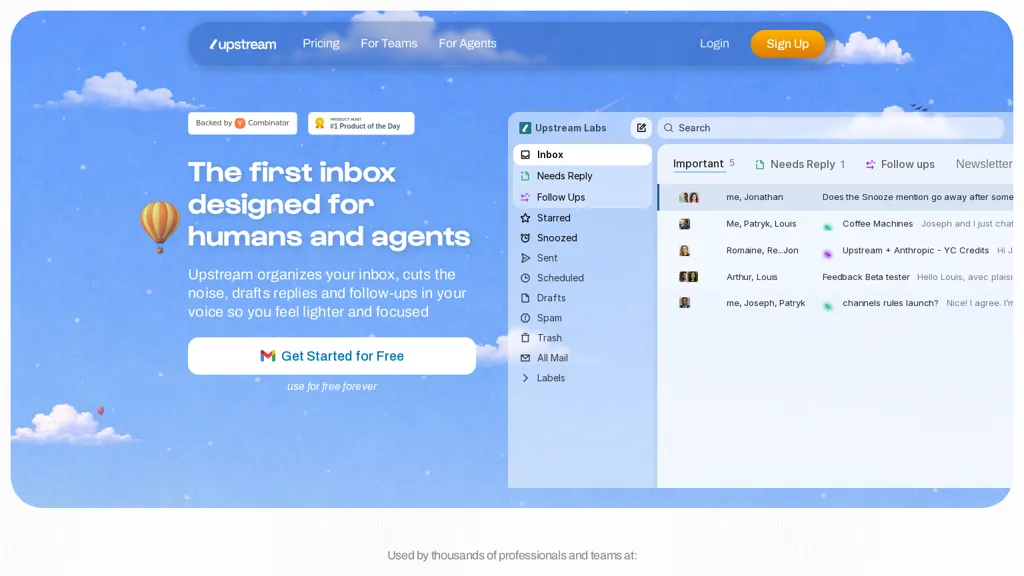
What is Upstream?
Upstream is an AI email assistant for inbox management and email automation.It sorts messages into folders such as Needs Reply, Follow-ups, Newsletters, VIP, Starred, Snoozed, Drafts, and Spam to surface high-priority threads.
Context-aware AI generates personalized reply drafts using thread history, recipient patterns, and learned voice and tone, with editable drafts available inline.Automated follow-up reminders and timed resurfacing bring important conversations back to the top of the inbox.
Integrations with Gmail, calendar, meeting notes, GitHub, Linear, and knowledge bases let the assistant pull project and meeting context.Features include multi-account management, keyboard shortcuts, a command palette for search and actions, team comments, private discussions, and task agents for tracking receipts, booking meetings, and drafting notes.
Target users include sales and pricing teams, customer success and support, product and engineering teams, and professionals who need prioritized, context-aware email workflows.
Upstream pricing
FreemiumVerify on the official pricing page.
View plansUpstream's key features
-
Smart inbox sorting into labeled folders (Needs Reply, Follow-ups, Newsletters, VIP, Starred, Snoozed, Drafts, Spam)
-
Context-aware AI reply drafting using thread history, recipient patterns, and learned voice/tone with editable inline drafts
-
Automated follow-up reminders and timed message resurfacing
-
Integrations with Gmail, calendar, meeting notes, GitHub, Linear, and knowledge bases to pull project and meeting context
-
Task agents for automating tasks (tracking receipts, booking meetings, drafting notes)
Upstream use cases
-
Organize multi-account inboxes with Upstream to auto-prioritize critical emails, surface and resurface important threads, add team comments and shortcuts for collaborative triage, and sync with Gmail, calendars and dev tools to convert messages into tracked tasks
-
Draft context-aware replies and reusable templates using AI that reference message history and calendar context, accelerate response time across teams, and automate follow-up reminders and scheduled resurfacing so nothing falls through the cracks
-
Automate email-driven workflows by integrating Upstream with dev tools and calendars to turn emails into tickets or tasks, assign owners via task agents, trigger follow-up sequences, and keep stakeholders aligned with shared inbox rules and commenting
Upstream user reviews
Would you recommend Upstream?
Who is Upstream for?
-
Sales managers
-
Pricing managers
-
Customer success managers
-
Support managers
-
Product managers
Upstream FAQ
Is Upstream free?
Partly. Upstream has a free plan with usage limits, and paid plans unlock the full feature set. Plans include Upstream pro at $20 per member/mo billed yearly and Upstream max at $60 per member/mo billed yearly.
What are the best alternatives to Upstream?
The closest alternatives to Upstream are Inbox Zero, Fyxer.ai, MailMaestro, Serif and AI Mail Assistant. You can compare them side by side in the alternatives section further down this page.
Is there a mobile app for Upstream?
Yes. Upstream has a mobile app alongside its web version.


