
What is Unwatermark AI?
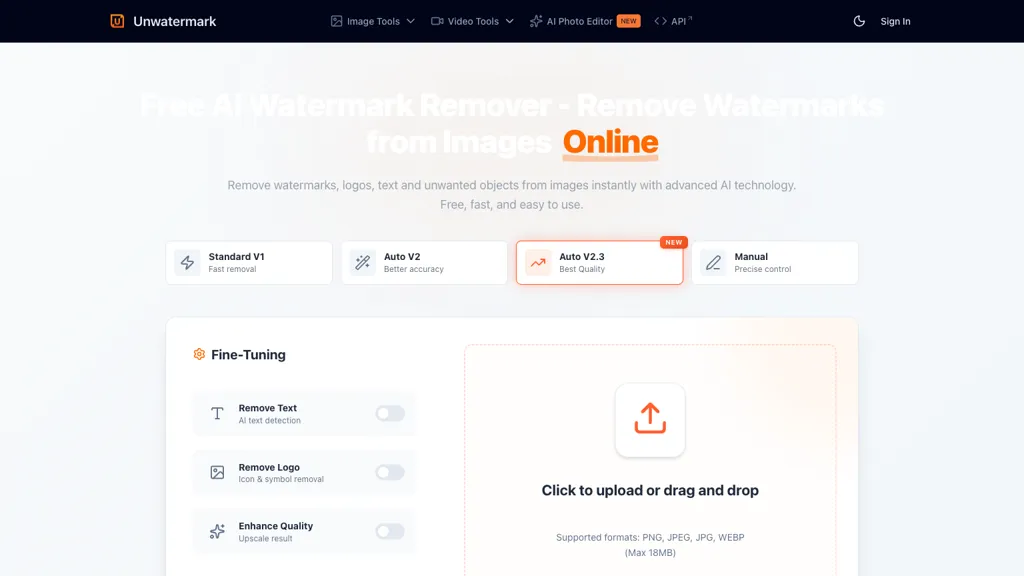
Unwatermark is a web-based tool designed for the efficient removal of watermarks, logos, and unwanted text from images and videos. It employs advanced AI image recognition technology to detect and eliminate these elements while preserving the original quality of the content.
Users can choose between automatic and manual removal modes, with batch processing capabilities allowing for the simultaneous handling of multiple images. Supported formats include PNG, JPEG, WEBP for images, and MP4, M4V, MOV for videos. The user-friendly interface facilitates easy navigation for all skill levels.
The tool also provides a preview function to review changes before finalizing the download. Unwatermark maintains strict privacy measures, ensuring uploaded content remains secure. Whether you're looking to enhance personal media or manage professional assets, Unwatermark offers a streamlined solution to watermark removal.
Unwatermark AI details
- Built for
- Individuals
Unwatermark AI pricing
Free trial- Auto-renewal
- Yes
Verify on the official pricing page.
Start free trialUnwatermark AI's key features
-
AI image recognition
-
Automatic and manual removal modes
-
Batch processing capabilities
-
Supports multiple formats (PNG, JPEG, WEBP, MP4, M4V, MOV)
-
Preview function before finalizing download
Unwatermark AI use cases
-
Easily remove watermarks from images used in social media posts to enhance visual appeal while maintaining high quality, making your content more engaging and professional-looking
-
Utilize Unwatermark to batch process a series of promotional videos by eliminating logos and distracting text, ensuring clarity and focus on the main message for an impactful presentation
-
Quickly prepare product images for your online store by removing any watermarks or logos from supplier images, allowing you to create an attractive and uniform catalog that better showcases your offerings
Unwatermark AI user reviews
Based on 17 reviews, 65% of users recommend Unwatermark AI, rated highly for ease of use.
Liked for
Disliked for
Would you recommend Unwatermark AI?
Who is Unwatermark AI for?
-
Content creators
-
Image editors
-
Video editors
-
Marketing specialists
-
E-commerce sellers
Unwatermark AI FAQ
Is Unwatermark AI free?
Not permanently. Unwatermark AI gives you a free trial, after which a paid plan is required. Plans include 1000 credits/month at $0.010, 100000 credits at $0.010, 30000 credits at $0.011 and 10000 credits at $0.012.
Is Unwatermark AI safe to use?
Unwatermark AI carries the TopAI.tools verified mark, which we award after a manual review of pricing transparency, published terms, public following and working functionality. It has a substantial audience that is independently measured month to month.
Is Unwatermark AI good?
Unwatermark AI has a 65% recommendation rate from 17 reviewers on TopAI.tools. Reviewers rate it highest on ease of use and quality of results.
What are the best alternatives to Unwatermark AI?
The closest alternatives to Unwatermark AI are videowatermarkremover.org, Dewatermark AI, VideoWatermarkRemove, VideoWatermarkRemover AI and Remove Watermark - MarkGone. You can compare them side by side in the alternatives section further down this page.
What does Unwatermark AI do with my data?
Its privacy policy states that personal data is not sold or shared for marketing purposes.
Does Unwatermark AI auto-renew or offer refunds?
Unwatermark AI subscriptions renew automatically until you cancel.
Does Unwatermark AI have an API?
Yes. Unwatermark AI offers an API, so you can call it from your own applications instead of using the interface directly.
Is there a mobile app for Unwatermark AI?
Yes. Unwatermark AI has a mobile app alongside its web version.
Compliance, privacy and billing terms are as stated in each product's own published documentation and have not been independently verified by TopAI.tools.


