
What is QMD - Query Markup Documents?
qmd is an on-device CLI search engine for documentation, markdown notes, meeting transcripts, and knowledge bases.It indexes files and collections, preserves tree structure, and returns matching subdocuments with contextual snippets.
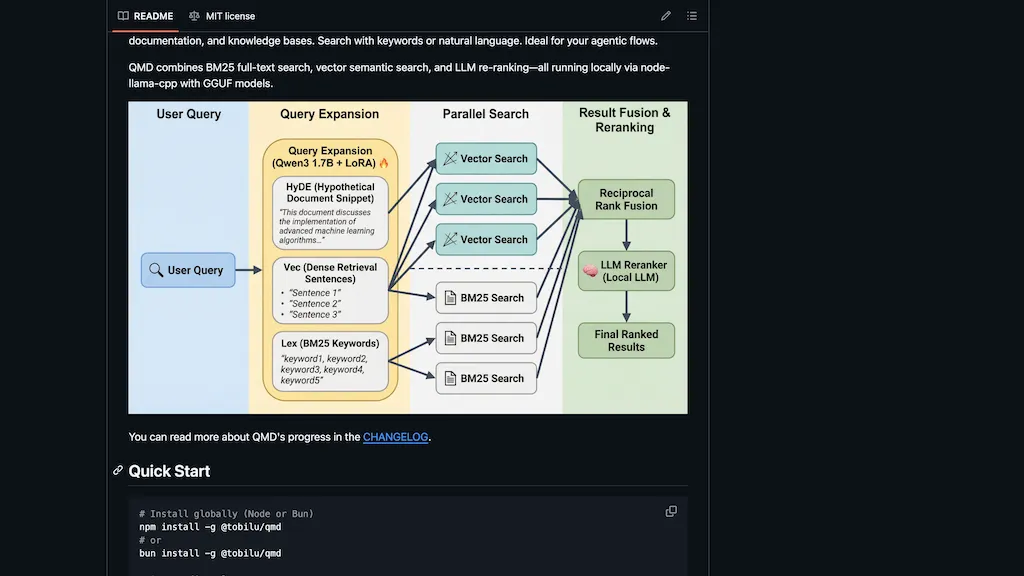
Search modes include BM25 full-text, vector semantic search, and LLM re-ranking, with embeddings generated locally via node-llama-cpp and gguf models.CLI commands support collection management, context injection, embedding generation, keyword and semantic queries (qmd vsearch, qmd search, qmd query) and document retrieval (qmd get).
The tool improves retrieval relevancy for LLM-driven workflows and agentic flows by supplying focused context for downstream models.Target users include developers, knowledge workers, teams, and researchers who need local, private search and fast access to project documentation.
Installation and execution are supported via npm, bun, npx, and bunx for Node-based environments.
QMD - Query Markup Documents pricing
FreeThis tool is free to use, with no credit card required.
Verify on the official pricing page.
Get started freeQMD - Query Markup Documents's key features
-
On-device CLI search engine for documentation, markdown notes, meeting transcripts, and knowledge bases
-
Indexes files and collections, preserves tree structure, and returns matching subdocuments with contextual snippets
-
Search modes: BM25 full-text, vector semantic search, and LLM re-ranking
-
Local embeddings generation via node-llama-cpp and gguf models
-
CLI commands for collection management, context injection, embedding generation, keyword/semantic queries (qmd vsearch, qmd search, qmd query), and document retrieval (qmd get)
QMD - Query Markup Documents use cases
-
Build a private, on-device knowledge base for company docs, meeting transcripts, and SOPs using qmd's tree-structured indexing and contextual subdocument retrieval so teams can query precise passages via the CLI while keeping data local and leveraging local embeddings plus LLM re-ranking for higher-quality answers
-
Accelerate developer workflows by performing fast CLI semantic search across codebases, READMEs, and design docs with qmd's BM25 + vector search and contextual subdocument returns to feed targeted context into LLMs for code generation, debugging, and PR drafting
-
Create an offline research assistant that indexes papers, notes, and interview transcripts with qmd's local vector search and LLM re-ranking to surface exact subdocuments and quoted passages for literature reviews, summarization, and reproducible citations
QMD - Query Markup Documents user reviews
Would you recommend QMD - Query Markup Documents?
Who is QMD - Query Markup Documents for?
-
Software developers
-
Knowledge workers
-
Research scientists
-
Project managers
-
Content writers
QMD - Query Markup Documents FAQ
Is QMD - Query Markup Documents free?
Yes. QMD - Query Markup Documents is free to use and does not require a credit card.
Does QMD - Query Markup Documents have an API?
Yes. QMD - Query Markup Documents offers an API, so you can call it from your own applications instead of using the interface directly.