
What is Photolaria?
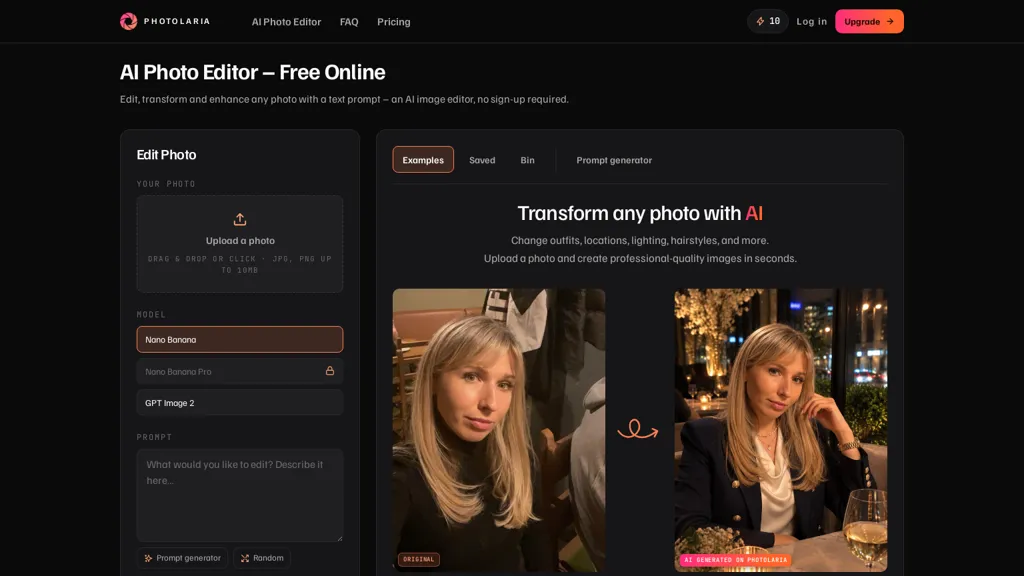
Photolaria AI Photo Editor is an online AI image editor with drag-and-drop upload for JPG and PNG files (up to 10 MB).It supports prompt-based edits and a built-in prompt generator to change outfits, backgrounds, lighting, hairstyles, and stylistic looks such as black-and-white or film-noir.
Core tools include background and model removal, preset styles, and targeted portrait and lifestyle adjustments.The private gallery stores generations by default and provides a bin with 30-day restore and permanent deletion options.
Guest sessions are available for temporary use, and profile controls let users delete individual photos or entire histories.Image export and re-editing are supported, while generation limits and account management are handled in the app; review the terms for usage and commercial-rights details.
Photolaria details
- Jurisdiction
- Poland
- Built for
- Individuals
- Stated compliance
- CCPA
Compliance as stated in Photolaria's own published documentation.
Photolaria tech specs
- Works with
- Google / Nano Banana ByteDance / Seedream
- Payment Processors
- Stripe
Photolaria pricing
Freemium- Refund window
- 14 days
- Auto-renewal
- Yes
Verify on the official pricing page.
View plansPhotolaria's key features
-
Drag-and-drop upload for JPG and PNG files (up to 10 MB)
-
Prompt-based editing with built-in prompt generator for outfits, backgrounds, lighting, hairstyles, and stylistic looks
-
Core editing tools: background removal, model removal, preset styles, and targeted portrait and lifestyle adjustments
-
Private gallery with default storage, bin with 30-day restore, and permanent deletion; profile controls for deleting individual photos or entire histories
-
Image export and re-editing; guest sessions; in-app generation limits and account management
Photolaria use cases
-
Create high-converting ecommerce product photos with Photolaria by drag-and-drop uploads, remove or replace backgrounds, apply lighting and retouching presets and use the prompt generator for outfit/background tweaks to produce consistent, ready-to-export images without Photoshop or advanced editing skills
-
Iterate marketing and campaign visuals quickly using prompt-driven edits and the built-in prompt generator to swap outfits, hairstyles and backgrounds across model shots, maintain brand-consistent styles with presets and store versioned assets in a private gallery for stakeholder review
-
Deliver polished portrait retouching and social media content for clients by combining portrait presets, background/model removal and prompt-based style suggestions, then export optimized files and share drafts securely through the private gallery
Photolaria user reviews
Would you recommend Photolaria?
Who is Photolaria for?
-
Graphic designers
-
Fashion designers
-
Portrait photographers
-
Product designers
-
E-commerce sellers
Photolaria FAQ
Is Photolaria free?
Partly. Photolaria has a free plan with usage limits, and paid plans unlock the full feature set. Plans include Starter at $9.99/mo, Pro at $29.99/mo and Studio at $99.99/mo.
Is Photolaria safe to use?
Photolaria states CCPA compliance in its own published documentation.
What are the best alternatives to Photolaria?
The closest alternatives to Photolaria are ImagetoImage AI, PicTools.AI, ImgToImg.ai, Photo AI Studio and Pixlr. You can compare them side by side in the alternatives section further down this page.
What does Photolaria do with my data?
Photolaria states that customer content is not used to train its models. Its privacy policy states that personal data is not sold or shared for marketing purposes. Data may be shared with third-party service providers that help run the product.
Does Photolaria auto-renew or offer refunds?
Photolaria subscriptions renew automatically until you cancel. It states a 14-day refund window.
Which AI models does Photolaria use?
Photolaria is built on Google / Nano Banana and ByteDance / Seedream. Which models you can reach may depend on your plan.
Compliance, privacy and billing terms are as stated in each product's own published documentation and have not been independently verified by TopAI.tools.


