
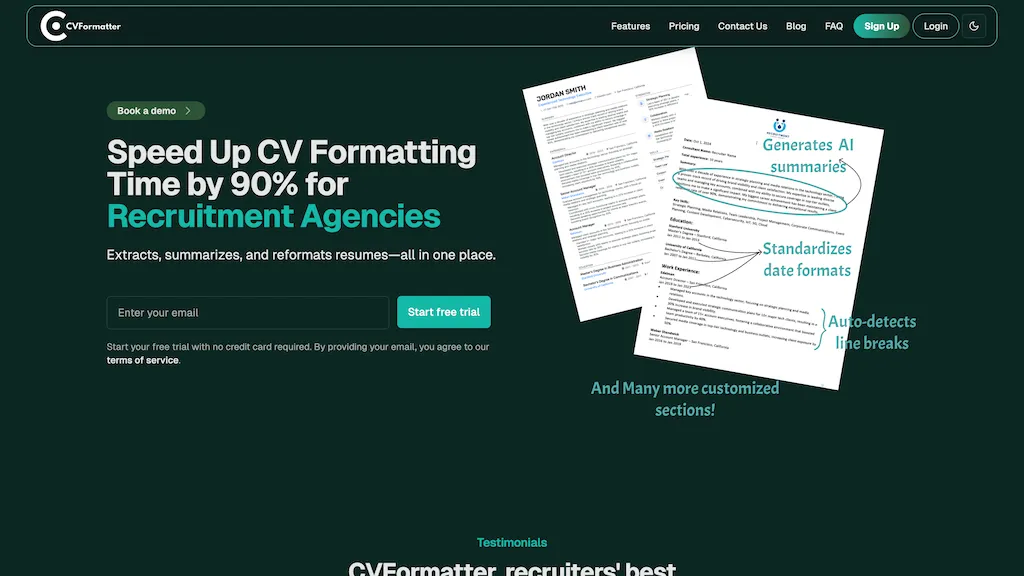
What is CVFormatter?
CVFormatter is an AI tool designed to streamline the process of formatting resumes for recruitment firms, offering features that enhance efficiency and accuracy.The platform includes AI-generated resume summaries, produced in just three seconds, as well as AI-powered proofreading to address typos, grammatical errors, and formatting inconsistencies.
Additionally, it offers translation capabilities for over 10 major languages, making it a versatile tool for global recruitment needs.Teams can collaborate seamlessly without incurring additional charges for multiple users.
Users can customize date formats and file names to meet specific requirements.It supports bulk uploading of up to 10 resumes at a time, with options for custom solutions to handle larger volumes.
CVFormatter details
- Company
- Aimanack LLC
- Jurisdiction
- State of Wyoming, United States
- Built for
- Individuals
- Data residency
- United States
- Stated compliance
- GDPR, CCPA
Compliance as stated in CVFormatter's own published documentation.
CVFormatter tech specs
- Works with
- OpenAI / GPT
- Cloud
- AWS
- Payment Processors
- Stripe
- Integrations
- Salesforce Google Workspace
CVFormatter pricing
Free trial- Refund window
- 30 days
Verify on the official pricing page.
Start free trialCVFormatter's key features
-
Resume extraction
-
Resume summarization
-
Multiple file format support
-
Customizable templates
-
Team collaboration with role-based permissions
CVFormatter use cases
-
Streamline the resume review process for recruitment agencies by using CVFormatter to extract and reformat applicants' resumes in bulk, saving significant time and effort for HR professionals
-
Create a standardized resume template that can be applied to all incoming applications with CVFormatter, ensuring consistent branding and compliance across the recruitment process
-
Enhance team collaboration by allowing HR professionals to share and manage a centralized CV database in CVFormatter, enabling seamless access and role-based permissions for multiple team members
CVFormatter user reviews
Based on 5 reviews, 60% of users recommend CVFormatter, rated highly for ease of use.
Liked for
Disliked for
Would you recommend CVFormatter?
Who is CVFormatter for?
-
Recruiting specialists
-
Human resources managers
-
Talent acquisition teams
-
Hr administrators
-
Corporate recruiters
CVFormatter FAQ
Is CVFormatter free?
Not permanently. CVFormatter gives you a free trial, after which a paid plan is required. Plans include Standard at from $79/mo and Premium at from $299/mo.
Is CVFormatter safe to use?
CVFormatter states GDPR and CCPA compliance in its own published documentation. CVFormatter is operated by Aimanack LLC, registered in State of Wyoming, United States.
What are the best alternatives to CVFormatter?
The closest alternatives to CVFormatter are Resume Screening AI, JobHire.ai, Resume Maker, Resumecoach.com and Resumes Ranker. You can compare them side by side in the alternatives section further down this page.
What does CVFormatter do with my data?
CVFormatter states that customer content is not used to train its models. Its privacy policy states that personal data is not sold or shared for marketing purposes. Data may be shared with third-party service providers that help run the product. Customer data is held in United States.
Does CVFormatter auto-renew or offer refunds?
CVFormatter states a 30-day refund window.
Who made CVFormatter?
CVFormatter is built and operated by Aimanack LLC, a company registered in State of Wyoming, United States.
Which AI models does CVFormatter use?
CVFormatter is built on OpenAI / GPT. Which models you can reach may depend on your plan.
What does CVFormatter integrate with?
CVFormatter connects with Salesforce and Google Workspace.
Compliance, privacy and billing terms are as stated in each product's own published documentation and have not been independently verified by TopAI.tools.


