Best SmartPDFs Alternatives in 2026
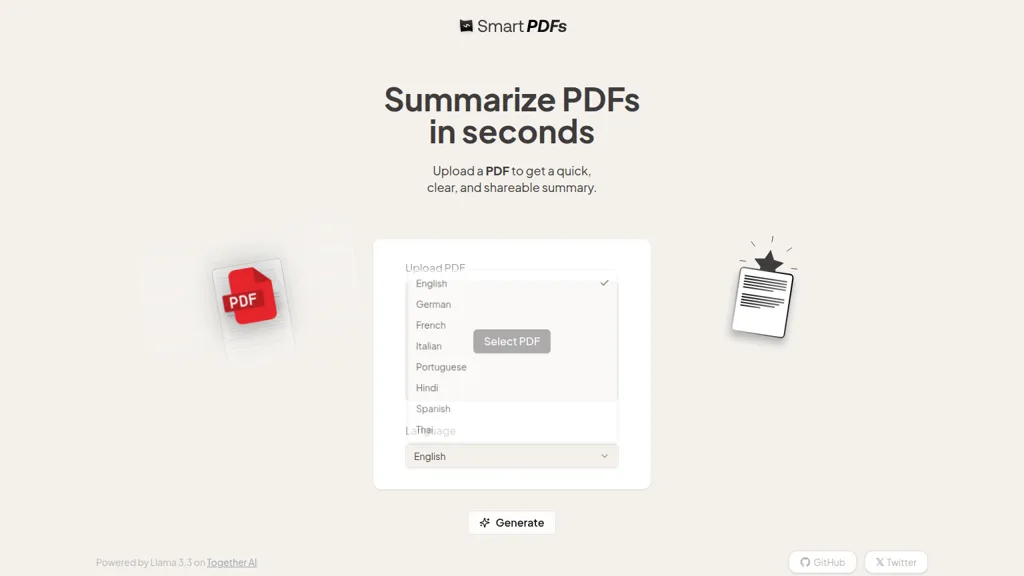
No user reviews yet FreemiumSmart PDFs uses Llama 3.3 to summarize uploaded documents, extracting key points, highlights and structured summaries in multiple languages (English, German, French, Italian, Portuguese, Hindi, Spanish, Thai). Exportable outputs streamline notes, briefs and reports.
We've ranked 29 SmartPDFs alternatives, including 23 with a free plan. Rankings are based on feature coverage and user feedbacks.
Top-rated alternatives include LightPDF, PDFSummarizer.org, and PDF Guru summarizer.
29 SmartPDFs Alternatives & Competitors, Ranked by User Reviews
Click Compare on any tool to compare it side-by-side with SmartPDFs.
#1
LightPDF
LightPDF lets users chat with PDFs, Word, Excel, PowerPoint, EPUB, performing OCR on scanned documents and handling multiple files per session. It returns plain text, lists, tables or markdown with citations, supporting over 100 languages in a cross‑platform interface.
#2
PDFSummarizer.org
AI‑powered PDF Summarizer turns multi‑page documents into concise summaries in seconds, supporting 90+ languages. It generates study guides, outlines, and searchable citations, helping students, researchers, and professionals cut review time.
#3
PDF Guru summarizer
AI PDF Summarizer from PDF Guru efficiently condenses lengthy PDF documents in multiple languages, supporting files up to 100 MB. Users can interact with content, ask questions, and request translations or rephrasing, all within a secure, user-friendly interface.
#4
AI PDF Summarizer
AI PDF Summarizer converts PDFs up to 10 MB into concise summaries within seconds. Upload by drag‑and‑drop, then request summaries, key‑point highlights, translations, search, rephrase, or citation extraction. Files are encrypted and not stored, ensuring privacy.
#5
summarizer.org
AI Summarizer quickly condenses essays, reports, and articles into short paragraphs or bullet lists. Paste text, upload DOCX/TXT/image, or give a URL; adjust summary length or set custom styles. Supports Spanish, French, German, Portuguese, and offers private, downloadable .docx outputs.
#6
ChatPDF
ChatPDF lets users upload PDFs for conversational queries, mapping content and providing cited answers. It supports folders for combined documents, side‑by‑side chat and source viewing, and offers multilingual input and output.
- Personalized recommendations
- Custom collections
- Save favorites
Already a member? Sign in
#7
Scholarcy
Scholarcy turns PDFs, articles, book chapters, and YouTube videos into concise summaries and flashcards. Users can annotate, highlight, and export the content to citation managers, Excel, or Word, streamlining literature reviews and study workflows.
#8
Filepower AI
FilePower AI lets users chat with PDFs, PPTs, Excel, and Word files, summarizing, translating, and organizing them into a searchable library. It uses a large‑language model with extended memory and encryption, speeding information extraction for researchers, educators, and analysts.
#9
Ai Summary Generator
Ai Summary Generator instantly creates concise summaries from text, PDFs, or Word documents in 17 languages. Users choose length and format—paragraph or bullets—suitable for reports, research, or content briefs, then copy or download in DOC or PDF.
#10
Resoomer
Resoomer summarizes web articles, PDFs, DOCX, EPUB, and plain text, extracting key points and arguments. It offers instant, editable summaries, a text editor, paraphraser, synonymizer, and word counter in multiple languages for students, researchers, writers, and professionals.
#11
TLDRAI
TL;DR AI condenses long documents, web pages, and PDFs into concise summaries in multiple languages. It accepts text, file uploads, or URLs, and offers a developer API for easy integration into custom applications.
#12
Documator
Documator summarizes PDFs up to 10 MB with Smart Overview or Page‑by‑Page output. It offers translation into English, Spanish, Portuguese, French, German, and Italian. Powered by GPT‑4o, it supports drag‑and‑drop uploads for quick, accurate document digestion.
#13
SummaryPDF
SummaryPDF is an AI tool that summarizes documents and images, allowing users to interact with content via a chat interface. It offers customizable summaries, multiple language options, and supports various file formats for efficient information digestion.
#14
Free AI PDF Reader
Free AI PDF Reader is a tool that analyzes, translates, and summarizes PDFs via drag-and-drop, delivering key insights. Its AI chat feature supports follow-up questions and multilingual interactions while ensuring data privacy.
#15
Notegpt
NoteGPT transcribes and summarizes lectures, meetings, and recordings in any language, offering PDF/PPT/book/video overviews, translation, and AI drafting tools. It also supports text‑to‑speech, voice cloning, infographics, slide generation, and multi‑model chat assistance.
#16
TLDR This
Online article summarizer that condenses long texts into concise summaries, extracting metadata, estimating reading time, and removing ads for a distraction‑free view. Supports text, URLs, PDFs, DOC/DOCX up to 25 MB, with a browser extension for instant page summarization.
#17
Ask Your PDF
AskYourPDF lets users upload PDF or text files to ask questions and retrieve instant answers. It instantly summarizes long documents, supports keyword search across multiple files, and offers a shared library with mobile, Chrome, and plugin access, all GDPR‑compliant.
#18
TopPDF
AI PDF Tools offers robust features for editing, translating, compressing, merging, and converting PDF documents. It ensures efficient document management while maintaining formatting integrity across various formats, enhancing productivity for users handling PDF files.
#19
PDF GPT
PDF GPT reads PDFs and instantly generates summaries, page‑referenced excerpts, and highlights. It supports multi‑file searches, tagging, collaboration, and 90+ languages, enabling efficient research, data extraction, and citation for professionals, students, and teams.
#20
PDF Translator & Editor
Cloud-based translator that handles PDFs, scanned PDFs, Word, Excel, PowerPoint, and images in 136 languages while preserving layout. Offers direct PDF editing, scanning, splitting, and share‑extension for seamless collaboration for teams, educators, and business professionals.
#21
Chatpdf.ae
ChatPDF lets users upload PDFs and chat with their content in any language. It extracts key information, provides summaries, answers queries with source citations, and supports bilingual interaction, all while keeping documents secure.
#22
PortableDocs
PortableDocs is an AI tool that allows users to engage with PDF documents through conversation, enabling quick extraction of insights and summarization. Its intuitive interface and advanced algorithms enhance productivity, particularly for technical, legal, and academic documents.
#23
aiPDF
aiPDF lets users upload PDFs, EPUBs, URLs or YouTube links to extract data, summarize content, and ask context‑specific questions. It returns source‑backed answers, supports any file size, auto‑deletes uploads, and offers response exports.
#24
PDFGPT
PdfGPT summarizes PDFs and folders, structures and links documents, supports conversational search for questions, comparisons, clause spotting. Built‑in agents perform compliance, risk, fact‑checking, and export results as notes, citations, or redlined docs.
#25
Youlearn
AI tutor that transforms PDFs, videos, slides, and recordings into study notes, quizzes, podcasts, and personalized exams, providing key takeaways, answer breakdowns, progress tracking, and interactive chat support for learners and educators.
#26
Linnk
Linnk AI's Instant Insight Page streamlines content analysis and information retrieval with automated features. Users can quickly summarize, extract insights, filter out fluff content, and bridge language barriers effortlessly.
#27
SummaVerse
SummaVerse converts PDFs and scanned documents into concise summaries—extractive, abstractive, bullet, key points, or chronological—within a click. Users set type, language, and length; chatbots answer document questions. Secure, browser‑based, aiding researchers, academics, and analysts.
#28
You-tldr
Transcribes, translates, and summarizes YouTube videos in 125+ languages, delivering instant transcripts, AI‑generated summaries with timestamps, and automatically formatted blog posts, LinkedIn articles, Twitter threads, PPT decks, chapter markers, and clip ideas for students, researchers, educators, and creators.
#29
Noiz AI PDF Summarizer
Noiz's AI PDF Summarizer swiftly condenses PDF documents of any length, generating precise summaries tailored to user preferences. Choose from short, medium, or long summaries in bullet points, Q&A format, or essays. No registration required for unlimited, hassle-free summarization.
Frequently Asked Questions
Why look for SmartPDFs alternatives?
Common reasons users switch from SmartPDFs:
- Feature gaps: teams needing specific capabilities like Analyze PDFs may find a more focused alternative better suited to their workflow.
- Flexibility: exploring alternatives helps find tools that better match your team size, integrations, and budget.
What is the best alternative to SmartPDFs?
Based on 30 user reviews, LightPDF (73.3% positive) ranks as the top SmartPDFs alternative. LightPDF lets users chat with PDFs, Word, Excel, PowerPoint, EPUB, performing OCR on scanned documents and handling multiple files per session. It ret It is available on a Paid plan.
How do the top SmartPDFs alternatives compare?
| Tool | Pricing | Starting Price | User Rating |
|---|---|---|---|
| SmartPDFs this tool | Freemium | — | — |
| LightPDF | Paid | — | 73.3% (30) |
| PDFSummarizer.org | Freemium | — | — |
| PDF Guru summarizer | Free | — | 60% (5) |
| AI PDF Summarizer | Free | — | — |
| summarizer.org | Free | — | 67.9% (28) |
Are there free SmartPDFs alternatives?
Yes, 23 free alternatives found in our list: PDFSummarizer.org, PDF Guru summarizer, AI PDF Summarizer. and 20 more — use the pricing filter above to see them all.
What should I look for in a SmartPDFs alternative?
- Core capabilities: confirm the tool supports Analyze PDFs, Extract key points, Generate summaries.
- Pricing transparency: look for clear free plan, trial period, or tiered pricing — avoid tools that hide costs.
- User reviews: check both the satisfaction percentage and the number of reviews; a high score from few users is less reliable.
- Integrations: verify it connects with your existing stack before committing.
- Support and updates: active development and responsive support are strong signals of a maintained product.
Which SmartPDFs alternative has the highest user rating?
TLDRAI has the highest satisfaction score among SmartPDFs alternatives, with 100% positive from 1 user review. It is available on a Free plan starting from $5/mo.
What are SmartPDFs alternatives used for?
- Analyze PDFs
- Extract key points
- Generate summaries
- Translate text
- Summarize documents