
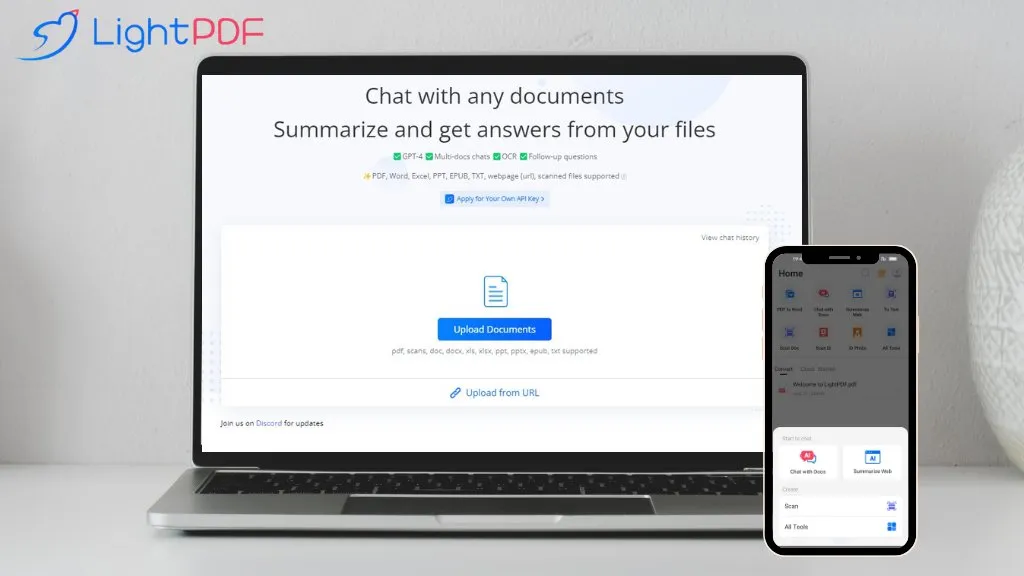
What is LightPDF?
LightPDF is an AI‑driven document assistant that lets users chat with PDFs, Word, Excel, PowerPoint, EPUB, and other file formats.
It supports searchable and scanned documents, performs OCR, and can process multiple files in a single session.
The interface returns answers in plain text, lists, tables, or markdown, and provides references for each response.
Users can ask follow‑up questions, generate summaries, extract tables, and create outlines from uploaded content.
The tool works on Windows, macOS, Android, and iOS and accepts prompts in over 100 languages, making it accessible for students, researchers, business analysts, and content creators.
LightPDF details
- Company
- Wangxu Technology Co.,Ltd.
- Built for
- Businesses and teams
- Stated compliance
- GDPR, ISO 27001
Compliance as stated in LightPDF's own published documentation.
LightPDF tech specs
- Works with
- OpenAI / GPT
- Payment Processors
- PayPal
- Integrations
- Discord Google Workspace
LightPDF pricing
Paid- Free trial
- 3 days
- Refund window
- 7 days
- Auto-renewal
- Yes
Verify on the official pricing page.
View plansLightPDF's key features
-
GPT-4 powered PDF chat
-
Multi-document chat support
-
OCR for scanned documents
-
Supports PDFs, Word, Excel, PPT
-
Summarize and answer queries
-
100+ language support
-
Chrome and G Suite extensions
LightPDF use cases
-
Generate concise meeting summaries from PowerPoint decks, returning Markdown with source citations and a clear outline
-
Extract and translate tables from multilingual PDFs into Excel for market research, ensuring accurate OCR and data mapping
-
OCR scan handwritten receipts and auto‑categorize expenses into encrypted PDF storage for personal finance tracking
LightPDF user reviews
Based on 30 reviews, 73% of users recommend LightPDF, rated highly for value for money.
Liked for
Disliked for
Would you recommend LightPDF?
Who is LightPDF for?
-
Content creators
-
Business managers
-
Office administrators
-
Data analysts
-
Academic researchers
LightPDF FAQ
How much does LightPDF cost?
LightPDF is a paid product with no free plan. Plans include Monthly plan at $19.99, Annual plan at $49.99 and Most popular perpetual plan at $109.99.
Is LightPDF safe to use?
LightPDF states GDPR and ISO 27001 compliance in its own published documentation. LightPDF is operated by Wangxu Technology Co.,Ltd.. LightPDF carries the TopAI.tools verified mark, which we award after a manual review of pricing transparency, published terms, public following and working functionality.
Is LightPDF good?
LightPDF has a 73% recommendation rate from 30 reviewers on TopAI.tools. Reviewers rate it highest on value for money and ease of use.
What are the best alternatives to LightPDF?
The closest alternatives to LightPDF are Chatdoc, PDF.ai, Chat PDF AI online, aiPDF and Filepower AI. You can compare them side by side in the alternatives section further down this page.
What does LightPDF do with my data?
Its privacy policy states that personal data is not sold or shared for marketing purposes. Data may be shared with third-party service providers that help run the product.
Does LightPDF auto-renew or offer refunds?
LightPDF subscriptions renew automatically until you cancel. It states a 7-day refund window.
Who made LightPDF?
LightPDF is built and operated by Wangxu Technology Co.,Ltd..
Which AI models does LightPDF use?
LightPDF is built on OpenAI / GPT. Which models you can reach may depend on your plan.
What does LightPDF integrate with?
LightPDF connects with Discord and Google Workspace.
Compliance, privacy and billing terms are as stated in each product's own published documentation and have not been independently verified by TopAI.tools.


