
Top 29 Doclingo Alternatives in 2026
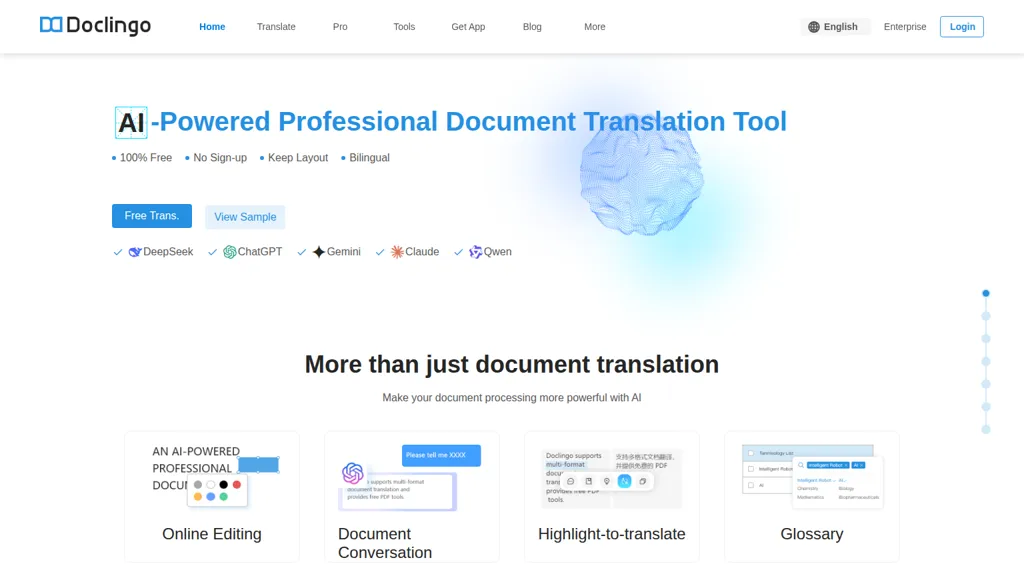
No user reviews yet FreeDoclingo is an AI document translation platform that preserves original formatting and complex layouts across PDFs, Office files and images using OCR, supports batch translation, glossary management, bilingual export, API access and 90+ languages for integrated workflows.
We've ranked 29 Doclingo alternatives, including 24 with a free plan. Rankings are based on feature coverage and user feedbacks.
Top-rated alternatives include AI TranslateDocs, PDFT.AI: AI Document Translator, and AI TransPDF.
29 Doclingo Alternatives & Competitors, Ranked by User Reviews
Click Compare on any tool to compare it side-by-side with Doclingo.
 #1
AI TranslateDocs
#1
AI TranslateDocs
AI TranslateDocs translates PDFs, Word, Excel, PowerPoint, CSV, and TXT files, using OCR to preserve layout. It supports over 130 languages, offers secure encryption, and delivers quick, accurate translations for legal, medical, academic, and business documents.
 #2
PDFT.AI: AI Document Translator
#2
PDFT.AI: AI Document Translator
PDFT.AI: AI Document Translator is an AI-powered tool that translates PDFs, DOCX, and XLSX files while preserving layout and formatting across 100+ languages. It ensures fast, secure translations with support for technical, medical, and legal terminology.
 #3
AI TransPDF
#3
AI TransPDF
AI TransPDF is a versatile AI tool that translates PDF, PPTX, XLSX, and other file formats while preserving original layouts, images, and tables. It supports 80+ languages, offers previews/summaries, and ensures secure, high-quality document processing.
 #4
BookTranslator
#4
BookTranslator
BookTranslator automatically translates entire books into 168+ languages, preserving tables, images, and formatting across EPUB, PDF, DOCX, etc., within minutes. It offers side‑by‑side comparison, supports up to 300 MB files, and delivers instant downloadable copies.
 #5
PDFTranslator.org
#5
PDFTranslator.org
PDFTranslator.org is a free AI tool that translates PDF documents into nearly 100 languages while perfectly preserving the original layout, images, and formatting. Simply upload your file and receive a translated copy, or an editable Word document, in just minutes with no registration required.
 #6
Translate Image AI
#6
Translate Image AI
TranslateImage.ai is an AI tool that extracts and translates text within images while perfectly preserving the original fonts, layout, and visual design. It supports batch processing for localizing documents, menus, and e-commerce assets without any graphic redesign.
- Catch deals before they expire
- Unlock tools matched to you
- Show off your AI stacks
Already a member? Sign in
 #7
PDF Translator & Editor
#7
PDF Translator & Editor
Cloud-based translator that handles PDFs, scanned PDFs, Word, Excel, PowerPoint, and images in 136 languages while preserving layout. Offers direct PDF editing, scanning, splitting, and share‑extension for seamless collaboration for teams, educators, and business professionals.
 #8
Free Doc Translator
#8
Free Doc Translator
DocTranslator delivers instant neural machine translation for over 120 languages, handling PDFs, DOCX, PPTX, XLSX, images and more up to 1 GB or 5,000 pages. It preserves formatting, supports conversion, and ensures secure, automated status tracking.
 #9
Image Translate AI
#9
Image Translate AI
Image Translate AI is a tool that translates text within images across 130 languages while preserving the original layout and styling. It supports batch processing of thousands of images with automatic language detection.
 #10
OpenL
#10
OpenL
OpenL Translate converts text, PDFs, images, and audio into 100+ languages, supporting dialects and emojis. Fast mode delivers short translations; Advanced mode offers precision for legal documents. It handles 150k characters and 40 scanned PDFs daily, processing locally for privacy.
 #11
Lóre AI
#11
Lóre AI
Lóre AI is a PDF conversion and translation tool using OCR technology to create editable Word files. It preserves original formatting, supports multiple languages, and efficiently handles complex layouts, enabling effective document editing and sharing.
 #12
O.Translator
#12
O.Translator
Online Document Translator provides professional translations while preserving original formatting across various document types. It supports over 80 languages, offers batch processing, custom terminology, online editing, and ensures data privacy, making it ideal for individuals and teams.
 #13
Doc2Lang
#13
Doc2Lang
Doc2Lang translates Excel, Word, PDF, PowerPoint, CSV, EPUB, images, video, audio, and subtitles, preserving layout, formatting, formulas, speaker notes, and embedded media across 100+ languages. OCR supports scanned documents; batch ZIP uploads, custom glossaries, and secure file handling are included.
 #14
Image Translator.com
#14
Image Translator.com
ImageTranslator is an AI tool that translates text in images while maintaining the original layout. It supports various image formats and over 100 languages, using OCR technology for accurate text detection and overlay. Download translated images securely post-processing.
 #15
TopPDF
#15
TopPDF
AI PDF Tools offers robust features for editing, translating, compressing, merging, and converting PDF documents. It ensures efficient document management while maintaining formatting integrity across various formats, enhancing productivity for users handling PDF files.
 #16
aidocmaker.com
#16
aidocmaker.com
AI Doc Maker produces PDFs, Word, PowerPoint, and Excel files from prompts or uploads, applying layouts, tables, and multilingual formatting. It provides templates for reports, contracts, proposals, and spreadsheets, streamlining document creation for professionals.
 #17
Lufe AI
#17
Lufe AI
Lufe AI is a fast, free AI translator for webpages, PDFs, and images, leveraging Gemini, OpenAI, and Claude for accurate multilingual support. It offers a browser extension with side-by-side translations, auto-detection, and customizable displays for seamless bilingual learning.
 #18
AI Document Translator
#18
AI Document Translator
AI Document Translator enables quick translation of documents in 135 languages, supporting various file formats. With an average processing time of 30 seconds per page, it ensures secure, high-quality translations for both individuals and businesses.
 #19
TranslateImage
#19
TranslateImage
TranslateImage.io is an AI platform that translates text within images, documents, and comics into 130+ languages while perfectly preserving the original layout, fonts, and design. It features specialized OCR, batch processing, and secure handling for e-commerce, marketing, and manga localization.
 #20
Innerai.com
#20
Innerai.com
All‑in‑one platform integrating GPT‑4o, Claude, Gemini, and others for unified text, image, video, and document AI. Offers summarizing, translation, prompt templates, workflow tools, quiz creation, SCORM export, web search, subtitles, dubbing. SOC II‑compliant with field‑level encryption and data isolation.
 #21
Readable
#21
Readable
Readable translates English PDFs to Japanese in about ten seconds, preserving the original layout and providing a side‑by‑side view. It supports up to 100 pages or 50 MB per file, unlimited translations, and a Chrome extension for quick browser use.
 #22
TranslateBase
#22
TranslateBase
TranslateBase is an AI-powered multilingual translation platform supporting 100+ languages for text, PDFs, websites, and subtitles, with formatting preservation. It offers glossary tools, document chat, and image translation for seamless localization.
 #23
PDF.ai
#23
PDF.ai
PDF.ai lets users upload PDFs and chat for questions, summaries, and data extraction. It parses documents into structured JSON, detects sections, tables, and figures, and supplies source‑cited answers via a RESTful API for rapid, secure analysis.
 #24
TranslatesDocument
#24
TranslatesDocument
TranslatesDocument is an AI-powered online translation tool that supports over 130 languages, allowing users to upload various file types while preserving original formatting. It ensures data privacy and delivers instant translations for efficient multilingual communication.
 #25
PDF Translator
#25
PDF Translator
Free PDF Translator Online enables instant translation of PDF documents into over 100 languages while preserving layout and images. It supports files up to 20MB and ensures privacy through end-to-end encryption, requiring no sign-up.
 #26
Notegpt
#26
Notegpt
NoteGPT transcribes and summarizes lectures, meetings, and recordings in any language, offering PDF/PPT/book/video overviews, translation, and AI drafting tools. It also supports text‑to‑speech, voice cloning, infographics, slide generation, and multi‑model chat assistance.
 #27
DocTranslator
#27
DocTranslator
doctranslator.io is an AI-powered document translator that preserves original formatting across PDF, DOCX, PPTX, and 15+ other file types. It supports 150+ languages with automatic detection, handling everything from subtitles to complex charts in a single drag-and-drop workflow.
 #28
DocTranslate.io
#28
DocTranslate.io
Doctranslate.io is an AI-powered tool offering seamless document translation in 29 languages. It features customizable options like domain specialization, bilingual formatting, and secure data management for precise, efficient communication across global audiences.
 #29
AITranslator.com
#29
AITranslator.com
Ai Translator compares 22 AI models via its SMART feature to produce the most agreed translations, offering over 100 languages and regional dialects. It auto‑detects source language, accepts text or files, and provides instant quality feedback and real‑time accuracy analytics.