
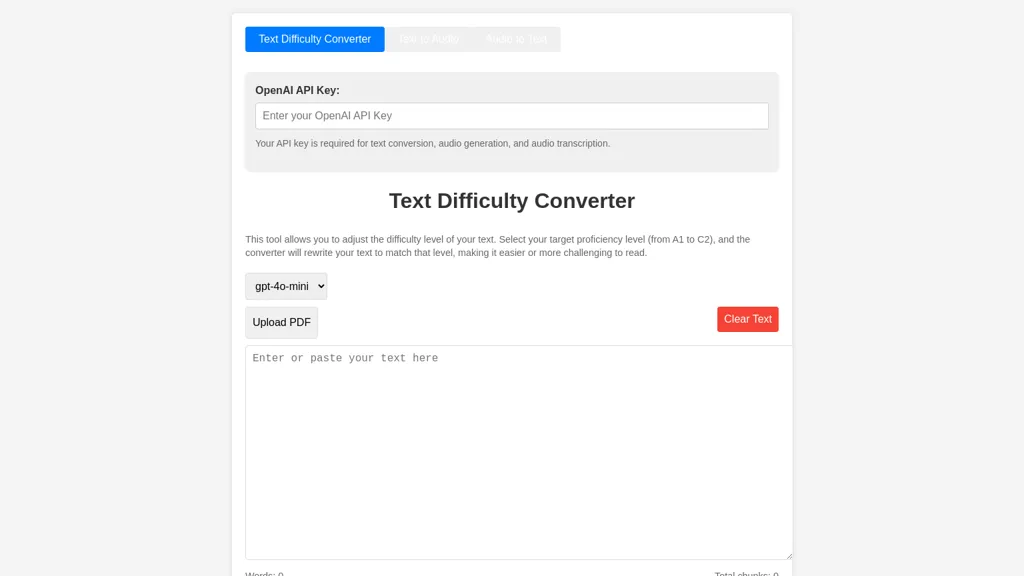
What is Text Difficulty Converter?
Text Difficulty Converter adjusts the reading level of any text from A1 to C2, automatically rewriting content to match the desired proficiency. It supports bulk PDF uploads and offers chunk‑based processing to manage large documents. In addition, the platform includes a text‑to‑speech module that generates spoken audio using models such as tts‑1 and tts‑1‑hd, with selectable voices like Alloy, Echo, Fable, Onyx, Nova, and Shimmer.
Generated audio can be played, stopped, or downloaded in full or merged form. The reverse conversion tool allows users to upload audio files and transcribe them into editable text, providing copy‑to‑clipboard and download options for the transcript. This integrated suite caters to language educators, content creators, and accessibility specialists looking for efficient, multilingual text transformation and speech‑recognition solutions.
Text Difficulty Converter pricing
FreemiumText Difficulty Converter offers a free plan with paid upgrades available.
Verify on the official pricing page.
View plansText Difficulty Converter's key features
-
Rewrite text by difficulty level
-
Convert text to spoken audio
-
Choose TTS model and voice
-
Transcribe audio to text
-
Download generated audio files
-
Download transcript text
-
Upload PDF for conversion
Text Difficulty Converter use cases
-
Simplify a university lecture transcript to an A2 reading level, export a bulk PDF for students, and generate a natural‑voice audio summary
-
Transcribe a full conference session into editable text, adjust it to a C1 level for executive reports, and synthesize key points into a spoken briefing
-
Create multilingual training manuals by chunking large PDFs, adjusting difficulty, translating, and providing text‑to‑speech output for mobile learners
Text Difficulty Converter user reviews
Would you recommend Text Difficulty Converter?
Who is Text Difficulty Converter for?
-
Content creators
-
Accessibility advocates
-
Technology evaluators
-
Text accessibility analysts
-
Educational researchers
Text Difficulty Converter FAQ
Is Text Difficulty Converter free?
Partly. Text Difficulty Converter has a free plan with usage limits, and paid plans unlock the full feature set.
What are the best alternatives to Text Difficulty Converter?
The closest alternatives to Text Difficulty Converter are Speechify, Audioread, Readpdfaloud, AnyToSpeech and Reader by Audeus. You can compare them side by side in the alternatives section further down this page.
Does Text Difficulty Converter have an API?
Yes. Text Difficulty Converter offers an API, so you can call it from your own applications instead of using the interface directly.


