
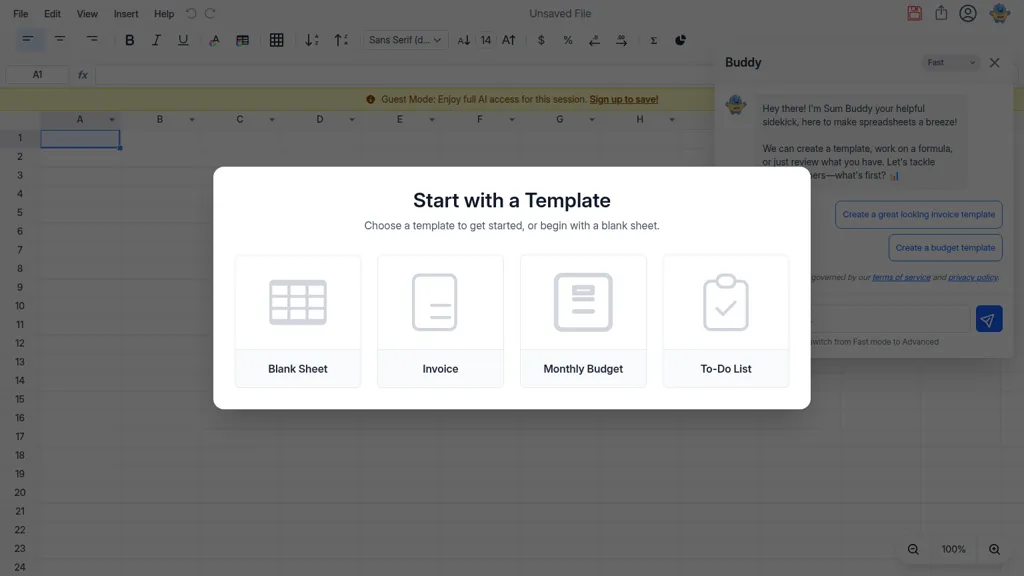
What is Sum Buddy?
Sum Buddy™ — The AI Spreadsheet provides plain-language formula assistance, in-sheet AI interactions, and automated data cleanup and formatting.
Built-in templates and blank-sheet options support invoices, budgets, to-do lists, and custom workflows.
Imports and exports Excel and CSV files, and includes a chart editor with live preview, table settings, and range-based data series.
Collaboration features include share links, access controls, email export, and cloud document saving.
Fast and Advanced AI modes handle single-step queries as well as multi-step data analysis and task automation.
Sum Buddy details
- Jurisdiction
- Province of Ontario, Canada
- Built for
- Individuals
Sum Buddy pricing
FreemiumSum Buddy offers a free plan with paid upgrades available.
- Refund window
- 30 days
Verify on the official pricing page.
View plansSum Buddy's key features
-
Natural-language AI assistant for formulas, sheet creation, and problem-solving
-
Import and export support for Excel and CSV (upload/download) and PDF export
-
Automated data cleaning and formatting ("Beautify Sheet") and multi-step task automation
-
Chart and table editor with live preview and customization (types, axes, styles)
-
Cloud file management, saving, sharing, and access controls (invite, public links)
Sum Buddy use cases
-
Build a dynamic cash-flow and expense tracker for a small business using Sum Buddy's templates and plain-language formulas, import historical Excel/CSV data, run fast AI forecasts and export polished reports with live charts for investor-ready presentations
-
Clean and consolidate messy sales and inventory data with automated cleanup and formatting, use in-sheet AI to generate categorization and reconciliation formulas in plain language, then collaborate with team members and export the cleaned CSV for accounting or ERP systems
-
Create interactive KPI dashboards and monthly performance reports with the live chart editor and AI-assisted analyses, have Sum Buddy translate plain-language queries into advanced formulas, and share read-only or editable sheets for cross-team review and decision-making
Sum Buddy user reviews
Would you recommend Sum Buddy?
Who is Sum Buddy for?
-
Spreadsheet users
-
Data analysts
-
Business professionals
-
Students
-
Collaborative teams
-
Non-technical users needing formula help
-
People who work with excel/csv files
-
Users seeking automated data cleanup and formatting
-
Individuals needing quick data analysis and visualization
Sum Buddy FAQ
Is Sum Buddy free?
Partly. Sum Buddy has a free plan with usage limits, and paid plans unlock the full feature set.
What are the best alternatives to Sum Buddy?
The closest alternatives to Sum Buddy are Excelmatic, SheetXAI, AskExcel, SheetSavvy AI and Excel-bot.com. You can compare them side by side in the alternatives section further down this page.
What does Sum Buddy do with my data?
Sum Buddy states that customer content may be used to train its models. Its privacy policy states that personal data is not sold or shared for marketing purposes. Data may be shared with third-party service providers that help run the product.
Does Sum Buddy auto-renew or offer refunds?
Sum Buddy states a 30-day refund window.
Compliance, privacy and billing terms are as stated in each product's own published documentation and have not been independently verified by TopAI.tools.


