
What is SpeedPainter?
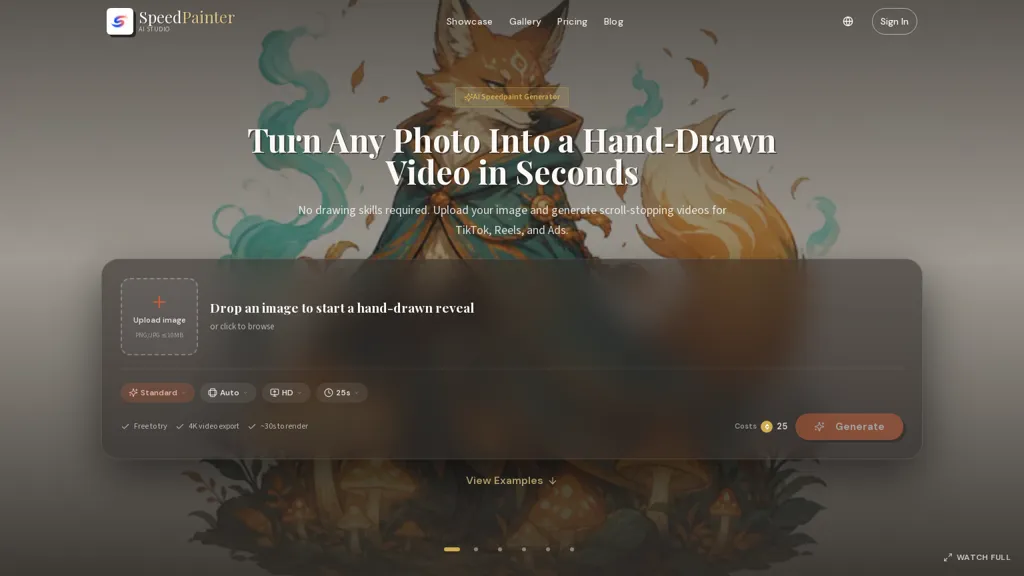
SpeedPainter converts any uploaded image into a hand-drawn reveal video using an AI speedpaint generator.
The tool produces an animated sequence that renders line work first and then fills color, with an optional drawing-hand overlay.
Choose from multiple style presets and adjust timing, stroke behavior, and canvas appearance to control the reveal.
The workflow automates generation and delivers a ready-to-download MP4 without manual recording, editing, or drawing.
Available presets include sketch and color reveals, whiteboard explainers, logo and poster reveals, and character or landscape build-ups.
Outputs are optimized for social and web publishing with export options suited to common display formats.
The interface follows an upload → style selection → generate → download flow to streamline image-to-video production.
SpeedPainter details
- Built for
- Individuals
- Stated compliance
- GDPR
Compliance as stated in SpeedPainter's own published documentation.
SpeedPainter pricing
FreemiumSpeedPainter offers a free plan with paid upgrades available. Plans start from $16.58/mo.
- Refund window
- 30 days
- Auto-renewal
- Yes
Verify on the official pricing page.
View plansSpeedPainter's key features
-
AI speedpaint conversion of uploaded images into hand-drawn reveal videos
-
Animated sequence rendering linework first then filling color, with optional drawing-hand overlay
-
Multiple style presets plus adjustable timing, stroke behavior, and canvas appearance
-
Automated generation pipeline producing ready-to-download MP4s
-
Export options optimized for social and web display formats
SpeedPainter use cases
-
Create eye-catching logo reveal animations for your brand using SpeedPainter without any motion-graphics software, converting existing vector or raster logos into hand-drawn reveal MP4s with optional hand overlay and presets optimized for Instagram, TikTok and website hero sections
-
Develop engaging whiteboard explainer videos for product onboarding and training by uploading screenshots or diagrams to SpeedPainter, automating stroke timing, color rendering and canvas controls to emphasize key steps and exporting social-ready MP4s for embedding in help centers or LMS
-
Produce attention-grabbing social posts and portfolio reels for artists, photographers and real estate listings by transforming images into animated drawing reveals with customizable stroke speed and timing, using presets to generate web-optimized MP4s without additional editing tools
SpeedPainter user reviews
Based on 3 reviews, 100% of users recommend SpeedPainter, rated highly for quality results.
Liked for
Would you recommend SpeedPainter?
Who is SpeedPainter for?
-
Graphic designers
-
Illustrators and artists creating timelapse reveals
-
Social media managers
-
Content creators and influencers
-
Digital marketers
-
Branding and advertising agencies
-
Logo and poster designers
-
Small business owners and entrepreneurs
-
Educators and e-learning creators
-
Video editors and motion designers
SpeedPainter FAQ
Is SpeedPainter free?
Partly. SpeedPainter has a free plan with usage limits, and paid plans unlock the full feature set. Paid plans start at $16.58/mo.
Is SpeedPainter safe to use?
SpeedPainter states GDPR compliance in its own published documentation.
What are the best alternatives to SpeedPainter?
The closest alternatives to SpeedPainter are imagetovideoai.pro, insMind Image to Video Generator, ImageToVideo AI, Dzine and ImageToVid. You can compare them side by side in the alternatives section further down this page.
What does SpeedPainter do with my data?
Its privacy policy states that personal data is not sold or shared for marketing purposes. Data may be shared with third-party service providers that help run the product.
Does SpeedPainter auto-renew or offer refunds?
SpeedPainter subscriptions renew automatically until you cancel. It states a 30-day refund window.
Compliance, privacy and billing terms are as stated in each product's own published documentation and have not been independently verified by TopAI.tools.


