
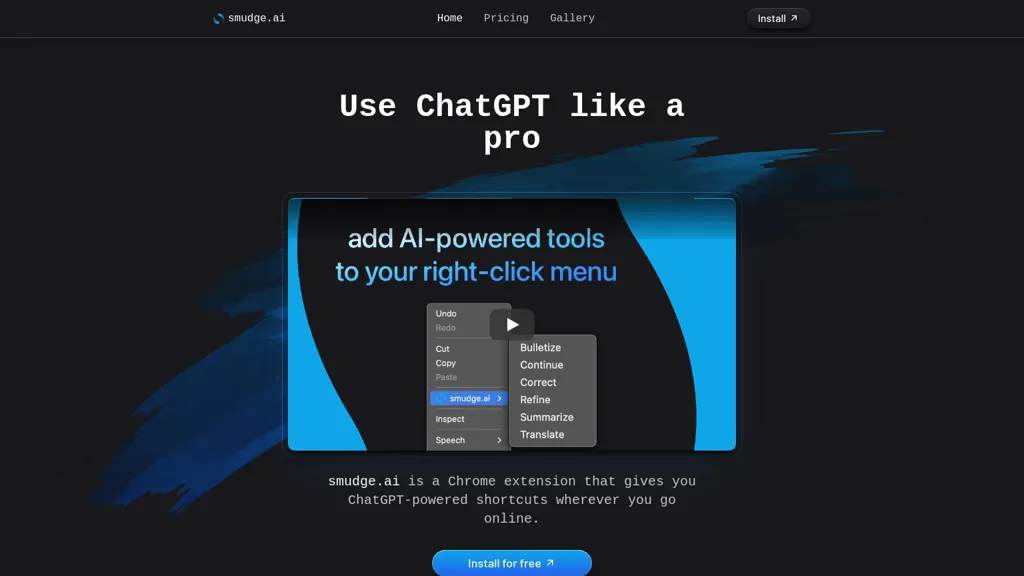
What is smudge.ai?
smudge.ai is a Chrome extension that injects AI‑powered commands into the browser’s right‑click menu, enabling instant summarization, proofreading, bullet‑point conversion, and translation of any highlighted text without leaving the page. The extension includes a library of 16 built‑in commands, such as Summarize, Correct, Bulletize, Refine, and Translate, and lets users create or import custom commands to automate repetitive tasks.
It supports up to 150 000 words per request, allowing users to process large documents, academic papers, or lengthy online articles. Professionals can draft email responses, format content, or bridge language gaps, while students can generate study notes, correct formatting, and break down complex problems step by step.
The tool syncs command sets and settings across all devices linked to the same Chrome profile, ensuring a consistent experience. smudge.ai routes input text to OpenAI’s API for processing and streams results back instantly, while preserving user privacy by not storing or logging the content.
smudge.ai details
- Company
- Oceanic Labs, LLC
- Jurisdiction
- Nevada
- Built for
- Individuals
smudge.ai tech specs
- Works with
- OpenAI / GPT
smudge.ai pricing
Subscription- Auto-renewal
- Yes
Verify on the official pricing page.
View planssmudge.ai's key features
-
AI-powered right-click menu commands
-
Summarize long articles quickly
-
Correct grammar and punctuation
-
Convert text into bullet lists
-
Translate across languages
-
Create custom commands
smudge.ai use cases
-
Summarize lengthy research papers or legal briefs on the fly from any web page, instantly converting thousands of words into concise bullet points without leaving your browser
-
Proofread and polish emails, reports, or blog drafts in real‑time using the Chrome context menu, catching grammar, tone, and style errors before you hit send
-
Translate international policy documents, contracts, or customer support pages instantly, enabling cross‑border team collaboration with instant multilingual summaries
smudge.ai user reviews
Based on 1 review, 0% of users recommend smudge.ai.
Disliked for
Would you recommend smudge.ai?
Who is smudge.ai for?
-
Content creators
-
Creative writers
-
Academic researchers
-
Language learners
-
College students
smudge.ai FAQ
How much does smudge.ai cost?
smudge.ai is a paid product with no free plan. Plans include Starter at $5/mo and Pro at $20/mo.
Is smudge.ai safe to use?
smudge.ai is operated by Oceanic Labs, LLC, registered in Nevada.
What are the best alternatives to smudge.ai?
The closest alternatives to smudge.ai are Sider, Linnk.AI, Innerai.com, iAsk.ai and MaxAI.me. You can compare them side by side in the alternatives section further down this page.
What does smudge.ai do with my data?
Its privacy policy states that personal data is not sold or shared for marketing purposes. Data may be shared with third-party service providers that help run the product.
Does smudge.ai auto-renew or offer refunds?
smudge.ai subscriptions renew automatically until you cancel.
Who made smudge.ai?
smudge.ai is built and operated by Oceanic Labs, LLC, a company registered in Nevada.
Which AI models does smudge.ai use?
smudge.ai is built on OpenAI / GPT. Which models you can reach may depend on your plan.
Compliance, privacy and billing terms are as stated in each product's own published documentation and have not been independently verified by TopAI.tools.


