
What is RewriteBar?
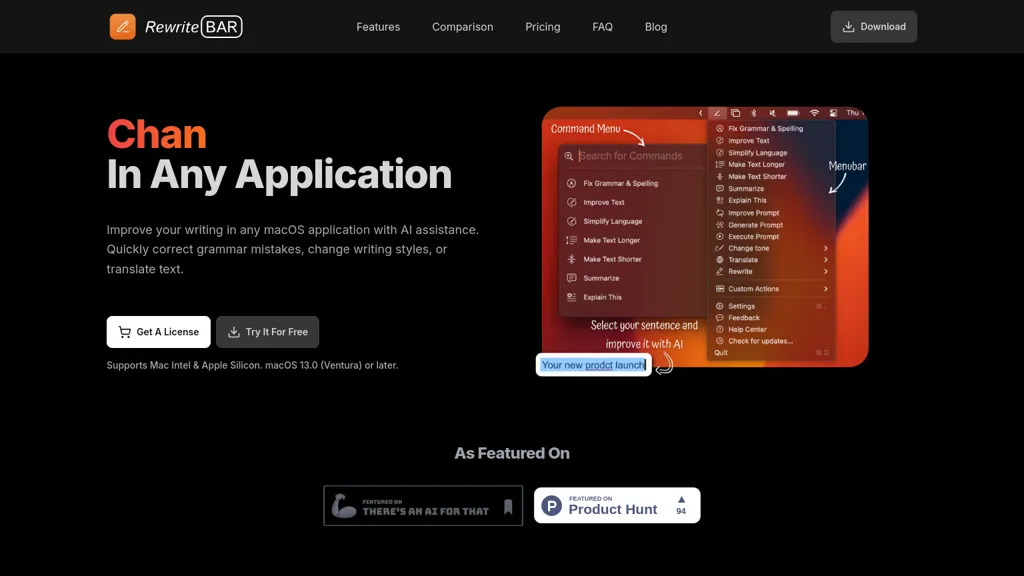
RewriteBar is a macOS menu bar AI assistant designed to enhance writing through various features. It allows users to quickly correct grammar and spelling errors, change writing styles, and translate text seamlessly within applications. With just a simple keyboard shortcut, users can access a user-friendly command menu that facilitates easy navigation and instant action execution.
RewriteBar supports up to 30 languages, making it particularly useful for non-native English speakers who wish to simplify their writing or adjust tone for different audiences, such as professional emails or casual messages. This tool is designed to improve daily writing tasks, catering to diverse user groups like students, developers, and marketers, without the complexity of external websites or additional software installations.
RewriteBar details
- Jurisdiction
- Germany
- Built for
- Individuals
RewriteBar tech specs
- Works with
- OpenAI / GPT OpenAI / Whisper Anthropic / Claude Google / Gemini Meta Mistral DeepSeek xAI / Grok Qwen Perplexity Amazon Bedrock Kimi MiniMax
- AI infrastructure
- Hugging Face Fireworks AI Groq
- Cloud
- Azure Vercel Cloudflare
- Integrations
- Slack Discord Microsoft Teams WordPress Figma WhatsApp
RewriteBar pricing
Free trial- Refund window
- 30 days
Verify on the official pricing page.
Start free trialRewriteBar's key features
-
Grammar and spelling correction
-
Writing style modification
-
Text translation
-
User-friendly command menu
-
Support for up to 30 languages
RewriteBar use cases
-
Quickly correct grammar and spelling errors in your emails and documents using RewriteBar, allowing for polished and professional communication without the hassle of switching between applications
-
Easily change writing styles to tailor your messages for different audiences, from formal proposals to casual notes, all with a simple keyboard shortcut to enhance your overall writing effectiveness
-
Seamlessly translate text within your projects in real-time, supporting up to 30 languages, which is particularly beneficial for non-native English speakers looking to convey their ideas accurately and fluently
RewriteBar user reviews
Would you recommend RewriteBar?
Who is RewriteBar for?
-
Writers
-
Translators
-
Content creators
-
Bloggers
-
Multilingual users
RewriteBar FAQ
Is RewriteBar free?
Not permanently. RewriteBar gives you a free trial, after which a paid plan is required. Plans include Monthly plan at $5/mo, One-time payment at $29 and Annual plan at $40/year.
What are the best alternatives to RewriteBar?
The closest alternatives to RewriteBar are Linguix, LanguageTool, ParagraphAI, Kerlig™ and InstaText. You can compare them side by side in the alternatives section further down this page.
What does RewriteBar do with my data?
RewriteBar states that customer content is not used to train its models. Its privacy policy states that personal data is not sold or shared for marketing purposes. Data may be shared with third-party service providers that help run the product.
Does RewriteBar auto-renew or offer refunds?
RewriteBar states a 30-day refund window.
Does RewriteBar have an API?
Yes. RewriteBar offers an API, so you can call it from your own applications instead of using the interface directly.
Which AI models does RewriteBar use?
RewriteBar is built on OpenAI / GPT, OpenAI / Whisper, Anthropic / Claude, Google / Gemini, Meta, Mistral, DeepSeek, xAI / Grok, Qwen, Perplexity, Amazon Bedrock, Kimi and MiniMax. Which models you can reach may depend on your plan.
What does RewriteBar integrate with?
RewriteBar connects with Slack, Discord, Microsoft Teams, WordPress, Figma and WhatsApp.
Compliance, privacy and billing terms are as stated in each product's own published documentation and have not been independently verified by TopAI.tools.


