
What is QR Code Generator?
QR Code Generator
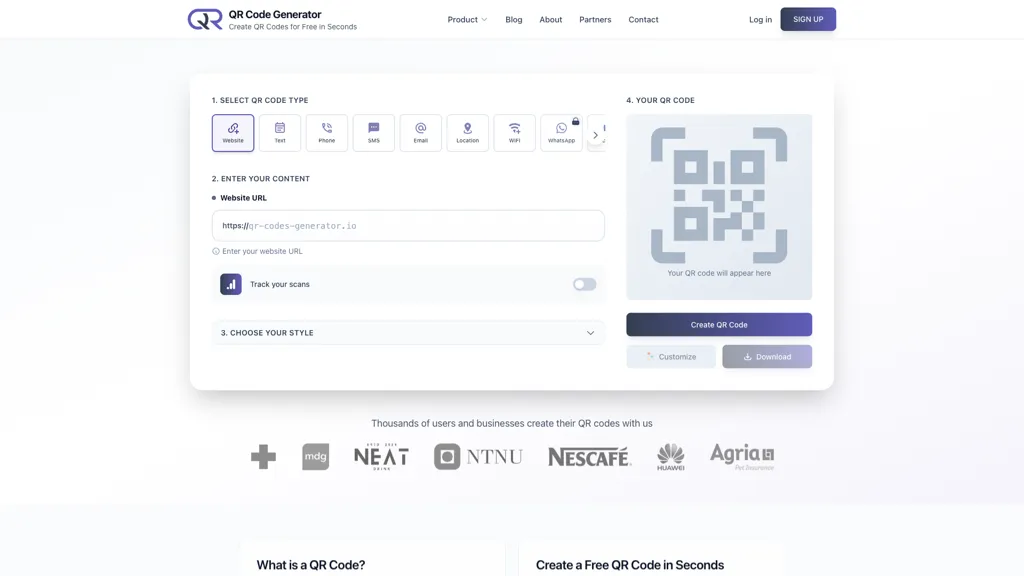
The QR Code Generator creates two‑dimensional barcodes that encode URLs, text, phone numbers, emails, WiFi credentials, and more. Users choose from over 16 code types—such as Website, Text, Phone, SMS, Email, Location, WiFi, WhatsApp, FaceTime, Event, VCard, Crypto, and payment options like PayPal, UPI, and PIX—then enter the desired content.
The interface offers a preview, color and pattern customization, and optional logo placement before generating the code. Static codes are free and uneditable; dynamic codes allow URL updates, expiration dates, password protection, and real‑time scan analytics including location and device data.
Generated codes are downloadable in PNG, JPG, SVG, or EPS formats at sizes up to 3200 px, making them suitable for digital displays, print media, business cards, menus, and event tickets. The tool is designed for individuals, small businesses, marketing teams, and event organizers who need quick, secure QR code creation and optional tracking.
QR Code Generator details
- Built for
- Individuals
QR Code Generator tech specs
- Payment Processors
- PayPal
- Analytics
- Google Analytics Meta Pixel
- Integrations
QR Code Generator pricing
Freemium- Free trial
- 3 days
- Auto-renewal
- Yes
Verify on the official pricing page.
View plansQR Code Generator's key features
-
Generate free static QR codes
-
Create editable dynamic QR codes
-
Track scan analytics & locations
-
Download PNG, SVG, JPG, EPS
-
Customize colors, frames, and logos
-
Support 16+ QR code types
-
Integrate tracking pixels (Facebook, Google)
QR Code Generator use cases
-
Generate a dynamic QR code for a business card that links to a LinkedIn profile, tracks scan location and time, and automatically updates the contact information when the LinkedIn profile changes
-
Create a custom Wi‑Fi QR code with company branding, password protection, and analytics to monitor guest access frequency, exporting the final design as an SVG for use in high‑resolution printed signage
-
Build a QR‑code‑enabled event ticket that embeds attendee details, displays a personalized QR code on the attendee’s mobile device, tracks scans at the venue entrance in real‑time, and exports the ticket in PNG and EPS for promotional materials
QR Code Generator user reviews
Would you recommend QR Code Generator?
Who is QR Code Generator for?
-
Digital marketers
-
Content creators
-
E-commerce sellers
-
Business owners
-
Product designers
QR Code Generator FAQ
Is QR Code Generator free?
Partly. QR Code Generator has a free plan with usage limits, and paid plans unlock the full feature set. Plans include Premium at $14/mo.
What are the best alternatives to QR Code Generator?
The closest alternatives to QR Code Generator are IMQRSCAN, design.com, QR Code AI, QuickQR Art and ViralQR. You can compare them side by side in the alternatives section further down this page.
What does QR Code Generator do with my data?
Its privacy policy states that personal data is not sold or shared for marketing purposes. Data may be shared with third-party service providers that help run the product.
Does QR Code Generator auto-renew or offer refunds?
QR Code Generator subscriptions renew automatically until you cancel.
What does QR Code Generator integrate with?
QR Code Generator connects with WhatsApp.
Compliance, privacy and billing terms are as stated in each product's own published documentation and have not been independently verified by TopAI.tools.


