
What is Lora AI?
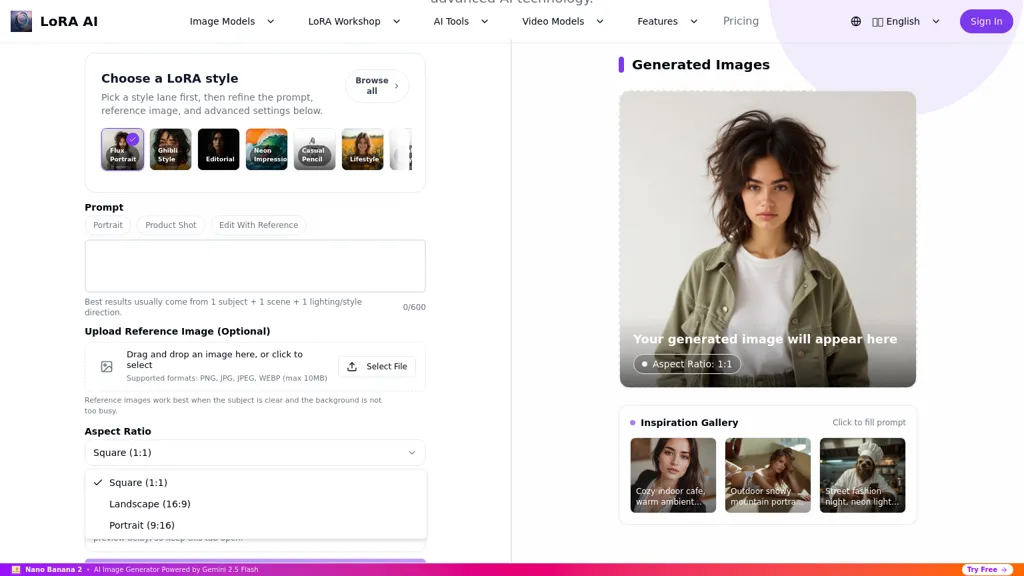
Lora AI is an image generator that turns text prompts and optional reference images into high-resolution AI-generated artwork.It supports PNG, JPG, JPEG and WebP reference uploads (up to 10 MB) and a library of pre-trained LoRA models plus user-uploaded LoRA models for custom styles.
The interface requires no coding and includes prompt refinement, style presets, reference-image editing and advanced generation settings, with recommended prompt structure of one subject + one scene + one lighting/style direction.
Outputs default to a square 1.1 aspect ratio and the platform is compatible with Stable Diffusion XL and ComfyUI for integration into existing workflows.Lora AI speeds creative workflows with rapid generation and model optimization, suitable for designers, illustrators, product photographers and content creators.
Common use cases include concept art, product shots, stylized portraits, character design and editorial or commercial visuals.
Lora AI details
- Built for
- Individuals
Lora AI tech specs
- Works with
- OpenAI / GPT Stability AI Qwen Black Forest Labs / Flux Midjourney
- Payment Processors
- Stripe
Lora AI pricing
Subscription- Refund window
- 7 days
- Auto-renewal
- Yes
Verify on the official pricing page.
View plansLora AI's key features
-
Text-to-image generation producing high-resolution artwork from text prompts with optional reference images
-
Supports PNG, JPG, JPEG, and WebP reference uploads up to 10 MB
-
Library of pre-trained LoRA models plus user-uploaded LoRA models for custom styles
-
No-code interface with prompt refinement, style presets, reference-image editing, and advanced generation settings
-
Compatibility with Stable Diffusion XL and ComfyUI and default 1:1 square output aspect ratio
Lora AI use cases
-
Create high-resolution product shots for e-commerce without any coding by uploading PNG/JPG/WebP reference images, using prompt refinement and style presets to achieve photorealistic lighting and consistent brand visuals, and export print-ready images or integrate with Stable Diffusion XL for advanced polishing
-
Generate rapid concept art and mood boards for games or films by combining reference image editing with LoRA custom style models, iterate quickly using prompt refinements and advanced settings to explore multiple stylistic directions and variations
-
Produce polished marketing visuals and social media creatives using built-in style presets and prompt refinement, edit reference images to match brand guidelines across campaigns, and leverage high-resolution outputs and ComfyUI compatibility for seamless pipeline integration
Lora AI user reviews
Based on 5 reviews, 100% of users recommend Lora AI, rated highly for quality results.
Liked for
Would you recommend Lora AI?
Who is Lora AI for?
-
Designers
-
Illustrators
-
Content creators
-
Concept artists
-
Character designers
Lora AI FAQ
How much does Lora AI cost?
Lora AI is a paid product with no free plan. Plans include Starter at $4.17/mo or $49.99/year, Pro at $8.33/mo or $99.99/year and Premium at $16.67/mo or $199.99/year.
What are the best alternatives to Lora AI?
The closest alternatives to Lora AI are Amazing AI, DiffusionArt.ai, Canva AI, Muse AI Art Generator and Stable Diffusion AI Generator. You can compare them side by side in the alternatives section further down this page.
What does Lora AI do with my data?
Lora AI states that customer content may be used to train its models. Its privacy policy states that personal data is not sold or shared for marketing purposes. Data may be shared with third-party service providers that help run the product.
Does Lora AI auto-renew or offer refunds?
Lora AI subscriptions renew automatically until you cancel. It states a 7-day refund window.
Which AI models does Lora AI use?
Lora AI is built on OpenAI / GPT, Stability AI, Qwen, Black Forest Labs / Flux and Midjourney. Which models you can reach may depend on your plan.
Compliance, privacy and billing terms are as stated in each product's own published documentation and have not been independently verified by TopAI.tools.


Lora AI Image Generator for lora AI Images