
What is Inkwell Plot?
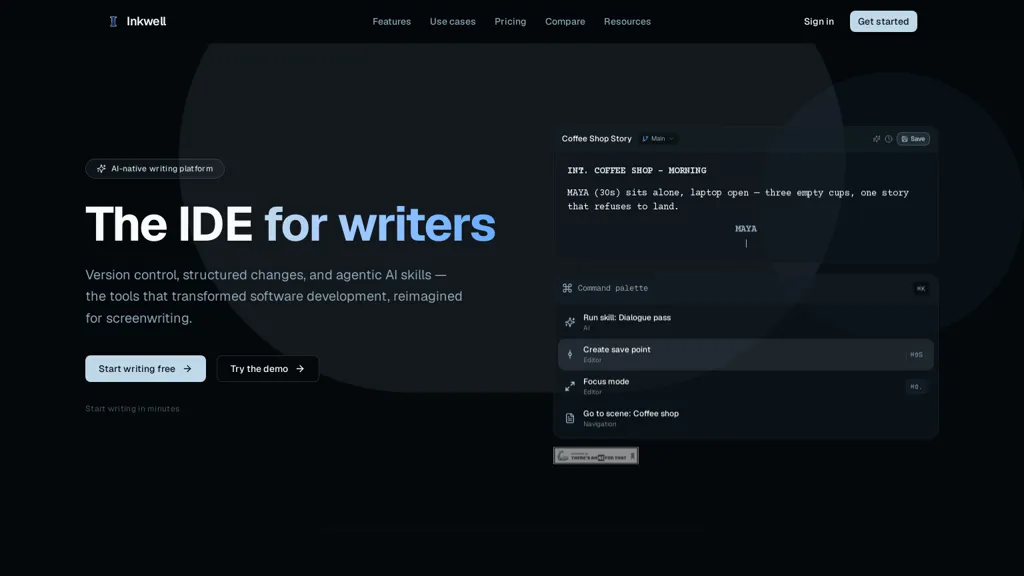
Inkwell is an AI-native screenplay editor that combines scene-aware editing, structured version control, and production workflows for screenwriters and production teams.It supports 16 screenplay element types, draft lines (alternate takes), dialogue passes and continuity checks so writers can run targeted ai passes and review suggestions line-by-line.
Save points (named moments) and colored revision tracking let writers experiment without duplicating files and keep production drafts locked and auditable.Plain-text, markdown-native storage plus FDX, Fountain and PDF export ensure portability and compatibility with industry tools.
Real-time co-authoring, threaded comments and block-aware diffs support collaboration between writers, editors and showrunners.A canvas and block-based editor extends the same substrate to long-form documents, research and team docs with 24+ block types and outline-to-draft workflows.
Use cases include screenwriters, script editors, showrunners and production managers who need structured drafting, revision control and export-ready screenplays.
Inkwell Plot details
- Company
- Ink Inc. Creative Group
- Jurisdiction
- United States
- Built for
- Individuals
- Data residency
- United States and other countries
Inkwell Plot pricing
FreemiumVerify on the official pricing page.
View plansInkwell Plot's key features
-
AI-native screenplay drafting and editing integrated directly into the editor.
-
Version Control: Writer-friendly named save points and draft lines
-
AI Writing Skills: Run focused passes for dialogue and continuity
-
Ghost-Text Autocomplete: Context-aware inline writing suggestions
Inkwell Plot use cases
-
Write and format professional screenplays in a structured, AI-native screenplay editor.
-
Track screenplay revisions with named save points, semantic diffs, and version history instead of creating duplicate draft files.
-
Use AI ghost text and context-aware writing assistance while drafting without moving between a screenplay editor and a separate AI chat tool.
Inkwell Plot user reviews
Based on 6 reviews, 100% of users recommend Inkwell Plot, rated highly for quality results.
Liked for
Would you recommend Inkwell Plot?
Who is Inkwell Plot for?
-
Screenwriters
-
Script editors
-
Co-authors
-
Editors
-
Showrunners
Inkwell Plot FAQ
Is Inkwell Plot free?
Partly. Inkwell Plot has a free plan with usage limits, and paid plans unlock the full feature set. Plans include Writer at $19/mo, Pro at $39/mo and Team at $39/seat/mo.
Is Inkwell Plot safe to use?
Inkwell Plot is operated by Ink Inc. Creative Group, registered in United States.
What are the best alternatives to Inkwell Plot?
The closest alternatives to Inkwell Plot are Script Reader AI, FilmmakerPRO, CinemaFlow AI, AIScriptReader and FinalBit. You can compare them side by side in the alternatives section further down this page.
What does Inkwell Plot do with my data?
Inkwell Plot states that customer content is not used to train its models. Its privacy policy states that personal data is not sold or shared for marketing purposes. Data may be shared with third-party service providers that help run the product. Customer data is held in United States and other countries.
Does Inkwell Plot have an API?
Yes. Inkwell Plot offers an API, so you can call it from your own applications instead of using the interface directly.
Who made Inkwell Plot?
Inkwell Plot is built and operated by Ink Inc. Creative Group, a company registered in United States.
Compliance, privacy and billing terms are as stated in each product's own published documentation and have not been independently verified by TopAI.tools.


Hey, Can you please explain Inkwell benefits and how it works? The landing page is quite overwhelming to get it quickly.
Hey Finnbar, thanks for pointing that out, we’ll work on making it clearer at a glance. Inkwell Plot is a screenplay editor with AI help built into your draft. It brings three things together: • Screenplay formatting: Write scenes, action and dialogue in the proper format. • Help when you want it: Ask questions about your script, get suggestions as you type, or ask the AI to help draft or revise a scene. You choose which suggestions to keep. • Room to experiment: Save versions and explore alternate scenes or endings without losing your original work. For example, you could select a conversation and ask, “Make this more tense without either character saying what they really want.” You can review the suggested changes right in the script and accept or reject them. The benefit is keeping your writing, AI assistance and revisions together, so you spend less time copying between tools and keeping track of drafts.
Interesting, clearer now. The IDE link was a bit confusing for me but now I get that.