What is ChatGPT Add-in for Outlook?
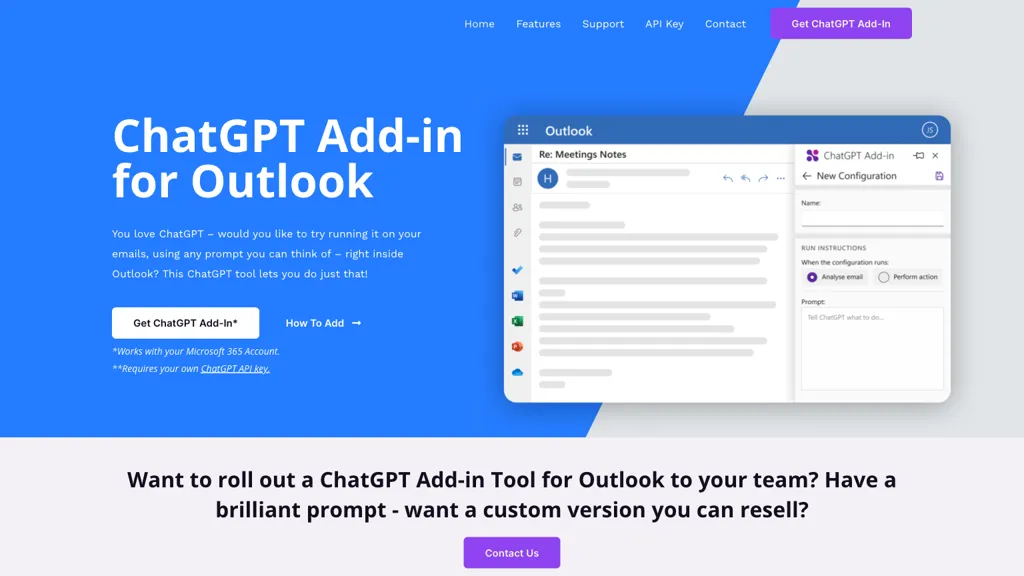
ChatGPT for Outlook is an add‑in that embeds OpenAI’s ChatGPT directly into Microsoft Outlook. It lets users run custom prompts on incoming or composed messages, generating concise summaries, highlights or revised text. The add‑in can target specific email parts—subject, body or attachments—so teams focus on the most relevant information.
Output is displayed in a side panel, and users can replace the original body or flag messages (e.g., high‑priority) based on the AI’s assessment. Administrators can deploy the add‑in across Office 365 with prompt configurations suited to business workflows, supporting individuals, teams, and IT management in improving email productivity.
ChatGPT Add-in for Outlook details
- Company
- Blueberry Consultants Ltd
- Stated compliance
- GDPR
Compliance as stated in ChatGPT Add-in for Outlook's own published documentation.
ChatGPT Add-in for Outlook tech specs
- Works with
- OpenAI / GPT
- Cloud
- AWS
ChatGPT Add-in for Outlook pricing
Paid- Auto-renewal
- Yes
Verify on the official pricing page.
View plansChatGPT Add-in for Outlook's key features
-
Simple setup with ChatGPT API
-
Custom prompts for email summarization
-
Filter by body, subject, attachments
-
Separate window display of output
-
Automatic flagging of high priority
-
Multiple configurations per email type
ChatGPT Add-in for Outlook use cases
-
Generate concise summaries of lengthy email threads to quickly grasp key points without scrolling through multiple messages
-
Rephrase and edit email drafts for tone, clarity, and professionalism, ensuring polished communication before sending
-
Automatically flag high-priority or action-required emails, helping teams focus on critical messages and improve inbox efficiency
ChatGPT Add-in for Outlook user reviews
Would you recommend ChatGPT Add-in for Outlook?
Who is ChatGPT Add-in for Outlook for?
-
Content creators
-
Product designers
-
Strategic managers
-
Office workers
-
Email correspondents
ChatGPT Add-in for Outlook FAQ
How much does ChatGPT Add-in for Outlook cost?
ChatGPT Add-in for Outlook is a paid product with no free plan. Plans include Custom add-in for your business at £4k.
Is ChatGPT Add-in for Outlook safe to use?
ChatGPT Add-in for Outlook states GDPR compliance in its own published documentation. ChatGPT Add-in for Outlook is operated by Blueberry Consultants Ltd.
What are the best alternatives to ChatGPT Add-in for Outlook?
The closest alternatives to ChatGPT Add-in for Outlook are SummaLetter, MailMaestro, Voilà, AI Mail Assistant and Superhuman. You can compare them side by side in the alternatives section further down this page.
What does ChatGPT Add-in for Outlook do with my data?
Its privacy policy states that personal data is not sold or shared for marketing purposes.
Does ChatGPT Add-in for Outlook auto-renew or offer refunds?
ChatGPT Add-in for Outlook subscriptions renew automatically until you cancel.
Does ChatGPT Add-in for Outlook have an API?
Yes. ChatGPT Add-in for Outlook offers an API, so you can call it from your own applications instead of using the interface directly.
Who made ChatGPT Add-in for Outlook?
ChatGPT Add-in for Outlook is built and operated by Blueberry Consultants Ltd.
Which AI models does ChatGPT Add-in for Outlook use?
ChatGPT Add-in for Outlook is built on OpenAI / GPT. Which models you can reach may depend on your plan.
Compliance, privacy and billing terms are as stated in each product's own published documentation and have not been independently verified by TopAI.tools.