
What is Blinkvid?
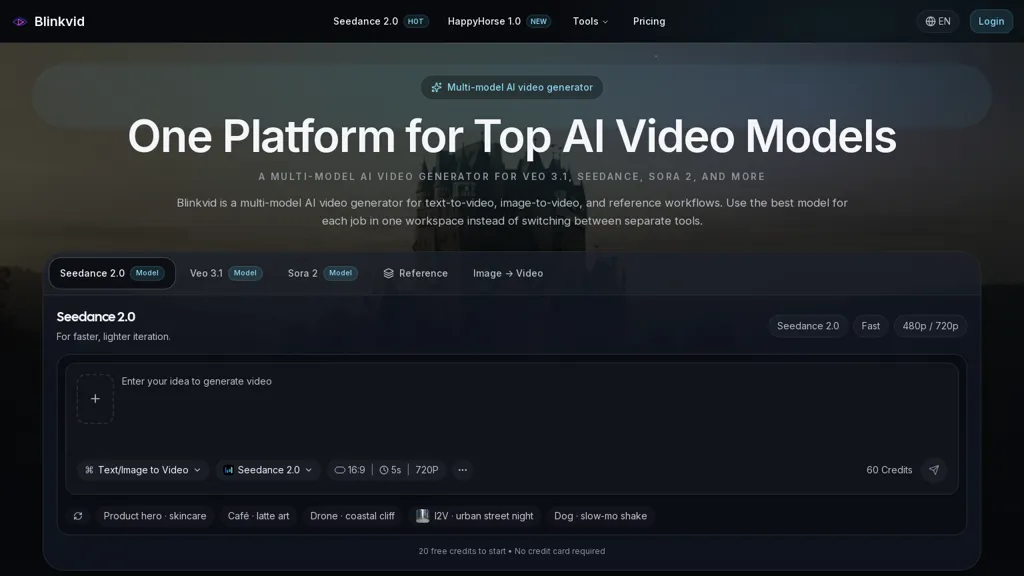
Blinkvid is a multi-model AI video generator that combines text-to-video, image-to-video and reference-guided workflows in a single workspace.It supports models such as Seedance 2.0, Veo 3.1 and Sora 2, allowing creators to choose model outputs for different tasks.
Seedance 2.0 targets quick iterations and lower-resolution outputs (480p/720p), while Veo 3.1 and Sora 2 support prompt-first and reference-led cinematic clips.Features include prompt-based generation, still-to-motion animation, camera path and movement cues, and support for common aspect ratios (16.
9, 9.16).Typical use cases include ad creatives, product spots, social ads, concept prototyping and editorial animation.The workspace enables model comparison, prompt reuse and consistent composition and styling across projects for teams, marketers and video editors.
Workflow steps are text prompt entry, optional reference upload, model selection and AI generation of short-form clips ready for export.
Blinkvid details
- Built for
- Individuals
Blinkvid tech specs
- Works with
- Google / Veo Google / Nano Banana ByteDance / Seedance ByteDance / Seedream
Blinkvid pricing
Free trialVerify on the official pricing page.
Start free trialBlinkvid's key features
-
Unified workspace combining text-to-video, image-to-video and reference-guided workflows
-
Selectable models (Seedance 2.0, Veo 3.1, Sora 2) with differing output styles
-
Prompt-based generation with prompt reuse
-
Still-to-motion animation
-
Camera path and movement cues; support for common aspect ratios (16:9, 9:16) and export-ready short-form clips
Blinkvid use cases
-
Create short-form ad videos for social media using Blinkvid's text-to-video and multi-model generators, iterating rapidly with Seedance 2.0 and Veo 3.1 to craft platform-optimized clips, camera paths and prompt-driven scenes without coding or complex editing tools
-
Animate product photos and marketing stills into dynamic motion pieces with Blinkvid's image-to-video and still-to-motion features, applying reference-guided motion and model comparison (Sora 2 vs Veo 3.1) to select the most realistic animation for e-commerce and ads
-
Produce branded explainer and tutorial videos by feeding scripts and reference footage into Blinkvid's reference-guided workflows, using prompt-driven clip generation, camera paths and multi-model comparison to quickly iterate on style and pacing for marketing campaigns
Blinkvid user reviews
Based on 2 reviews, 100% of users recommend Blinkvid, rated highly for quality results.
Liked for
Would you recommend Blinkvid?
Who is Blinkvid for?
-
Video editors
-
Content creators
-
Motion graphic designers
-
Creative agencies
-
Video production teams
Blinkvid FAQ
Is Blinkvid free?
Not permanently. Blinkvid gives you a free trial, after which a paid plan is required. Plans include Basic plan at $8.90/mo, Pro plan at $28.90/mo and Team plan at $69.90/mo.
What are the best alternatives to Blinkvid?
The closest alternatives to Blinkvid are GenMix AI, AI VideoWeb, Veo3AI.io, imagetovideo-ai.org and SotaVideoAI. You can compare them side by side in the alternatives section further down this page.
Does Blinkvid have an API?
Yes. Blinkvid offers an API, so you can call it from your own applications instead of using the interface directly.
Which AI models does Blinkvid use?
Blinkvid is built on Google / Veo, Google / Nano Banana, ByteDance / Seedance and ByteDance / Seedream. Which models you can reach may depend on your plan.


Text glowing: "Never Give Up", cinematic ending