
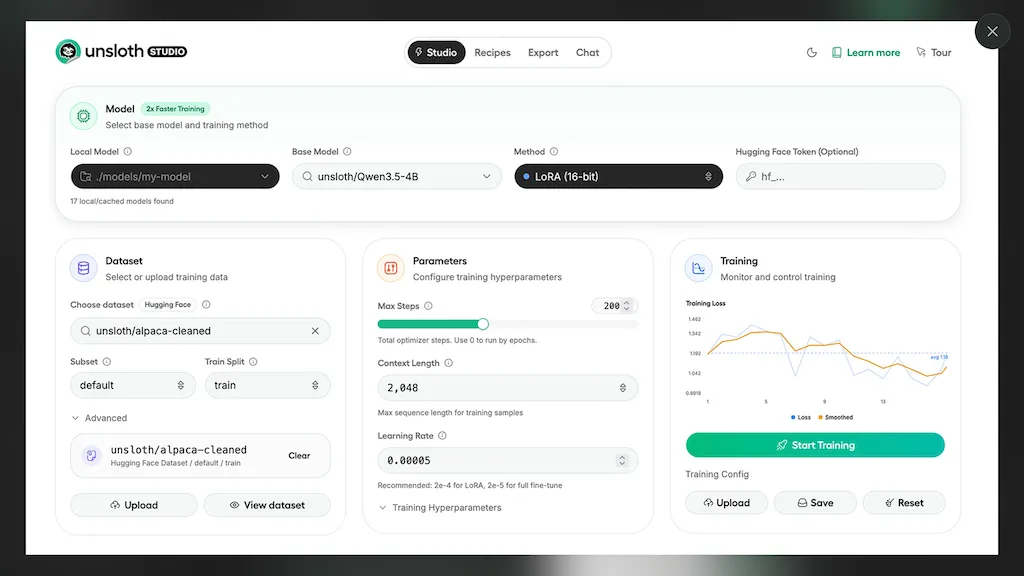
What is Unsloth Studio?
Unsloth Studio is a no-code web UI for training, running, and exporting open AI models locally.It allows users to quickly experiment with models like Qwen3.5, NVIDIA Nemotron 3, and GLM-4.7-Flash, without needing extensive technical expertise.
Key features include: running GGUF and safetensor models on Mac, Windows, and Linux, 2x faster training with reduced VRAM, auto-dataset creation from PDFs, CSVs, and JSON files, and support for multi-GPU training.
Users can fine-tune the latest LLMs and export models to formats like GGUF and safetensors.The Studio offers features like model comparison (“Model Arena”), self-healing tool calling, and inference parameter tuning.
It supports a wide range of model families including text, vision, and audio models.Furthermore, Unsloth Studio incorporates Data Recipes for automated dataset creation and observability tools for monitoring training runs.
The platform emphasizes privacy with 100% offline operation and secure token-based authentication.It’s currently in beta, with ongoing improvements planned, including support for Apple Silicon and AMD/Intel.
It can be accessed via Google Colab for a quick start.
Unsloth Studio tech specs
- Works with
- OpenAI / GPT Anthropic / Claude Meta Qwen Z.ai Kimi MiniMax
- AI infrastructure
- Hugging Face
- Cloud
- Cloudflare
- Integrations
- Discord GitHub
Unsloth Studio pricing
FreeThis tool is free to use, with no credit card required.
Verify on the official pricing page.
Get started freeUnsloth Studio's key features
-
Running GGUF and safetensor models locally
-
2x faster training with reduced VRAM
-
Auto-dataset creation from PDFs, CSVs, and JSON files
-
Support for multi-GPU training
-
Fine-tuning the latest LLMs (Qwen3.5, NVIDIA Nemotron 3)
-
Model comparison ('Model Arena')
-
Self-healing tool calling
-
Inference parameter tuning
-
Data Recipes for automated dataset creation
-
Observability tools for monitoring training runs
-
100% offline operation and secure token-based authentication
-
Google Colab access for quick starts
Unsloth Studio use cases
-
Fine-tuning Large Language Models (LLMs) for specific tasks.
-
Rapid prototyping and testing of various AI models on local hardware.
-
Creating and managing datasets for model training from diverse file formats.
Unsloth Studio user reviews
Based on 4 reviews, 100% of users recommend Unsloth Studio, rated highly for quality results.
Liked for
Would you recommend Unsloth Studio?
Who is Unsloth Studio for?
-
Software engineers
-
Model developers
-
Data engineers
-
Machine learning engineers
-
Mlops engineers
Unsloth Studio FAQ
Is Unsloth Studio free?
Yes. Unsloth Studio is free to use and does not require a credit card.
What are the best alternatives to Unsloth Studio?
The closest alternatives to Unsloth Studio are foundrylocal.ai, local.ai, Lemonade AI, LLMWare.ai and Liner.ai. You can compare them side by side in the alternatives section further down this page.
What does Unsloth Studio do with my data?
Its privacy policy states that personal data is not sold or shared for marketing purposes.
Which AI models does Unsloth Studio use?
Unsloth Studio is built on OpenAI / GPT, Anthropic / Claude, Meta, Qwen, Z.ai, Kimi and MiniMax. Which models you can reach may depend on your plan.
What does Unsloth Studio integrate with?
Unsloth Studio connects with Discord and GitHub.
Compliance, privacy and billing terms are as stated in each product's own published documentation and have not been independently verified by TopAI.tools.


 Alan Clear
That's a long anticipated tool, hopefully MLX support will arrive very soon.