
What is Thumblore?
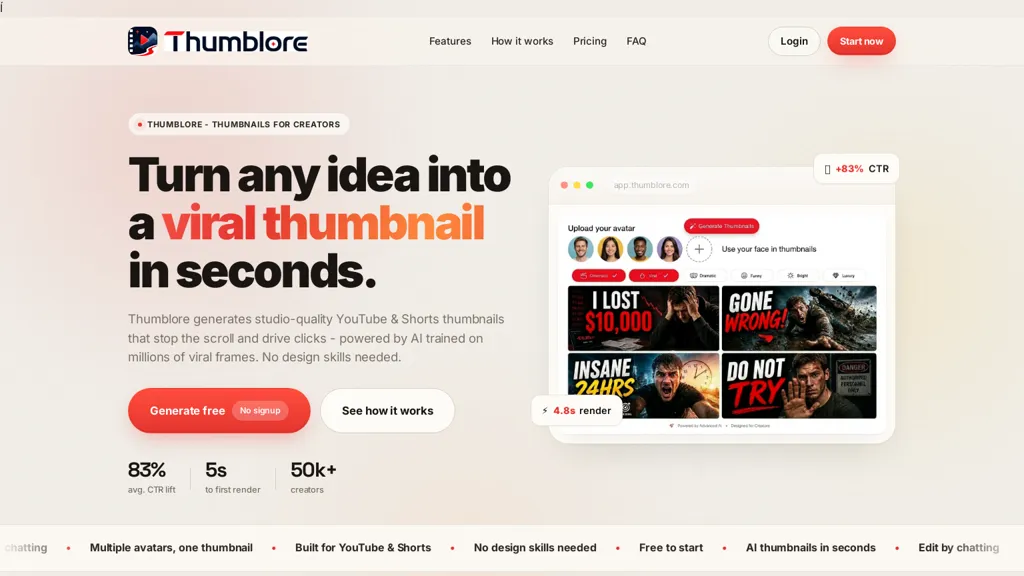
Thumblore is an AI thumbnail generator for YouTube and Shorts that produces multiple thumbnail variants in seconds. Generate and edit AI thumbnails using templates, automatic layout, smart headline selection, and emotion-driven facial expressions to match video intent.
Create and save AI avatars or upload photos, swap faces across thumbnails, and maintain consistent channel branding.Auto-export thumbnails at YouTube-recommended 1280×720 (16.9) in HD formats ready to upload.
Supports A/B testing, batch generation, and style presets (cinematic, gaming, tutorial, documentary, etc.) to evaluate click-through performance.Workflow features include one-click generation from a title or topic, in-editor adjustments, and fast render times to speed thumbnail production.
Designed for creators, YouTubers, short-form content producers, and social marketers who need rapid thumbnail production and consistent visual branding.
Thumblore details
- Jurisdiction
- Respected Ground
- Built for
- Individuals
- Data residency
- United States and European Union
Thumblore pricing
Free trial- Auto-renewal
- Yes
Verify on the official pricing page.
Start free trialThumblore's key features
-
Fast AI thumbnail generation producing multiple variants in seconds
-
Template-based editor with automatic layout, smart headline selection, and emotion-driven facial expression control
-
Create/save AI avatars, upload photos, and swap faces across thumbnails
-
Auto-export thumbnails in YouTube-recommended 1280×720 (16:9) HD formats
-
Support for A/B testing, batch generation, and style presets (cinematic, gaming, tutorial, documentary, etc.)
Thumblore use cases
-
Create high-converting YouTube and Shorts thumbnails with thumblore in seconds using pre-built templates, smart headline selection and emotion-driven facial expressions, then export HD 1280×720 thumbnails ready to upload to increase CTR
-
Batch-generate consistent thumbnail sets for a series or channel using thumblore's batch thumbnail generation, automatic layouts and style presets, apply avatar/face swaps for branding and run A/B tests to find top-performing variations
-
Rapidly iterate and optimize thumbnail creatives without manual design work by using thumblore's thumbnail A/B testing, template editor and smart headlines to test emotion-driven faces and styles across audiences, exporting ready-to-use assets for immediate publishing
Thumblore user reviews
Based on 1 review, 100% of users recommend Thumblore, rated highly for quality results.
Liked for
Would you recommend Thumblore?
Who is Thumblore for?
-
Content creators
-
Video editors
-
Social media marketers
-
Marketing agencies
-
Channel managers
Thumblore FAQ
Is Thumblore free?
Not permanently. Thumblore gives you a free trial, after which a paid plan is required. Plans include Starter at $9/mo, Pro at $24/mo and Pro studio at $45/mo.
What are the best alternatives to Thumblore?
The closest alternatives to Thumblore are Thumbs.ai, ThumbnailCreator.com, AIThumbnail.so, AI YouTube Thumbnails and Thumblytics. You can compare them side by side in the alternatives section further down this page.
What does Thumblore do with my data?
Thumblore states that customer content is not used to train its models. Its privacy policy states that personal data is not sold or shared for marketing purposes. Data may be shared with third-party service providers that help run the product. Customer data is held in United States and European Union.
Does Thumblore auto-renew or offer refunds?
Thumblore subscriptions renew automatically until you cancel.
Does Thumblore have an API?
Yes. Thumblore offers an API, so you can call it from your own applications instead of using the interface directly.
Compliance, privacy and billing terms are as stated in each product's own published documentation and have not been independently verified by TopAI.tools.


