
What is Source Layer?
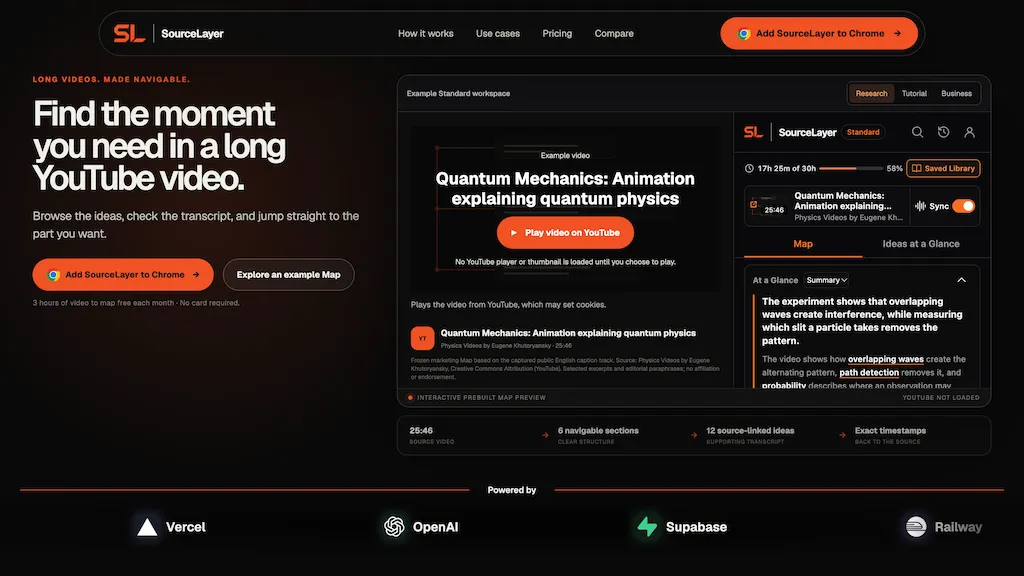
SourceLayer is a Chrome extension that turns long YouTube videos into clear, navigable notes. Open a podcast, lecture, course or tutorial and SourceLayer breaks it into sections and ideas. Every idea links to the supporting transcript passage and the exact timestamp, so you can jump straight to the moment you need and check what was really said.
Use At a Glance for a quick summary, browse the Map of sections and ideas, read the Transcript, and turn on Sync to keep your place as the video plays. On Standard, save Maps and ideas to your Saved Library and come back to them later.
Free for 3 hours of video a month, no card required. Install from the Chrome Web Store: https://chromewebstore.google.com/detail/sourcelayer/nmooingpgdkjkcdpmackdahahemoefln
Source Layer pricing
FreemiumVerify on the official pricing page.
View plansSource Layer's key features
-
Map of sections and ideas for long YouTube videos
-
Every idea linked to its transcript passage
-
Exact timestamps that jump to the original moment
-
At a Glance summary
-
Transcript view and Sync with playback
-
Saved Library (Standard plan)
Source Layer use cases
-
Studying lectures and online courses
-
Researching interviews and podcasts
-
Following long tutorials
Source Layer user reviews
Would you recommend Source Layer?
Who is Source Layer for?
-
Product managers
-
Marketing managers
-
Growth/ads analysts
-
Ux designers/researchers
-
Sales engineers
-
Frontend developers/integrators
-
Website visitors/demo viewers
Source Layer FAQ
Is Source Layer free?
Partly. Source Layer has a free plan with usage limits, and paid plans unlock the full feature set. Plans include Standard at $13.99/mo.
What are the best alternatives to Source Layer?
The closest alternatives to Source Layer are AskVideo, ChatTube, Tube Transcript , videotranscript.ai and VideoToTranscript. You can compare them side by side in the alternatives section further down this page.


